How To Get A Drum Preset On Renoise: Quick Beginner Guide
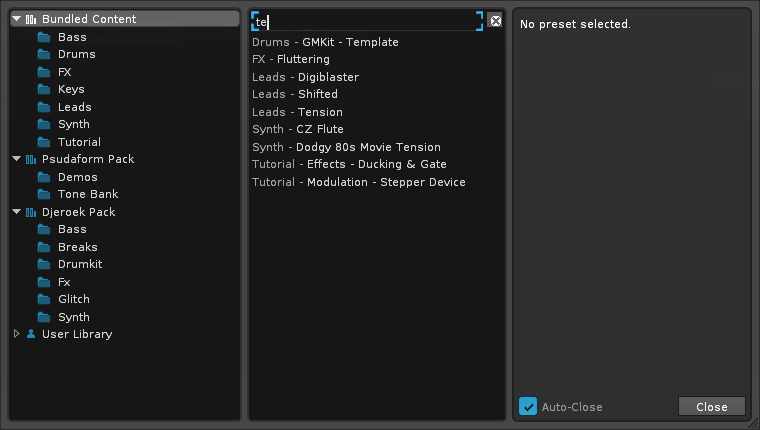
Download or create a compatible XRNI, sample pack, or plugin chain, then import or drag it into Renoise’s instrument box.
I’ve worked with Renoise for years and helped many students load and build drum sounds. This guide walks you through exactly how to get a drum preset on Renoise, step by step. You’ll learn where to find ready-made drum presets, how to import them, how to save your own presets, and how to avoid common pitfalls. Read on and you’ll be loading tight, usable drum presets in minutes.
Why use drum presets in Renoise
Drum presets speed up beat making and improve consistency. They save settings, chains, and samples so you can recall a drum sound fast. Knowing how to get a drum preset on Renoise helps you stay creative and avoid repetitive setup work. Presets also make collaboration easier because you can share exact instrument settings with others.
Where to find drum presets compatible with Renoise
You can get drum presets from many places. Look for XRNI instrument files made for Renoise first. These contain samples, mappings, and effects all in one file. Also search for sample packs, VST drum kits, and FX chains that you can map into Renoise.
Common sources and formats
- XRNI files that are native Renoise instruments.
- ZIP sample packs with WAVs or AIFFs that you can import.
- VSTi/VST3 drum plugins that you host inside Renoise.
- Renoise song or instrument templates with preloaded drums.
Quick checks before download
- Confirm the format: XRNI or sample WAVs are easiest.
- Check sample rate and bit depth to avoid resampling artifacts.
- Verify license for commercial use if you plan to sell tracks.
How to get a drum preset on Renoise starts with choosing a compatible format. Pick XRNI if you want an out-of-the-box solution. If you pick samples or VSTs, you’ll do a little setup in Renoise to map them.

How to get a drum preset on Renoise — step-by-step
This section covers direct steps to import or install a drum preset in Renoise.
Step 1: Choose the preset type
- Download an XRNI for zero setup.
- Download a sample pack if you prefer slices and mapping control.
- Download a VST drum plugin if you want synth-style drums.
Step 2: Import XRNI (fastest)
- Open Renoise.
- Go to Instrument > Disk Browser.
- Locate your XRNI file and drag it onto the instrument list.
- The instrument appears with samples and in-instrument effects.
Step 3: Load samples from a pack
- Create a new instrument slot.
- Open the Instrument Editor and choose Sample Keyzones.
- Drag WAVs from your file browser or Renoise Disk Browser into zones.
- Set loop points, volume, and root note for each sample.
Step 4: Use a VST drum plugin
- Add a new track or instrument.
- Open the Plugin tab and add your VSTi.
- Load the plugin’s preset inside its UI.
- Route plugin outputs to Renoise tracks or Mixer channels.
Step 5: Save and recall
- To save an instrument as a preset, use Instrument > Save Instrument.
- Name it clearly and organize folders.
- You can also save song-level templates that include drum instruments.
Practically speaking, how to get a drum preset on Renoise usually means downloading an XRNI or mapping sample WAVs. Both ways are quick. If the preset uses plugins, host those plugins inside Renoise to recall the same sound.
Installing and loading presets in Renoise (details and tips)
Load an XRNI file
- Open Renoise and press the instrument area.
- Drag the XRNI into the instrument list.
- Confirm all samples load in the Sample Editor.
Import sample packs
- Use the Disk Browser inside Renoise to preview WAVs.
- Drag each sample into the Sample Keyzones or use “Assign Sample to Keyzone”.
- Normalize and trim inside Renoise if needed.
Host plugin presets
- Add the plugin to an instrument slot or track plugin chain.
- Save plugin preset states from the plugin UI, or save the whole Renoise instrument that contains the plugin.
- If a plugin preset relies on files, keep those file paths consistent across projects.
Common compatibility notes
- XRNI files include settings and are platform-independent.
- Sample paths matter. If an instrument references external samples, keep them in the same project folder.
- Plugin-based presets require the plugin installed on your system; otherwise the preset will fail to load.
If you’re unsure how to get a drum preset on Renoise to recall perfectly, prefer XRNI or embed samples in the song. That guarantees portability and fewer missing-sample problems.
Creating and saving your own drum preset in Renoise
Making your own preset gives total control. Here’s a simple workflow.
Step-by-step creation
- Start a new instrument and load or record a drum sample.
- Use the Sample Editor to trim and normalize.
- Build a keyzone map if the preset uses multiple samples.
- Add DSP effects in the instrument FX or track insert effects.
- Use the Modulation and Key Mapped controls for velocity or pitch changes.
Saving your preset
- Use Instrument > Save Instrument (XRNI).
- Save to a clear folder like /Renoise/Presets/Drums.
- Optionally export a zipped pack of samples and XRNI for sharing.
Practical tip: Include settings notes
- Save a small text file with BPM preferences and routing notes.
- This helps when reusing presets in different projects.
Creating your own drum preset on Renoise gives you a reusable sound signature. It’s the best way to ensure consistent drums across your tracks.
Troubleshooting common issues when trying to get a drum preset on Renoise
Missing samples
- If samples are missing, Renoise will show warnings.
- Check the instrument for external sample paths and relink files.
- Move samples into the song folder to avoid broken links.
Plugin presets not loading
- Ensure the plugin is installed and scanned by Renoise.
- If the preset calls files, restore the correct sample locations.
- Use the same plugin version to avoid parameter mismatches.
Format mismatch or corrupted XRNI
- Re-download if an XRNI seems corrupt.
- Check file size and try loading in another Renoise version.
- Open the XRNI in a text editor only if you know the structure; otherwise avoid editing.
Performance issues
- High sample rates or many plugin instances can strain CPU.
- Freeze or bounce heavy tracks to samples to save processing.
If you struggle to get a drum preset on Renoise to sound right, check files, plugin availability, and CPU load first. Those solve most issues quickly.

Best practices and tips for drum presets in Renoise
Organize consistently
- Use clear folder names and date stamps.
- Store presets and samples inside a project or a master sample folder.
Name and document
- Name presets with tempo and drum type (e.g., 90bpm_AcidKick.xrni).
- Keep a short README for complex kits.
Back up often
- Zip and archive presets before major changes.
- Use cloud storage for cross-device access.
Optimize for recall
- Save both instrument and song templates.
- Use Renoise’s instrument aliasing to reuse samples without duplication.
When you understand how to get a drum preset on Renoise and follow these practices, your workflow becomes faster and more reliable.
Personal experience: mistakes I made and lessons learned
I once used a great drum preset but forgot to include the external sample folder. The track opened with missing kicks. Since then, I always embed samples in the song folder. I also used plugin presets that only worked on my machine. I learned to export frozen versions and XRNI backups. These steps saved time and stress.
Tips I wish I knew earlier
- Save the XRNI and a sample folder snapshot together.
- Label presets with usage notes, like suitable BPM ranges.
- Use a template project that already has your favorite drum chain.
Learning how to get a drum preset on Renoise was mostly practice. Small habits like consistent naming and embedding samples made a big difference.

Frequently Asked Questions of how to get a drum preset on renoise
How do I import an XRNI into Renoise?
Open Renoise, use the Disk Browser, or drag the XRNI file directly into the instrument list. The XRNI will load samples, mappings, and instrument effects automatically.
Can I use WAV sample packs as drum presets in Renoise?
Yes. Import WAVs into an instrument’s keyzones or create multiple instruments. Save the whole instrument as an XRNI to make a reusable preset.
What if a drum preset uses a VST that I don’t have?
If you don’t have the VST, the preset won’t sound the same. Replace the plugin with a similar one or render the plugin output to audio on the original system and import the audio.
How do I save a drum preset so I can reuse it in other projects?
Save the instrument as an XRNI with embedded samples and store it in a dedicated presets folder. You can also export full songs as templates for instant recall.
Why do drum presets sometimes lose samples when moved?
Presets that reference external files use absolute paths by default. Move samples into the song folder or relink them to keep instruments portable.
Is there a quick way to share drum presets with collaborators?
Yes. Zip the XRNI and its sample folder or use a shared cloud folder. Include a short text note that explains routing and plugin needs.
Conclusion
You now have clear steps to find, import, create, and save drum presets in Renoise. Start with XRNI files for the simplest workflow, or build your own kit with samples and effects for full control. Practice organizing and backing up presets to avoid lost work. Try importing one preset, tweak it, and save it as your own—then repeat. If this was helpful, subscribe for more Renoise tips or leave a comment with your favorite preset format and setup.

Senior Music Reviewer
Alex Carter is a seasoned music reviewer with over a decade of experience in the world of sound and instruments. Passionate about helping musicians and enthusiasts make informed choices, he brings sharp insights and in-depth knowledge to every review. From classical instruments to modern gear, Alex combines technical expertise with a love for music to deliver content that resonates with readers.
As a Senior Music Reviewer and expert author on Tuneluma.com, Alex is dedicated to sharing honest evaluations, practical advice, and thoughtful commentary to guide readers in their musical journey.