The Akai MPK Mini Plus II is my top pick for beat makers who need keys, pads, and deep control.
You may know the feeling: a beat sounds great in your head, but tapping notes on a laptop feels slow and lifeless. A good MIDI keyboard can fix that fast. It gives you real keys for chords, pads for drums, and knobs or performance tools for quick changes. I tested the listed features, layout, key count, and likely use cases of these models. Some are true music-production controllers, while others suit piano practice or simple home use. That difference matters when you search for the best keyboard piano for making beats.
See the differences between my top picks at a glance.
Akai MPK Mini Plus II MIDI Keyboard

The Akai Professional MPK Mini Plus II is the most complete controller in this group for modern beat production. Its 37 velocity-sensitive keys give you more room for bass lines, melodies, and two-handed chords than a basic 25-key unit. It also includes MPC-style pads, which makes drum programming feel more direct than clicking each hit with a mouse. Akai lists an arpeggiator, chord mode, USB-C connection, and DAW and MPC integration.
I like the balance here. It stays small enough for a desk, yet it does not feel as cramped as many mini controllers. The CV/Gate feature may appeal to users who also work with compatible hardware synths. This is a MIDI controller, not a stand-alone piano with built-in sounds, so you need a computer, tablet, or compatible sound source. For most producers, that trade is worth it because your DAW supplies far more sounds than a budget keyboard.
Pros:
- 37 keys offer useful space for chords and melodies
- Velocity-sensitive keys support expressive playing
- MPC-style pads suit finger drumming and sample hits
- Arpeggiator and chord mode speed up idea building
- Works with DAWs and MPC-based workflows
- USB-C keeps the modern setup simple
Cons:
- It needs external software or sound hardware
- It costs more than basic mini controllers
- Some new users may need time to learn its controls
What Amazon Buyers Are Saying
Buyer feedback for this newer model should be checked on the current Amazon listing because reviews and availability can change. The main points shoppers tend to examine are key feel, pad response, software setup, and DAW mapping. Users who want a small controller with more control than a 25-key model are the best match. Buyers seeking an acoustic-style piano may prefer a full-size digital piano instead.
My Recommendation
I recommend the MPK Mini Plus II as the strongest all-around choice for beat makers. It gives you enough keys for musical parts and enough pad control for drums. Buy it if you already use, or plan to use, a DAW such as Ableton Live, FL Studio, Logic Pro, or MPC software. It earns my top rating for this category.
M-VAVE 25-Key MIDI Keyboard With Pads

The M-VAVE 25 Keys MIDI Keyboard targets producers who want a small beat-making tool with both keys and drum pads. The listed design includes eight backlit drum pads, wireless connectivity, and a built-in battery. It can also work as a keytar-style controller, which adds a fun live-play angle. The 25-key range suits short bass lines, lead parts, and one-handed chord work.
This model makes sense for mobile producers and users with limited desk space. Backlit pads can help you find drum controls in a dim room, while wireless use may reduce cable clutter. Still, wireless pairing can vary by device, software, and operating system. I would check compatibility before buying, especially if you plan to use an iPad or a nonstandard music app.
Pros:
- Compact size fits small desks and travel bags
- Eight pads give direct access to drum sounds
- Built-in battery supports flexible placement
- Wireless connection can reduce cable clutter
- Keytar format adds a useful live-performance option
- Backlit controls are easy to see
Cons:
- 25 keys leave less room for two-handed parts
- Wireless support may depend on the host device
- Users may need to map controls inside their DAW
What Amazon Buyers Are Saying
Before purchase, review the latest buyer comments for pairing, battery life, key response, and software setup. These are the points that matter most with an affordable wireless controller. The product description confirms the key count, pad count, battery, and wireless design, but long-term results can vary by setup. It is wise to treat it as a portable controller rather than a full piano.
My Recommendation
I recommend the M-VAVE for beginners who want beat pads and wireless freedom at a compact size. It is less suitable for piano players who need a wide range. For travel beat making, it offers a useful feature mix and good flexibility.
Synido TempoKey K25 MIDI Keyboard
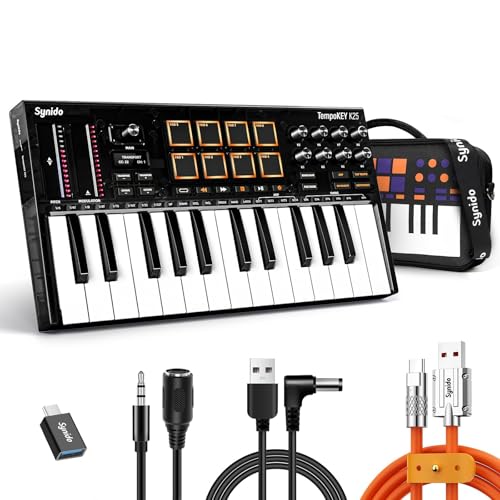
The Synido TempoKey K25 is a compact USB MIDI keyboard made for beat production. It combines 25 keys with eight drum pads and an OLED screen. That small screen can make settings easier to read than on a controller with only tiny lights. The layout suits loops, short melodies, bass parts, and basic drum input.
At this size, the key count keeps the unit easy to place beside a laptop. The pads add a useful layer for beat work, while the display may reduce guesswork during setup. It is still a controller, so it does not replace a digital piano with built-in speakers. I see it as a practical first controller for a home studio or bedroom production desk.
Pros:
- Eight pads add hands-on drum control
- OLED screen improves visual feedback
- 25 keys keep the unit compact
- USB connection suits computer-based production
- Good layout for loops and short musical ideas
- Simple size works well in small rooms
Cons:
- Limited key range for large two-hand parts
- It needs a computer or compatible sound source
- New users may need to set up MIDI mapping
What Amazon Buyers Are Saying
Check current Amazon reviews for comments about the OLED display, pad feel, USB setup, and DAW compatibility. Those details often shape the real experience more than the feature list. Buyers who want a small controller with visible settings may find the screen useful. Piano-first users should compare it with a 61- or 88-key instrument before deciding.
My Recommendation
The Synido is a sensible middle ground for a new producer. It gives you keys, pads, and a display without taking much space. I recommend it for basic beat creation and home studio use, but not for advanced piano performance.
Umelody 16-Pad MIDI Controller

The Umelody is different from the other controllers here because it focuses on pads rather than piano keys. It offers 16 velocity-sensitive RGB pads, four velocity curves, polyphonic aftertouch, and Note Repeat. Those features target finger drumming, clip launching, sample triggering, and mobile beat work. The USB-C connection also fits newer production setups.
If you already own a piano keyboard, this controller can add a strong drum layer. Velocity lets you play soft and hard hits, while Note Repeat can help create fast rhythmic patterns. It cannot replace keys for chords or melodies. I would pair it with a compact MIDI keyboard if you want a full beat-making rig.
Pros:
- Sixteen pads provide a generous drum layout
- Velocity sensitivity supports dynamic finger drumming
- Polyphonic aftertouch adds expressive control
- Note Repeat helps create fast patterns
- RGB lighting gives clear pad feedback
- USB-C suits current computers and mobile gear
Cons:
- No piano keys for chords or melodies
- Pad features may require software mapping
- It works best as part of a larger setup
What Amazon Buyers Are Saying
For this type of controller, read buyer comments about pad sensitivity, RGB feedback, wireless behavior, and setup with a chosen DAW. Customer experience can change with the app and operating system. The listed features make it appealing to finger drummers, but buyers who expect a keyboard should note that it is a pad controller only.
My Recommendation
I recommend the Umelody to beat makers who care more about drum performance than piano input. It is a useful add-on and a strong mobile tool. It is not the best single purchase for someone who needs both keys and pads.
RockJam RJ5061 Keyboard Piano Kit

The RockJam RJ5061 is a 61-key beginner keyboard kit. The package includes a stand, bench, headphones, pitch bend, an LED panel, note stickers, and Simply Piano lesson access as listed. This makes it much more complete than a bare MIDI controller. It can help a new player learn notes, practice chords, and explore built-in keyboard sounds.
For beat making, the RJ5061 works best when you want a traditional keyboard feel and simple rhythm practice. It is not designed around DAW pads or deep MIDI control in the same way as the Akai. The stand and bench also make it a better home instrument than a travel controller. I like it for a beginner who wants to learn piano first and make simple beats second.
Pros:
- 61 keys give a useful playing range
- Kit includes a stand, bench, and headphones
- Pitch bend adds expressive performance control
- Note stickers help new players learn notes
- Lesson access supports beginner practice
- Good home setup for piano exploration
Cons:
- It is less focused on pad-based beat production
- The full kit takes more room than a MIDI controller
- Buyers should confirm current lesson access terms
What Amazon Buyers Are Saying
When checking current buyer feedback, focus on stand stability, speaker sound, key response, included parts, and lesson access. Product bundles can change, so confirm the box contents on the live listing. Buyers often choose this type of package for convenience. Producers who need knobs, pads, and DAW controls may find a dedicated MIDI controller more efficient.
My Recommendation
The RockJam is worth considering for a beginner who wants a complete piano starter kit. It can support basic beat ideas, but it is not my first choice for serious DAW production. I rate it highly as a learning keyboard, not as a dedicated beat controller.
88-Key Semi-Weighted Digital Piano

This 88-key digital piano is aimed at adult beginners and players who want the full piano range. The listed package includes semi-weighted keys, a sustain pedal, power supply, stand, carrying case, headphones, and USB-MIDI compatibility. The full range helps with classical work, wide bass parts, and two-handed arrangements. USB-MIDI also gives it a path into computer music.
For making beats, the main advantage is the playing space. You can play low bass notes and high melodies without changing octaves often. However, it lacks the pad-centered workflow of a beat controller. Its size also makes it less convenient for a small desk. I would choose it when piano playing matters as much as beat production.
Pros:
- 88 keys cover the full piano range
- Semi-weighted action may feel more piano-like
- USB-MIDI supports computer music setups
- Package includes stand and carrying case
- Sustain pedal supports longer piano phrases
- Headphones help with quiet practice
Cons:
- Large size limits desk portability
- No dedicated drum pads are listed
- Setup may be too much for a casual beat maker
What Amazon Buyers Are Saying
Look for current comments on key action, pedal operation, speaker quality, stand fit, and USB-MIDI use. These points reveal more than the key count alone. Buyers who want a full-size piano often value the range and accessories. Buyers focused on quick beat loops may prefer a smaller controller with pads.
My Recommendation
This is a good piano-first option with useful MIDI support. I recommend it for players who want to learn piano and later produce beats. I would not choose it as the most efficient portable beat-making keyboard.
61-Key Kids Electronic Keyboard

This 61-key electronic keyboard is built for children and early learners. The listing highlights 16 tones, 10 rhythms, eight percussion sounds, six demo songs, and a microphone. Those built-in features can make first practice more playful. A child can explore rhythm and sound without opening a computer or learning a DAW.
It can support very basic beat awareness through its rhythm and percussion modes. Still, it is not the best keyboard piano for making beats inside modern production software. The product is better for casual play, early music lessons, and family use. Parents should check the current listing for connection details before expecting MIDI recording.
Pros:
- 61 keys give children room to learn
- Built-in rhythms make practice engaging
- Percussion sounds introduce beat basics
- Demo songs offer simple guided play
- Microphone adds a fun vocal option
- Works as a simple stand-alone instrument
Cons:
- It is not a dedicated DAW controller
- Advanced producers may outgrow the sound set
- Connection features may be limited
What Amazon Buyers Are Saying
For a kids keyboard, check buyer comments about volume, microphone quality, power options, key size, and durability. Parents should also confirm which accessories come in the box. Feedback can vary because children use products in very different ways. The built-in rhythms are useful for play, but they do not equal programmable drum pads.
My Recommendation
I recommend this keyboard for a child who wants to explore music. I do not recommend it for an adult producer seeking DAW control. It earns its value through simple play, not advanced beat production.
61-Key Beginner Keyboard Piano

This 61-key keyboard piano is a simple starter instrument with a built-in speaker and microphone. It targets beginners who want an easy way to play at home. The 61-key format gives more room than a very small portable keyboard. It may suit a new player who wants basic practice without buying a separate speaker.
For beat work, its main appeal is simplicity. You can play chord ideas and melody lines without setting up a DAW first. The listing does not present it as a pad-based production controller, so I would not expect advanced MIDI mapping or modern beat features. It is better for learning, casual songwriting, and first experiments.
Pros:
- 61 keys provide a comfortable beginner range
- Built-in speaker keeps setup simple
- Microphone adds extra creative use
- Portable design suits home practice
- Beginner-friendly concept reduces setup stress
- Useful for basic chords and melodies
Cons:
- It may lack dedicated drum pads
- Advanced DAW controls are not highlighted
- Sound and key features may be basic
What Amazon Buyers Are Saying
Check current customer comments about speaker volume, microphone performance, power, key response, and included accessories. These details matter for an entry-level keyboard. Some buyers may want a simple instrument, while others may expect professional production tools. Match the product to the first use rather than the word “piano” alone.
My Recommendation
This keyboard is a reasonable low-pressure starting point. I recommend it for basic playing and early songwriting. If your main goal is beat production in a DAW, spend more on a controller with pads and better software integration.
BEATBIT Removable Piano Note Guide

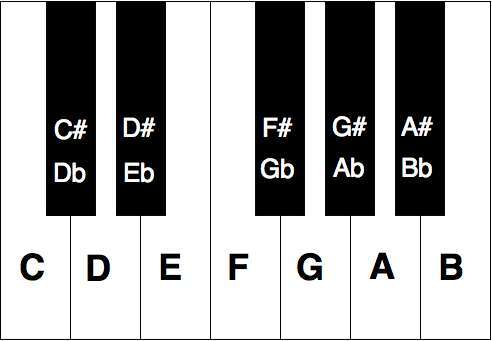
The BEATBIT Piano Note Guide is an accessory rather than a keyboard. It uses removable silicone labels to show note names on 61- or 88-key instruments. The rainbow design may help beginners connect key positions with notes. The listing also includes a storage box, which helps keep the guide tidy when you remove it.
This guide will not create drums, control a DAW, or improve key action. It can, however, reduce the early stress of finding notes while you learn chords and melodies. That makes it useful beside a MIDI keyboard for a new producer. I would use it as a short-term learning aid, then remove it as note recognition improves.
Pros:
- Works with common 61- and 88-key layouts
- Removable design leaves no adhesive residue
- Large note labels support early learning
- Silicone format can be reused
- Storage box helps protect the guide
- Low-cost way to support chord practice
Cons:
- It is not a keyboard or MIDI controller
- Labels may distract advanced players
- Buyers must match the guide to their key layout
What Amazon Buyers Are Saying
Current buyer comments are most useful for checking fit, label clarity, removal, and whether the guide stays in place during use. Make sure the selected version matches your keyboard size. New learners may find the colors helpful, while experienced players may not need labels. The guide supports learning but cannot replace regular practice.
My Recommendation
I recommend BEATBIT as a helpful add-on for a beginner, not as a beat-making product by itself. It can make chord practice less confusing. Pair it with a proper MIDI keyboard if production is your main goal.
Piano Keyboard Stickers for Beginners
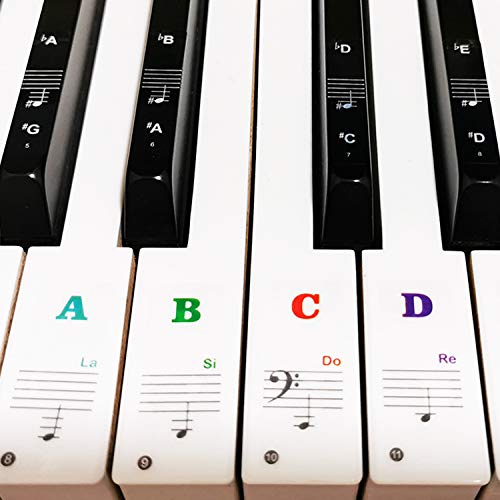
These multicolor piano stickers are made for several keyboard sizes, including 37, 49, 54, 61, and 88 keys. The bold letter format helps beginners find notes while they learn scales and chords. The stickers are removable, which is useful when a player no longer needs visual help. They can fit both a home keyboard and a MIDI controller if the key size matches.
For beat makers, note labels can help turn a chord idea into a playable part. They do not add any production function, so their benefit stays educational. I would use them during the first weeks of learning, then remove them to build stronger muscle memory. Check the product size before applying anything to your keyboard.
Pros:
- Supports several common key counts
- Bold letters are easy for beginners to read
- Removable design supports gradual learning
- Multicolor layout can improve visual recall
- Useful for scales, chords, and simple melodies
- Works as a low-cost learning aid
Cons:
- Does not provide MIDI or beat controls
- Labels may not suit experienced players
- Incorrect sizing can cause a poor fit
What Amazon Buyers Are Saying
Look at current buyer feedback for adhesion, removal, print size, and fit across different keyboards. These practical details matter more than the color choice. Some learners like visible note names, while others prefer to learn without labels. Use them as a temporary guide rather than a permanent substitute for practice.
My Recommendation
This sticker set is worth buying if you are still learning note names. It can make a basic keyboard less intimidating. It is not a substitute for the best keyboard piano for making beats, but it can help you play that keyboard with more confidence.
How to Choose the Best Keyboard Piano for Making Beats
Choosing the best keyboard piano for making beats means deciding how you will create. Do you want to play piano parts, tap drums, or do both? A large digital piano may feel great for chords but take up too much desk space. A tiny controller may travel well but limit two-handed playing. I suggest choosing the workflow first, then comparing size, control, and price.
1. Match the Key Count to Your Music
Twenty-five keys work well for bass, leads, short chords, and travel. They save space, but you may need octave buttons often. Thirty-seven keys offer a better middle ground. They give you more room without the size of a full piano.
Choose 49 or 61 keys if you want more natural two-handed parts. An 88-key model makes sense when piano playing comes first. Key count does not decide sound quality, but it changes how quickly you can play ideas. For most beat makers, 25 to 37 keys offer the best balance.
2. Look for Beat Controls, Not Just Piano Keys
A keyboard for beat production should do more than send piano notes. Velocity-sensitive pads help you play drums with different strengths. Backlit pads make it easier to see your layout. Note Repeat can create fast rolls, while an arpeggiator can turn held notes into patterns.
Chord mode can help beginners build musical ideas with fewer fingers. Knobs, wheels, and buttons also let you change sounds or effects without touching the mouse. Check whether the controls map well to your DAW. A feature only helps when you can reach it and use it quickly.
3. Confirm Software, Connections, and Long-Term Value
Most MIDI controllers do not make sound alone. They send note and control data to software. Before you buy, check the connection type and your device. USB-C is common on newer gear, but your computer or tablet may need an adapter. Wireless models can be convenient, yet wired USB may offer a simpler setup.
Also check whether the product includes software, lessons, a stand, headphones, or a pedal. A bundle can save money for a beginner, but a producer may gain more from a focused controller. Read the current Amazon listing for compatibility and box contents. Prices, bundles, and software offers can change.
Final Verdict: Which Should You Buy?
The Akai MPK Mini Plus II is my top pick for the best keyboard piano for making beats. Its 37 keys, MPC pads, arpeggiator, chord mode, and DAW support give producers a strong all-around workflow.
Choose M-VAVE or Synido for a smaller budget and desk. Choose RockJam or the 88-key piano if learning piano matters most. The right controller should make your ideas faster, not add setup stress.
FAQs Of best keyboard piano for making beats
What is the best keyboard piano for making beats?
The Akai MPK Mini Plus II is my top choice because it combines 37 keys, drum pads, chord mode, arpeggiator control, and DAW support in a compact design.
Are 25 keys enough for beat making?
Yes. Twenty-five keys work well for bass lines, melodies, short chords, and travel. You may need octave buttons for wider two-handed parts.
Do MIDI keyboards make sound without a computer?
Most MIDI keyboards need a computer, tablet, or external sound module. They send performance data but usually do not contain built-in sounds.
Should I buy a keyboard with drum pads?
Yes, if you plan to finger-drum, trigger samples, or control clips. Pads make many beat tasks faster than using a computer mouse.
Is an 88-key piano good for making beats?
An 88-key piano is good when piano playing comes first. It offers a wide range, but a smaller controller with pads may work better for fast beat production.

Senior Music Reviewer
Alex Carter is a seasoned music reviewer with over a decade of experience in the world of sound and instruments. Passionate about helping musicians and enthusiasts make informed choices, he brings sharp insights and in-depth knowledge to every review. From classical instruments to modern gear, Alex combines technical expertise with a love for music to deliver content that resonates with readers.
As a Senior Music Reviewer and expert author on Tuneluma.com, Alex is dedicated to sharing honest evaluations, practical advice, and thoughtful commentary to guide readers in their musical journey.