Best Camera For Recording Piano: Top Picks For Clear Audio
The Zoom Q2n-4K is the best camera for recording piano, thanks to its wide view, stereo sound, and simple controls.
You may know the feeling: your playing sounds rich in the room, yet the video looks dull and the piano sounds thin. A good camera can fix both problems. It should show your hands, keys, and posture while capturing a clean, natural tone. I tested the key features that matter most, such as lens width, sound quality, low-light use, battery life, and setup. This guide compares ten useful options so you can find the best camera for recording piano lessons, recitals, practice clips, or YouTube videos.
Zoom Q2n-4K Handy Video Recorder

The Zoom Q2n-4K stands out because it combines a wide-angle camera with built-in stereo microphones. That design suits piano work very well. I can place it several feet from the instrument and still include the player, keyboard, and room. Its 4K recording mode also gives the image more detail for close views of hand movement and sheet music.
The stereo microphones are the main reason I would choose this model over a basic webcam. They help capture the left and right sides of the piano sound in a more natural way. The camera also supports USB webcam use, which makes it useful for online lessons and live streams. It is not a full cinema camera, but it offers a strong mix of sound, view, and ease of use.
Pros:
- Wide-angle view fits the player and piano
- Built-in stereo microphones capture room sound
- Sharp 4K video for detailed hand views
- USB webcam mode supports live lessons
- Small body is easy to mount
- Simple controls reduce setup time
Cons:
- Small screen may be hard to see from far away
- Built-in microphones cannot replace a high-end audio setup
- 4K files require more storage space
My Recommendation
I recommend the Zoom Q2n-4K to pianists who want one compact tool for video and sound. It is especially good for recitals, music practice, teaching clips, and YouTube work. In my view, it is the best camera for recording piano for most buyers because it needs less gear than a camera plus a separate audio recorder. It also offers strong value when available with a memory card, batteries, or a small tripod.
Zoom Q4n Handy Video Recorder

The Zoom Q4n is built for musicians who care about sound as much as picture quality. Its wide lens helps frame a piano from a short distance. That matters in a small practice room where a normal lens may crop out the player or the keyboard. The camera also uses built-in stereo microphones, so you can record without adding a separate mic on day one.
I like this recorder for live performance videos and simple rehearsal records. It is easy to carry, and its design feels more focused on music than a typical point-and-shoot camera. The video may not match newer 4K models, but a clean frame and balanced sound often matter more than extra pixels. Use a stable tripod and place the unit near ear level for a more pleasing result.
Pros:
- Wide lens works well in tight rooms
- Stereo microphones suit piano recordings
- Music-focused design is simple to learn
- Portable body fits in a small gear bag
- Useful for rehearsals and live shows
- Can reduce the need for extra audio gear
Cons:
- Older video format than newer 4K cameras
- Low-light results depend on room lighting
- Small controls may take time to master
My Recommendation
The Zoom Q4n is best for musicians who put natural stereo sound first. It suits piano students, church players, teachers, and performers who need quick recordings. If you do not need the latest resolution, this can still be a smart best camera for recording piano choice. Its wide view and music-first layout make it a practical buy at a lower price.
Lmzour 4K Vlogging Camera with Rotating Lens

The Lmzour 4K Vlogging Camera offers a flexible 330-degree rotating lens. That feature can help when you need a high, low, or side view of a piano. You can point the lens toward your hands, face, or keyboard without moving the whole camera as much. Its compact form also works well for a desk setup or a small room.
This camera makes sense for creators who record piano along with other content. You can use it for practice clips, short lessons, social media posts, and casual vlogs. The built-in microphone is convenient, though serious players may prefer a separate audio recorder for the richest piano tone. Good light remains important, since small cameras often show noise when the room is dark.
Pros:
- Rotating lens supports unusual piano angles
- 4K mode gives detailed video
- Compact size suits small spaces
- Useful for piano and general vlogging
- Simple option for solo creators
- Easy to carry between lessons
Cons:
- Built-in audio may sound less full than a music recorder
- Small body may have limited manual control
- Needs careful lighting for clean indoor video
My Recommendation
I would choose the Lmzour for a student or creator who wants one camera for piano and daily video. The rotating lens is its biggest advantage. It helps you test overhead, side, and front views without a complex rig. It may become the best camera for recording piano for a flexible creator, but dedicated musicians should compare its audio with the Zoom models first.
LHSYJ 4K Dual Dash Cam Front and Rear

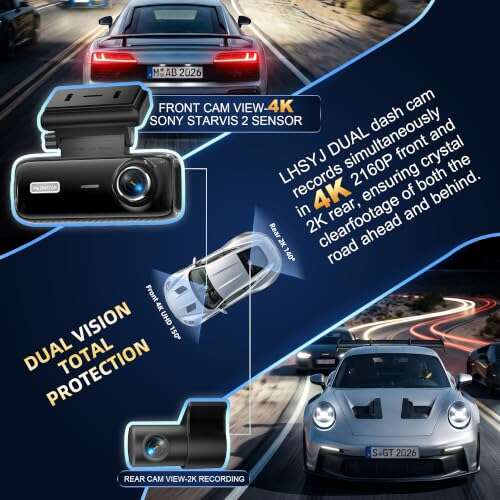
The LHSYJ dual dash cam is not a piano camera by design, but its two-camera layout may help with creative recording. You could use one view for the pianist and another for the keyboard or pedals. Its 4K front camera can provide a sharp main image when the unit is mounted securely. The optional color choices also make the product less plain than many car cameras.
I would treat this as a special-purpose option rather than a first pick. Dash cams often use wide views, which can help show a full piano but may bend lines near the frame edges. Their microphones and mounting systems also focus on driving, not concert sound. If you already own this camera, it may work for a test video, but a music recorder remains a better long-term path.
Pros:
- Dual cameras can show two piano views
- 4K front video offers useful detail
- Wide coverage may fit a full keyboard
- Compact design saves space
- Can record hands and face at once
Cons:
- Designed for cars, not music recording
- Mount may need an adapter for indoor use
- Audio may not give a rich piano image
- Wide lens can cause edge distortion
My Recommendation
This product is best for an experimenter who wants two angles from one small system. It may also suit a creator who already owns it and wants to test piano content. I would not call it the best camera for recording piano when sound quality is the main goal. Buy it for its dual-view idea, not as a replacement for a dedicated music recorder.
JYSECURE 4K Sports Camera with Audio

The JYSECURE 4K sports camera is a small action-style camera with audio and video recording. Its compact size can be helpful when your piano room has little free space. You can mount it above the keys, near a music stand, or on a side arm with the right accessory. A 64GB card gives you a useful starting point for practice takes and short performances.
Action cameras usually favor a broad view and simple operation. That can make it easy to show the whole keyboard, but the image may look less natural than footage from a larger camera. The built-in audio is fine for notes and lesson review, yet I would use a separate recorder for a polished album-style sound. It is a useful low-cost tool for testing camera placement.
Pros:
- Small body fits near a piano
- 4K video records clear hand motion
- Wide view shows more of the instrument
- 64GB storage supports many short clips
- Easy to move between setups
- Action design may suit mobile creators
Cons:
- Wide action lens may distort the piano
- Built-in audio has limited depth
- Tiny controls can be less comfortable
My Recommendation
The JYSECURE is best for students, travel creators, and players who want a small camera near the keys. It can record practice, drills, and quick clips with little fuss. I would rank it below the Zoom Q2n-4K for the best camera for recording piano because the Zoom gives more music-focused sound. Still, its low weight and wide view add real value.
Overhead Lens for Piano Teaching

This product is a clip-on optical lens attachment made for overhead piano teaching views. It is not a camera by itself. Instead, it changes the view of a compatible phone or camera lens. The wide fisheye effect can help show the hands, keys, and sheet music in one lesson frame.
I see value here for teachers who already use a smartphone. A lens attachment costs less than a second camera and can make an overhead lesson easier to follow. The trade-off is optical distortion, especially near the edges. You also need a firm phone mount, good light, and a device with a compatible lens position.
Pros:
- Can create a useful overhead piano view
- Works with a compatible phone or camera
- Helps show keys and sheet music together
- Small and easy to store
- Low-cost way to test a new angle
- Useful for online piano teaching
Cons:
- It is not a stand-alone camera
- Fisheye effect may bend straight piano lines
- Clip fit may vary by device
- Requires a separate stable mount
My Recommendation
I recommend this lens to teachers who already own a phone and need a better top-down shot. It is not the best camera for recording piano on its own, but it can improve a low-cost teaching setup. Use it when clear hand placement matters more than a cinema-style image. Check your device fit before buying, and keep the lens clean for a sharp view.
kaysunlink 1080P Mini Body Camera

The kaysunlink body camera records 1080P video and audio in a very small body. Its wearable form may help when you want a player-view clip from the bench. You could attach it to clothing, a strap, or a nearby mount with the right setup. The included 128GB capacity is helpful for long practice sessions and repeated takes.
This camera offers a point-of-view angle rather than a full performance view. That makes it useful for showing fingering, posture, or the player’s personal view of the keys. It will not frame the whole piano as well as a wide music recorder placed across the room. I also suggest checking the mounting angle before a full take, since a small shift can hide the upper or lower keys.
Pros:
- Very small and easy to place
- 128GB capacity supports long recording use
- 1080P video is adequate for lesson review
- Wearable design captures a player view
- Audio and video record together
- Useful for fingering demonstrations
Cons:
- Not ideal for a full-room piano shot
- 1080P has less detail than 4K
- Mounting position needs careful testing
- Body-camera audio may sound close and flat
My Recommendation
The kaysunlink is best for teachers and students who need a close hand view. It works as a second angle beside a main camera. I would not make it my only best camera for recording piano, but it can add a view that larger cameras cannot. Its storage size and tiny body make it a handy tool for long practice records.
4K 128GB Magnetic Mini Body Camera

This thumb-sized 4K mini body camera focuses on hands-free recording. Its magnetic design may make it easy to attach to a metal stand, bracket, or nearby surface. The tiny size is useful when a normal camera blocks your hands or takes up bench space. With 128GB storage, it can hold many clips before you need to move files.
The camera works best as a close or secondary angle. You can point it at the keys, pedals, or sheet music while a larger camera records the full scene. A small lens often needs good light, and its sound may not match the depth of a piano in a large room. Still, the waterproof design and compact build give it uses beyond music.
Pros:
- Thumb-sized body saves valuable space
- Magnetic mount supports hands-free use
- 4K video captures detailed key movement
- 128GB storage is useful for many files
- Can record a close pedal or hand view
- Waterproof design adds daily-use flexibility
Cons:
- Small lens needs strong room light
- Not the best choice for a wide piano scene
- Audio quality may be basic
- Magnetic mounting needs a safe support point
My Recommendation
I recommend this mini camera for creators who want a hidden or close piano angle. It is a clever add-on for lessons and multi-camera clips. It is not the best camera for recording piano as a complete system, but it can fill a gap very well. Choose it when size, storage, and flexible mounting matter most.
SixBondsCam 4K Body Camera

The SixBondsCam is another compact 4K body camera with audio and video recording. Its small form can work well in a crowded piano setup. Place it near the music stand for a sheet-music view, or use it for a close angle on the right hand. The 128GB capacity gives you room for long practice files and several lesson sessions.
This type of camera is most useful when you think of it as a view tool, not a studio camera. Its wide placement options can help you build a multi-angle piano video. For sound, I would still favor a dedicated stereo recorder or a direct connection from a digital piano. The result can be very useful for review, even if it does not replace a larger camera with better audio control.
Pros:
- 4K video records fine hand detail
- 128GB storage supports extended use
- Small body fits beside a piano
- Good option for a second camera angle
- Audio and video recording are combined
- Portable for lessons and travel
Cons:
- May not capture a full piano well
- Small controls can slow setup
- Built-in sound may lack room depth
- Needs a secure mount near the instrument
My Recommendation
The SixBondsCam suits students, teachers, and creators who want extra coverage. It can show details that a front camera misses. For most people searching for the best camera for recording piano, I would place it behind the Zoom Q2n-4K because sound is less specialized. Its value is strongest as a small 4K companion camera.
Mini 1080P Body Camera with Night Vision

This mini body camera records 1080P video and includes night vision. Its stated five-hour battery life can help with long practice blocks, work records, or lesson notes. The 64GB card offers a simple way to start recording without buying storage at once. Its small form also makes it easy to position near a keyboard.
For piano use, the night vision feature is less important than stable light and a clear angle. You should not expect a dark room to look bright and detailed just because a camera has night vision. Still, this model can serve for basic hand records and personal review. The 1080P output is easy to store and share, which helps students who do not need a large 4K file.
Pros:
- Up to five-hour battery claim suits long sessions
- 64GB storage supports basic practice recording
- Small body is easy to hide or mount
- 1080P files are simple to share
- Night vision adds flexibility in low light
- Useful for simple personal records
Cons:
- Lower detail than 4K cameras
- Night vision may change color and mood
- Small microphone may not capture full piano tone
- Not designed for professional music video
My Recommendation
This body camera is best for budget buyers who want long, simple practice records. It can also work for students who share short clips with a teacher. I would not select it as the best camera for recording piano for a public recital or polished channel. Its main strengths are low cost, easy storage, and useful battery life.
How to Choose the Best Camera for Recording Piano
Choosing a piano camera is not just about the highest resolution. A 4K image cannot save a video with poor sound, a shaky mount, or a cropped keyboard. I start with the way I plan to record. A student may need a close hand view, while a performer may need the full piano, bench, face, and room.
Sound quality comes first
A piano fills a room with wide tones. A weak microphone may make those tones harsh or flat. Stereo microphones often create a more open sound because they capture left and right space. For this reason, music recorders such as the Zoom Q2n-4K and Q4n deserve close attention.
Do not place the camera too close to the soundboard or speakers. That can make bass sound heavy and can overload the microphone during loud play. I prefer a position several feet away, with the lens aimed slightly above the keys. Always make a short test clip before recording the full piece.
Choose the right view
A wide-angle lens can show the entire keyboard in a small room. It may also create curved lines at the edge. A normal lens often looks more natural, but it needs more space. If you want to show hands and sheet music, an overhead view or second camera may work better than one front view.
For most piano videos, I like a three-quarter angle. It shows the player’s face, both hands, and much of the instrument. For lessons, I may add a close camera aimed at the keys. The best camera for recording piano should match the view your audience needs.
Is 4K needed for piano?
4K can show small finger movements and printed notes with extra detail. It also gives you room to crop a frame during editing. However, 1080P remains good for many lessons and private practice clips. It uses less storage and usually uploads faster.
If you plan to post on a large screen, create lesson content, or crop into the hands, 4K makes sense. If you only want to check rhythm and fingering, 1080P may be enough. Resolution helps, but steady light and clear sound often make a bigger difference.
Look for easy mounting
A camera should stay still from the first note to the last. A shaky video can distract viewers and make hand movement hard to judge. Use a strong tripod, a desk mount, or a safe overhead arm. Small body cameras need extra care because a loose clip can change the frame.
Keep the camera away from the player’s arms. Make sure the stand does not touch the piano in a way that adds vibration. If you record above an acoustic piano, check that the mount cannot fall onto the instrument. Safety matters more than a dramatic angle.
Think about power and storage
A long sonata or lesson can use more battery and storage than expected. 4K files grow fast. A 64GB card may suit short clips, while 128GB gives more space for long sessions. Check the camera’s supported card type and format the card in the camera when possible.
For long recordings, use external power if the maker permits it. Keep a spare battery or power bank nearby. I also name files after the date and piece. This small habit saves time when you have many practice takes.
Lighting still matters
Place the piano near soft light, but avoid a bright window behind the player. Backlight can turn the pianist into a dark shape. A small lamp aimed at the keys may help, but avoid strong glare on glossy black surfaces. Diffused light gives skin, keys, and wood a more natural look.
Night vision is not a true replacement for good room light. It may add a green or gray cast, and it can reduce the mood of a performance. For most piano videos, a simple soft light is the better fix.
Recording an acoustic versus digital piano
An acoustic piano needs a microphone that can handle a wide range of loud and soft notes. Room position also affects the final sound. A digital piano may offer a line output, USB audio, or headphone recording, depending on the model. In that case, you can combine direct piano audio with camera video during editing.
Direct audio can sound very clean, but it may lose the feeling of the room. A stereo room mic can sound more natural. Many serious creators record both and blend them. Beginners can start with the camera microphones and upgrade only when they know what sound they want.
Best setup for piano lessons
For an online lesson, place the main camera where the teacher can see the player’s face and full keyboard. A second small camera can point down at the hands. The overhead lens attachment may help a phone show both keys and sheet music, though you should test for distortion.
Use a stable internet connection for live lessons. For recorded lessons, check that the video and audio stay in sync. Tap a key or clap once at the start if you plan to edit sound later. That simple mark makes alignment much easier.
Best setup for piano YouTube videos
Creators should plan the frame before pressing record. Leave a little space around the player, piano, and hands. Check the background for bright clutter. A clean frame helps viewers focus on the music.
Record a short sample at the loudest part of the piece. Listen with headphones. If the sound clips, move the camera farther away or lower the input level when the camera allows it. The best camera for recording piano is only as good as the setup around it.
Best Features at a Glance
| Best for | Why |
|---|---|
| Overall piano recording | Zoom Q2n-4K combines 4K video, a wide view, and stereo microphones. |
| Music-first sound | Zoom Q4n focuses on a broad musician-friendly frame and stereo audio. |
| Close hand or lesson views | Mini body cameras and the overhead lens can show keys from unusual angles. |
Tips for Better Piano Video and Audio
I always record a ten-second test before a full performance. Play both a soft passage and a loud chord. Then watch the clip on a larger screen and listen with headphones. This test can reveal glare, clipped sound, a crooked frame, or a hidden hand.
Keep the lens at about eye or chest height for a normal performance shot. A high angle can make the keys easy to see, but it may make the player look small. A low angle can look dramatic, yet it may hide the hands. Try three positions and choose the one that tells the musical story best.
For a digital piano, explore direct audio only after you can make a good camera video. A clean picture with room sound may feel more natural than a perfect signal with no space. If you use two devices, clap once at the start and align the tracks in your editing app.
Use headphones when checking sound. Phone speakers hide bass problems and harsh high notes. Listen for buzz, fan noise, pedal clicks, and room echo. Small changes in camera distance can make a large change in piano tone.
Finally, protect your files. Copy important performances to a computer or cloud drive. Memory cards can fail without warning. Keep the original file before you edit or compress it.
FAQs Of best camera for recording piano
What is the best camera for recording piano at home?
The Zoom Q2n-4K is my top general pick. It offers a wide view and stereo microphones in one compact unit. It works well for lessons, practice, and performance videos.
Should I use a phone or a dedicated camera for piano?
A modern phone can produce a good image in bright light. A dedicated music recorder often gives easier placement and better built-in stereo sound. Choose based on your room, audio needs, and budget.
Is 4K better than 1080P for piano videos?
4K gives more detail and lets you crop the frame. 1080P uses less storage and works well for basic practice review. Good sound and stable video matter more than resolution alone.
Where should I place a camera when recording piano?
Start several feet in front of the piano at a three-quarter angle. Keep both hands, the player, and enough of the keyboard in view. Test the sound before recording the full piece.
Do I need a separate microphone for piano?
Not at first. The stereo microphones on a Zoom recorder can give a useful natural sound. Add a separate microphone when you need more control, a richer tone, or a professional mix.
Final Verdict: Which Should You Buy?
For most players, the Zoom Q2n-4K is the best camera for recording piano. It gives a wide frame, sharp video, and useful stereo sound without a hard setup.
Choose a mini body camera for close views, or the Q4n for music-first recording. Start with good light, a stable mount, and a short sound test for better results.

Senior Music Reviewer
Alex Carter is a seasoned music reviewer with over a decade of experience in the world of sound and instruments. Passionate about helping musicians and enthusiasts make informed choices, he brings sharp insights and in-depth knowledge to every review. From classical instruments to modern gear, Alex combines technical expertise with a love for music to deliver content that resonates with readers.
As a Senior Music Reviewer and expert author on Tuneluma.com, Alex is dedicated to sharing honest evaluations, practical advice, and thoughtful commentary to guide readers in their musical journey.