Best Camera For Online Piano Lessons: Top Picks
The best camera for online piano lessons is a wide-angle setup that clearly shows your face, hands, keys, and sheet music.
You sit down for a lesson, open your laptop, and then notice the problem: your teacher can see your face but not your hands. A normal webcam often misses the keyboard, while a top-down view may hide your expression and posture. The right setup solves that gap. This guide reviews useful piano-learning tools, including an overhead camera lens and several lesson books. I will also explain what to look for in the best camera for online piano lessons, so you can build a clear, simple setup for Zoom, Skype, FaceTime, or another video platform.
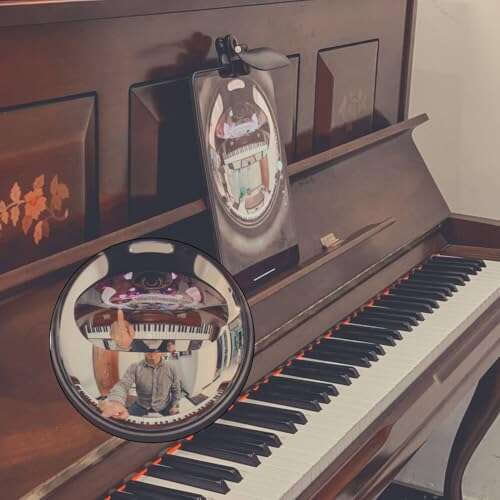
Overhead Camera Lens for Piano Teaching

This clip-on lens aims to give online piano students a wider view of the keyboard. Its fisheye design can help a single camera show more of the playing area than a standard narrow webcam view. That can be useful when a teacher needs to watch both hands during scales, chords, or simple songs. It is an accessory for an existing phone or camera, not a complete camera by itself.
I see the most value here for students who already own a device but struggle with framing. A wide view may reduce the need to move the camera each time you change exercises. The clear sheet-music view is also designed to support a teaching angle that includes the keys and music stand. Results will depend on the phone lens, clip fit, lighting, and the distance from the piano.
Pros:
- Expands the visible keyboard area with a wide-angle view
- Can help one device capture more of both hands
- Clip-on design is easy to store and carry
- Useful for phones and compatible cameras with the right fit
- May reduce the need for frequent camera repositioning
- Supports overhead or angled piano teaching views
Cons:
- It is a lens accessory, not a camera or full stand
- Fisheye views may bend straight lines near the edges
- Compatibility depends on the device and lens placement
- It may not work well with thick phone cases
Beginner Piano Lessons for Kids Book

This beginner piano book is made for children who need a simple path into music. It includes online video and audio access, which can add a visual and listening layer to printed lessons. That mix may help a child understand rhythm, finger placement, and basic note reading. A camera cannot replace a clear lesson plan, and this book can help give the lesson structure.
For online students, the book works best when it sits on the music rack beside the keyboard. A parent or teacher can use the camera to check posture and hand position while the child follows the page. The short lesson format may also make practice feel less like a large task. I would still confirm the access details and device needs before buying, since online materials can change over time.
Pros:
- Written for young beginners
- Includes online video and audio support
- Gives practice a clear step-by-step path
- Can support lessons with a webcam or phone camera
- Helps parents follow a child’s progress
- Combines print learning with digital material
Cons:
- It is a lesson book, not a camera
- Older children or advanced players may outgrow it quickly
- Online access may require internet service or a compatible device
- It may not match every teacher’s lesson method
Learn the Piano in 5 Easy Steps

This self-guided piano course takes a staged approach to learning. The five-step format may feel less overwhelming than a large book filled with theory and long exercises. Online video instruction can show how a passage should sound and move. That makes it a useful companion for students who learn well from both text and demonstration.
I would pair this book with the best camera for online piano lessons when a student wants feedback between guided sessions. A clear view of the hands lets a teacher spot uneven finger motion or a weak thumb position. The book can then provide the next exercise without making the student search for random online lessons. It suits adults, teens, and motivated beginners who want a self-paced start.
Pros:
- Uses a simple five-step learning structure
- Includes online video instruction
- Supports self-paced practice at home
- May reduce confusion for first-time players
- Works well beside a digital lesson setup
- Can help students prepare questions for a live teacher
Cons:
- Self-guided study requires regular discipline
- It does not provide personal correction on its own
- Students who need advanced theory will need extra material
- Video access depends on a working internet connection
Beginning Piano Book for Kids

This kids’ piano book focuses on an easy method for young beginners. Its online video and audio support can make the printed page easier to understand. Children often need to hear and see a task before it becomes clear, so this format can add helpful context. The simple design may also help a parent guide short practice sessions.
A good camera setup makes this book more useful during remote instruction. The teacher can see whether the child uses the correct fingers instead of guessing from the sound alone. I recommend placing the book just outside the main camera frame or using a second device to show the page. This is not the best camera for online piano lessons, but it can improve what students do after each video call.
Pros:
- Designed for young piano students
- Uses simple, beginner-friendly instructions
- Includes video and audio support
- Can help parents lead home practice
- Pairs well with short online lessons
- Encourages steady progress through small steps
Cons:
- Not intended for intermediate or advanced players
- Digital support may need account or internet access
- Some children may still need a live teacher
- The book does not solve camera framing problems
Early Intermediate Piano Lessons for Adults

This book targets adult learners at an early intermediate level. It covers reading sheet music, finger dexterity, and musical styles such as Baroque pieces. The title suggests a focus on listening and ear development, which matters when a student wants to play with more control. It can serve as a practical bridge between basic exercises and fuller piano pieces.
Adults often need a lesson tool that respects a busy schedule. A printed course lets you mark a passage, repeat a drill, and return to a weak skill without starting over. During an online lesson, a teacher can use a camera view to inspect the hands while this book guides the musical task. I would choose it for a returning player who already knows the keyboard basics and wants more polish.
Pros:
- Made for adult learners at an early intermediate level
- Works on sheet music reading
- Includes finger dexterity practice
- Introduces Baroque and other musical ideas
- Can support focused online coaching
- Useful for adults returning to piano after a break
Cons:
- Too difficult for a complete beginner
- May require teacher help with some theory points
- It is not a camera or video-call accessory
- Students seeking only popular songs may want another book
Teach Yourself to Play Piano

This method book is aimed at adults and teens who want a direct introduction to piano. It uses a step-by-step format with sheet music and keyboard instruction. That can help a new player build a routine instead of jumping between unrelated tutorials. The clear method-book style may appeal to students who like written goals.
For remote lessons, I like this type of book because it gives both student and teacher a shared map. The teacher can assign a page before the call, then use a camera to review posture, hand shape, and rhythm. A phone or webcam should show the keys clearly, while the book stays on the music stand. It is a strong learning companion, but shoppers should not mistake it for the best camera for online piano lessons.
Pros:
- Suitable for adults and teens
- Offers a step-by-step learning path
- Includes sheet music and piano instruction
- Helps organize independent practice
- Easy to use as a shared lesson reference
- Can support live or remote teaching
Cons:
- Beginners still need feedback on technique
- It lacks the interactive feel of a full lesson platform
- Digital camera equipment must be purchased separately
- Some players may prefer a book with popular songs
Hit Songs Super Easy Songbook

This songbook focuses on accessible arrangements of popular music. It includes letter note names and chord diagrams, which can help a new player connect a printed page with the keyboard. Familiar songs often give beginners a reason to practice one more time. The “super easy” approach is especially useful after a student learns a few basic notes and chords.
During an online piano lesson, a teacher can use this book to demonstrate rhythm, chord changes, and simple accompaniment patterns. A camera that captures the full keyboard helps the student compare the teacher’s hand movement with their own. This book will not replace a technique course, but it can add fun and motivation. I recommend it for adults and students who lose interest when lessons feel too formal.
Pros:
- Uses familiar popular songs to build interest
- Includes easy piano arrangements
- Provides letter note names
- Includes chord diagrams for beginners
- Works well for casual online coaching
- Can make daily practice feel more rewarding
Cons:
- Easy arrangements may not teach full original parts
- It may not cover advanced technique in depth
- Song preferences vary from player to player
- A separate method book may still be needed
I Used to Play Piano: 60s and 70s Hits
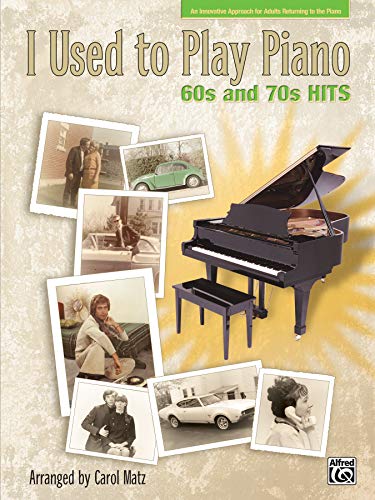
This book is designed for adults returning to the piano. Its focus on 1960s and 1970s hits may feel familiar to players who learned years ago and want music that sparks old memories. The approach can make restarting less intimidating than beginning with dry drills alone. It is a music-first option for someone who remembers basic skills but needs a gentle path back.
Online lessons can work very well for returning players when the camera shows relaxed hands and proper posture. A teacher can identify habits that developed during a long break, then use a song from this book to rebuild confidence. I would place the device slightly above the keyboard and angle it down toward the hands. This book is best used with a method guide or teacher when the player needs deeper theory.
Pros:
- Made for adults returning to piano
- Uses music from the 1960s and 1970s
- Can make practice feel familiar and enjoyable
- Supports a gentle return after a long break
- Pairs naturally with remote piano instruction
- May help rebuild confidence through known songs
Cons:
- It may not suit players who dislike older song styles
- It is not a complete beginner method
- Advanced players may find the arrangements limited
- It does not include camera equipment
Beginner Piano Classics, Volume Two
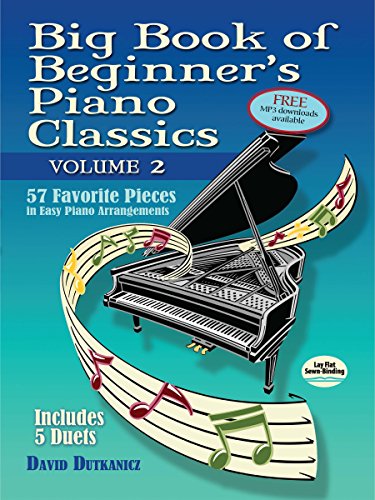
This collection offers 57 beginner-friendly classical pieces and includes five duets. It also lists downloadable MP3 support, which can help students hear the music before they play it. A broad collection gives a learner room to explore different moods, tempos, and patterns. The arrangements are intended to make classical repertoire more approachable.
For online teaching, a clear camera view is important because classical pieces often expose uneven fingers and poor hand position. The teacher can listen to the piece while watching the hands for tension or missed notes. Duets can also make remote practice more engaging when both players have a reliable audio setup. I recommend this volume for learners who want more than short pop tunes and enjoy a traditional piano sound.
Pros:
- Includes 57 beginner classical pieces
- Offers five duet selections
- Provides downloadable MP3 support
- Introduces students to varied classical styles
- Useful for ear training before practice
- Creates many lesson and recital options
Cons:
- Classical music may not appeal to every beginner
- Some pieces may still challenge very new players
- MP3 access and download details should be checked
- A teacher may need to select suitable pieces
Easy Piano Vivaldi

This book presents Vivaldi in simplified piano arrangements. It gives beginners a friendly way to approach classical music without starting with the hardest original scores. Simplified pieces can teach repeated patterns, rhythm, and musical phrasing in a manageable form. It is a focused choice for students who want to explore one important composer.
A remote teacher can use a camera to show the hand shape needed for repeated figures and changing patterns. The student can then copy the movement while following the score. Good lighting matters because small notes and finger motion must stay visible on screen. This book is not the best camera for online piano lessons, but it can make a well-framed lesson more musical and rewarding.
Pros:
- Introduces Vivaldi through easier arrangements
- Offers a focused classical learning theme
- Helps beginners explore phrasing and rhythm
- Works well with live online instruction
- Can build interest in classical repertoire
- Provides a clear goal for practice
Cons:
- It focuses on one composer and style
- Very new players may need easier exercises first
- It does not replace a complete piano method
- Students need separate camera and audio equipment
What Makes the Best Camera for Online Piano Lessons?
The best camera for online piano lessons must show more than a face. It should capture the keyboard, both hands, and enough of the upper body to reveal posture. A camera with a sharp image helps a teacher see finger shape and movement. Yet image quality alone does not make a good teaching setup.
Framing matters just as much as resolution. A 1080p camera is often enough for lessons when the light is good and the camera sits at a useful angle. A 4K model can show more detail, but many video platforms compress the image. I would rather use a well-placed 1080p camera than a poorly placed 4K camera.
Camera Angle
A front-facing webcam works for face-to-face conversation, but it often hides the keys. An overhead or high three-quarter angle gives the teacher a better view of the hands. Some students use two cameras: one for the face and one for the keyboard. Others use one wide-angle device and switch the view when needed.
The clip-on lens reviewed above may help when a phone already sits close to the piano. It can widen the image without buying a second camera. However, a lens cannot correct a poor mount, weak light, or a phone that does not focus well at close range.
Resolution and Frame Rate
For most lessons, 1080p video gives a clear balance of detail and bandwidth. A frame rate of 30 frames per second is usually fine for slow practice and normal demonstrations. A higher frame rate can make quick hand motion look smoother, but it may use more data. I recommend testing the actual video call before the first paid lesson.
Autofocus and Exposure
Autofocus should stay on the hands and keys without hunting back and forth. A camera that keeps changing exposure can make white keys look bright and hide the fingers. Manual controls are helpful, but many beginners prefer a camera that works well with automatic settings. Lock the focus and exposure when possible after the piano is in position.
Audio for Piano Lessons
Video gets attention, but sound carries the music. The built-in microphone on a laptop may pick up speech, yet it may not capture a piano with enough balance. A separate microphone can improve sound, but it also adds setup work. If the camera has a poor microphone, use a trusted headset or external audio device and check for echo.
Some video apps use noise cancellation that may cut off soft piano notes. Ask the teacher which audio setting works best. A piano lesson needs natural sound, not just clear speech. I always test a few loud chords, soft notes, and pedal changes before deciding that the setup is ready.
How to Set Up a Camera for Remote Piano Teaching
Start by placing the camera where the teacher can see both hands. Keep the lens high enough to avoid blocking the music stand. If you use a laptop, a small stand may lift the built-in webcam, but the laptop screen must still face you. A phone on a stable tripod can provide a better keyboard view than a laptop alone.
Use light from in front or from the side. Avoid placing a bright window behind you, because it can turn your face and hands into dark shapes. A desk lamp may work if it does not create glare on the keys or sheet music. Soft, even light makes the best camera for online piano lessons perform better.
Before the lesson, open the video preview and check four things. Can the teacher see the full playing area? Can the camera see the fingers without blur? Does your face appear when you need to speak? Can the microphone hear both quiet and loud playing?
One-Camera Setup
A one-camera setup costs less and takes less time. Use a wide view that includes the keyboard and your upper body. This is convenient for beginners, children, and students who do not want to manage several devices. The trade-off is that the hands may appear smaller on screen.
Two-Camera Setup
A two-camera setup offers a face view and a hand view. It is helpful when a teacher needs to watch posture, expression, and technique in the same lesson. Many video platforms let the student switch cameras, though the exact steps vary. This approach needs more bandwidth, power, and space.
Overhead Setup
An overhead camera points down at the keys. It offers a strong teaching view for scales, chords, and finger patterns. Use a firm arm or tripod, and check that it cannot fall onto the piano. Keep cables away from the pedals and floor path.
Buying Guide: Choosing the Best Camera for Online Piano Lessons
When I compare cameras for online piano lessons, I focus on useful performance rather than a long list of technical terms. The best choice should fit the piano, the room, and the student’s skill level. A small webcam may suit a digital keyboard on a desk. A full-size acoustic piano may need a phone, tripod, or overhead mount.
Check Compatibility First
Confirm that the camera works with your computer, tablet, or phone. Check the operating system, connector, app support, and power needs. If you plan to use Zoom or another service, read its current camera requirements. A camera that cannot connect easily becomes an expensive shelf item.
Measure the Room
Measure the distance from the camera position to the keyboard. A narrow lens may show only part of the keys. A wide lens may include the full piano but create edge distortion. Choose the view after measuring, not just by reading the product box.
Look for a Stable Mount
A clear camera image is useless if the device shakes whenever you touch the piano. Use a stable tripod, clamp, or overhead arm. Tighten each joint before the lesson. If children use the setup, choose extra stability over a small price difference.
Consider Privacy
A camera with a physical privacy shutter gives peace of mind between lessons. You can also unplug the device or close the laptop. Teach children to check the video preview before joining a call. Simple privacy habits matter in any home learning setup.
Do Not Ignore Latency
Video delay comes from the camera, computer, network, and meeting service. A better camera cannot remove every delay. Use a wired internet connection when possible, close extra apps, and keep the camera close to the router if you use Wi-Fi. Teacher and student should avoid playing together unless the delay is low enough to make it practical.
Which Products Actually Help Online Piano Students?
The listed products are not all cameras. Only the clip-on overhead lens is camera-related. The other products are books that support piano practice, technique, music reading, and song choice. I include them because a successful online lesson needs both a clear view and a useful learning plan.
If you need a true camera, shop for a webcam, phone camera, or dedicated video camera with a stable mount. If you already own a phone, the overhead lens may be the lowest-cost way to widen its view. If your problem is weak practice rather than poor video, one of the lesson books may give you more value than another piece of hardware.
| Best for | Why |
|---|---|
| Showing both hands | The overhead clip-on lens can widen a compatible phone view. |
| Young beginners | The children’s lesson books use simple steps and digital support. |
| Returning adult players | The adult books offer familiar songs, reading work, and guided practice. |
My Recommendation
The overhead piano teaching lens is best for students who already have a compatible phone or camera and need a wider keyboard view. It may help show both hands during remote instruction, but it cannot replace a stable mount, good light, or a quality camera. For children, the beginner lesson books add structure and can make video lessons easier to follow. For adults, the self-guided, popular-song, classical, and returning-player books cover different learning goals.
If I had to build a simple setup, I would start with a phone on a stable tripod, add the clip-on lens only if the keyboard does not fit in frame, and use one suitable book for practice. That combination offers better value than buying gear without a plan. In the search for the best camera for online piano lessons, remember that angle, audio, and stability often matter more than the highest resolution.
FAQs Of best camera for online piano lessons
What is the best camera for online piano lessons?
The best camera is one that clearly shows the hands, keys, and posture. A 1080p webcam or modern phone can work well when placed on a stable mount. Choose a wide enough view for the full keyboard and test the audio before the lesson.
Is a laptop webcam good enough for piano lessons?
It can work for speaking, but it often gives a poor view of the hands. Raise or angle the laptop if it can show the keyboard safely. A separate phone or webcam usually gives a better teaching angle.
Do I need two cameras for online piano lessons?
No. One wide camera can work for many students. Two cameras are useful when the teacher needs to see your face and hands at the same time. They also require more setup and may use more internet bandwidth.
Is 4K necessary for the best camera for online piano lessons?
No. Clear 1080p video is enough for most lessons. Good light, stable mounting, and correct framing usually improve the lesson more than 4K resolution. Use 4K only if your computer and video service support it well.
Can the overhead clip-on lens work with every phone?
No. The clip must fit the phone and align with its camera lens. Thick cases and multi-lens phones can cause problems. Check the product details and test the image before the lesson.
Final Verdict: Which Should You Buy?
For the best camera for online piano lessons, I would choose a good phone or webcam on a stable mount, with the overhead clip-on lens as a helpful add-on. Pair it with the piano book that matches your age, skill, and music goals.
A clear view is the first step, but steady practice completes the lesson. Choose simple gear, good light, and a reliable learning plan for better online piano progress.

Senior Music Reviewer
Alex Carter is a seasoned music reviewer with over a decade of experience in the world of sound and instruments. Passionate about helping musicians and enthusiasts make informed choices, he brings sharp insights and in-depth knowledge to every review. From classical instruments to modern gear, Alex combines technical expertise with a love for music to deliver content that resonates with readers.
As a Senior Music Reviewer and expert author on Tuneluma.com, Alex is dedicated to sharing honest evaluations, practical advice, and thoughtful commentary to guide readers in their musical journey.