Best Free Piano Software For MIDI Keyboard: Free Tools
Spitfire LABS, GarageBand, and Waveform Free are excellent free piano software choices for MIDI keyboards.
You plug in your MIDI keyboard, press a key, and hear nothing. It is a common first step for new players. A MIDI controller sends notes, but it does not make sound by itself. You need a piano plugin or music app to turn those notes into piano audio. I tested the key features that matter most, such as USB setup, key response, range, control options, portability, and software support. This guide covers the best free piano software for MIDI keyboard users and the controllers that make practice, recording, and home music work much easier.
See the differences between my top picks at a glance.
| Controller | Keys | Best For | Main Strength | Amazon |
|---|---|---|---|---|
| Akai MPK Mini IV | 25 | Beat makers | Pads, knobs, chord mode | View on Amazon |
| Akai MPK Mini MK3 | 25 | Home studios | Compact controls | View on Amazon |
| M-Audio Keystation 49 MK3 | 49 | Learning piano | Useful playing range | View on Amazon |
| Akai MPK Mini IV White | 25 | Portable production | Small, modern layout | View on Amazon |
| M-Audio Keystation 61 MK3 | 61 | Two-hand playing | Large note range | View on Amazon |
| Akai MPK Mini Plus II | 37 | Serious beat work | Arpeggiator and CV/Gate | View on Amazon |
| M-Audio Keystation Mini 32 | 32 | Travel use | Very portable | View on Amazon |
| M-Audio Keystation 88 MK3 | 88 | Full piano range | Semi-weighted action | View on Amazon |
| Akai MPK Mini Play MK3 | 25 | No-computer practice | Built-in sounds and speaker | View on Amazon |
| Arturia MiniLab 3 | 25 | Software control | Pads, knobs, bundled tools | View on Amazon |
Akai MPK Mini IV 25-Key Controller

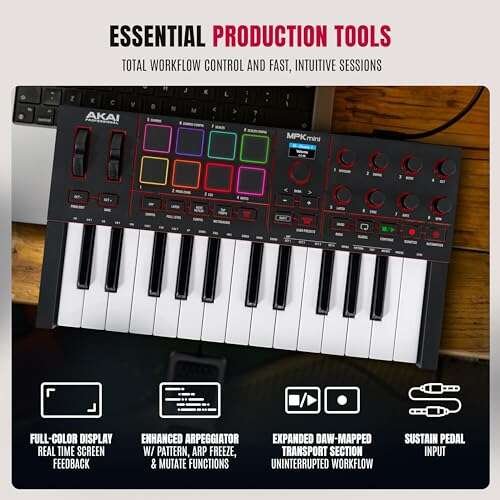
The Akai MPK Mini IV is a compact MIDI keyboard for producers who need many controls in a small space. Its 25 velocity-sensitive keys work well with free piano plugins and virtual instruments. The eight MPC-style pads add a useful way to play drums or trigger clips. The 360-degree knobs also let you adjust tone, volume, effects, or other software controls.
Chord and scale modes can help new players stay in key. The USB-C connection fits a modern computer setup, though you still need a computer and piano software to hear its MIDI notes. This is not a full piano replacement, but it is a strong music production tool for a desk, dorm room, or travel bag.
Pros:
- Velocity-sensitive keys support expressive playing
- Eight useful MPC pads
- Multiple knobs for software control
- Chord and scale modes help beginners
- Compact USB-C design saves desk space
Cons:
- 25 keys limit wide piano pieces
- Mini keys feel smaller than piano keys
- It needs external software for sound
What Amazon Buyers Are Saying
Buyer feedback commonly focuses on the small footprint, useful controls, and easy computer setup. Some users prefer the compact size for beat making and travel. Other buyers point out that mini keys and a two-octave range do not suit serious classical practice. Check current customer reviews for the latest notes about software registration and compatibility.
My Recommendation
I recommend this model for beat makers who want the best free piano software for MIDI keyboard work, plus pads and hands-on control. It is worth buying when desk space matters more than a wide key range.
Akai MPK Mini MK3 25-Key Controller

The MPK Mini MK3 remains a popular small controller for home studios. Its 25 velocity-sensitive keys give basic control over free piano instruments, synths, and samplers. Eight pads and eight knobs add more control than a simple keyboard. The small display can also help you check settings without opening every menu in your music app.
This keyboard works best for loops, chords, melodies, and compact production sessions. It is not ideal for learning full piano songs because the key span is limited. Still, its familiar layout and bundled software access make it a practical entry point for a new producer.
Pros:
- Small and easy to place near a laptop
- Velocity-sensitive mini keys
- Eight pads for beats and samples
- Eight knobs support sound editing
- Widely supported by music software
Cons:
- Limited two-octave playing range
- No built-in speakers or piano sounds
- Mini keys may not suit large hands
What Amazon Buyers Are Saying
Amazon buyers often praise the controller for its size, price, and number of controls. Many use it for beginner production and simple MIDI work. The most common limitations mentioned by users involve the small keys and the need to spend time mapping controls in some software. Review the current listing for updated software details.
My Recommendation
This is a sensible choice if you want an affordable controller for GarageBand, Waveform Free, or another free piano app. I would choose it for production rather than traditional piano study.
M-Audio Keystation 49 MK3

The M-Audio Keystation 49 MK3 gives piano learners more room than a 25-key controller. Its 49 synth-action keys cover a useful range for lessons, chords, and two-handed parts. Pitch and modulation wheels add expression when you use a piano, organ, or synth plugin. The keyboard also includes assignable controls for a compatible DAW.
This model has a simple layout, so it does not overwhelm a new player with pads and menus. That makes it a good match for free piano software for MIDI keyboard practice. The keys are not weighted, so the feel differs from an acoustic piano. However, the larger range makes it much more useful for everyday playing than most mini controllers.
Pros:
- 49 keys give a useful practice range
- Simple layout suits beginners
- Pitch and modulation wheels add control
- Velocity response works with piano plugins
- Good fit for lessons and home recording
Cons:
- Synth action is lighter than hammer action
- Larger body needs more desk space
- It relies on a computer for piano sound
What Amazon Buyers Are Saying
Customer comments often highlight the playable range and straightforward USB setup. Buyers who want a basic MIDI keyboard tend to like the uncluttered design. Some users note that the light key action does not feel like an acoustic piano. As with any USB controller, current reviews are useful for checking the setup experience with your operating system.
My Recommendation
I recommend the Keystation 49 MK3 as one of the best values for beginners who want to learn piano with free software. It offers a better balance of size and range than a 25-key model.
Akai MPK Mini IV White

The white MPK Mini IV offers the same compact production idea as the black version in a bright finish. It uses velocity-sensitive keys, pads, and knobs to control free virtual instruments. Chord and scale functions are useful when you want quick musical ideas without reaching for the mouse. Its small frame also fits well in a clean desktop setup.
The color does not change the core MIDI job, but it may matter if you want a lighter studio look. I like this type of controller for writing bass lines, simple piano parts, and drum patterns. Players who need a full range should choose a 49-, 61-, or 88-key keyboard instead.
Pros:
- Compact design for small work areas
- Velocity-sensitive keys respond to touch
- Useful pads and rotary controls
- Chord and scale modes aid quick writing
- USB-C suits newer computer setups
Cons:
- Only 25 keys are available
- Mini keys feel less natural for piano study
- No onboard piano sound
What Amazon Buyers Are Saying
Buyer feedback tends to center on the clean design, portability, and extra controls. Users who make beats often value the pads more than the limited range. A few buyers may find the small keys less comfortable for long piano sessions. Always check the current Amazon page for the latest comments and included software.
My Recommendation
Choose the white MPK Mini IV if you want a stylish, compact controller for free piano software and beat production. It is a good buy for ideas and travel, not full piano technique.
M-Audio Keystation 61 MK3

The Keystation 61 MK3 is a better fit for players who need space for both hands. Its 61 synth-action keys cover more musical ground without the large footprint of an 88-key controller. Pitch and modulation wheels support expressive parts. Assignable controls also help when you connect the keyboard to a DAW or free virtual piano.
This keyboard gives you room to play chords in the lower range and melodies above them. It remains light and simple, which helps if you move it between rooms. The key action will not replace a weighted digital piano. Still, it is a practical choice for songwriting, lessons, and home recording.
Pros:
- 61 keys support two-hand arrangements
- Light synth action is easy to play
- Pitch and modulation wheels add expression
- Useful for piano, synth, and organ sounds
- Bundled DAW access can aid recording
Cons:
- No weighted hammer action
- Needs a stand or wide desk
- It does not create sound without software
What Amazon Buyers Are Saying
Many buyers describe the 61-key range as a useful middle ground. Reviews often mention the light weight and simple controls as benefits for home setups. Some users expect a heavier piano feel and find the synth action different. Check recent feedback if you plan to use it with a specific computer or DAW.
My Recommendation
I recommend this model for intermediate beginners who have outgrown 25 or 49 keys. It pairs well with the best free piano software for MIDI keyboard lessons and songwriting.
Akai MPK Mini Plus II 37-Key

The MPK Mini Plus II sits between a small beat controller and a full keyboard. Its 37 velocity-sensitive keys give more room for chords and melodies. Pads, an arpeggiator, chord mode, and DAW integration make it useful for active production. CV and Gate connections also appeal to users who combine computer music with compatible hardware.
This is more capable than a basic keyboard, so it may take longer to learn. The added controls are valuable when you build songs rather than only play piano. For a free virtual piano setup, the 37-key range is a comfortable compromise. It remains too short for advanced classical work.
Pros:
- 37 keys offer a useful compact range
- Arpeggiator supports fast idea building
- Chord mode helps create progressions
- Pads work for drums and clip triggering
- CV/Gate expands compatible studio options
Cons:
- More features can feel complex to beginners
- Still lacks a full 61- or 88-key range
- External software remains necessary for piano audio
What Amazon Buyers Are Saying
Customer feedback for this type of controller usually values the extra range and deeper production features. Users who make electronic music tend to appreciate the arpeggiator and hands-on control. Buyers seeking a basic piano keyboard may find the added features unnecessary. Read the current listing carefully for exact generation details and software support.
My Recommendation
I would buy this model for a producer who wants one compact controller for keys, beats, and hardware control. It is less suitable if your only goal is piano practice.
M-Audio Keystation Mini 32 MK3

The Keystation Mini 32 MK3 focuses on portability. Its 32 velocity-sensitive keys provide more notes than a 25-key controller while keeping the body small. This makes it useful for travel, mobile songwriting, and simple piano practice. The USB design keeps setup easy with compatible music software.
The mini keys do require an adjustment. They are not the same size or feel as acoustic piano keys. I like this model for sketching chords, entering melodies, and controlling a virtual instrument on the road. It is less convincing as a main keyboard for serious technique work.
Pros:
- Very easy to carry
- 32 keys give a little more range
- Velocity response adds musical control
- Simple layout suits first-time users
- Works well in a laptop music setup
Cons:
- Mini keys are not full-size keys
- Limited controls for advanced production
- Requires free or paid software for sound
What Amazon Buyers Are Saying
Buyers often like the light weight and small footprint. Many choose it for travel or basic MIDI input rather than full piano study. The main concern is the compact key size, especially for players used to a standard keyboard. Check recent customer comments before choosing it as your only controller.
My Recommendation
This is a good low-cost travel choice. I recommend it with free piano software for MIDI keyboard practice when portability matters more than realistic piano feel.
M-Audio Keystation 88 MK3

The Keystation 88 MK3 is the strongest option here for full-range piano playing. Its 88 semi-weighted keys cover the complete standard piano range. That matters when you practice classical pieces, use both hands, or play bass notes and high melodies at once. It also includes pitch and modulation controls for other virtual instruments.
The large size needs a stable stand or a wide desk. It is also less portable than every smaller model in this guide. Still, the semi-weighted action gives a more piano-like response than mini or light synth keys. Pair it with a free piano plugin, and you get a powerful home practice setup without buying a digital piano.
Pros:
- Full 88-key piano range
- Semi-weighted keys offer added resistance
- Strong choice for two-hand practice
- Pitch and modulation wheels add flexibility
- Useful with piano, organ, and synth plugins
Cons:
- Large and heavy compared with compact models
- It has no built-in speakers
- Software setup is still required
What Amazon Buyers Are Saying
Customer feedback often praises the full range and the more substantial key feel. Buyers who want a low-cost 88-key MIDI controller tend to see its size as a fair trade. Some users want even heavier hammer action for classical training. Review the current page for comments on shipping, stand choice, and computer setup.
My Recommendation
If piano playing is your main goal, this is my top hardware pick. It gives free piano software for MIDI keyboard users the full range needed for serious practice.
Akai MPK Mini Play MK3

The MPK Mini Play MK3 stands out because it includes built-in sounds and a speaker. You can practice without opening a computer, then connect it by USB when you want to use free piano software. Its 25 velocity-sensitive keys, pads, and knobs support both simple playing and beat creation. That makes it more flexible than a controller that only sends MIDI.
The built-in speaker is convenient for quick ideas, but it does not replace a full home audio system. The small key range also limits two-handed piano parts. I see this as a useful hybrid tool for beginners, travel, and casual playing. It gives you a fast way to make sound while still supporting computer production.
Pros:
- Built-in sounds allow computer-free play
- Speaker supports quick practice
- Velocity-sensitive mini keys
- Pads and knobs support production
- USB connection works with music software
Cons:
- Only 25 mini keys
- Built-in speaker has limited room-filling power
- Not a substitute for a full piano keyboard
What Amazon Buyers Are Saying
Buyers commonly like the ability to play without a computer. Portability and the built-in speaker are frequent reasons to choose this model. Some users still want larger keys and a wider range for piano practice. Since included sounds and software can change by package, confirm the current Amazon description before ordering.
My Recommendation
I recommend the Mini Play MK3 for beginners who want both standalone sounds and MIDI control. It is one of the easiest options for casual practice and travel.
Arturia MiniLab 3 25-Key Controller

The Arturia MiniLab 3 is a small controller aimed at modern music production. Its 25 keys, eight pads, knobs, and touch controls provide a lot of hands-on access in a compact body. The bundled software package can help new users start with virtual instruments and recording tools. It works well with free piano plugins when you want direct control of notes and sound settings.
This model is a good match for users who like editing sounds and building loops. The white finish looks clean on a desk, while the small layout suits laptop studios. As with other 25-key controllers, it cannot replace a full piano for lessons. I would pair it with a free DAW and a quality free piano plugin for the best result.
Pros:
- Compact design for desktop studios
- Eight pads support beat work
- Knobs and touch controls aid editing
- Bundled software gives beginners a useful start
- Good fit for virtual instruments
Cons:
- 25 keys limit piano range
- Small keys may not suit every player
- Some features need software mapping
What Amazon Buyers Are Saying
Amazon buyers often mention the attractive design, compact size, and useful software bundle. Production users tend to enjoy the pads and control layout. Common limitations relate to the mini keys and the learning curve of music software. Check current reviews and the seller listing for the latest bundle terms.
My Recommendation
The MiniLab 3 is a strong choice for a beginner who wants more than a basic piano input device. It is worth buying for production and software control, but not for full-range piano study.
How to Choose Best Free Piano Software for MIDI Keyboard
Finding the best free piano software for MIDI keyboard use depends on both the app and the controller. A free piano plugin can sound good, but it still needs a host app or DAW in many setups. Your computer, operating system, key range, and playing goals all matter. Use these three checks before you download software or buy a keyboard.
1. Match the Software to Your Computer
First, check whether the app supports Windows, macOS, or both. GarageBand is a simple choice for many Mac and iPhone users. Waveform Free offers a flexible free DAW for supported desktop systems. Cakewalk by BandLab has been a strong Windows option for recording and MIDI work, though software names and license terms can change. Always check the current developer page before installation.
Also check plug-in formats. A piano instrument may come as VST, AU, or another plug-in type. Your host must support that format. A keyboard can connect correctly while the piano plugin remains silent if the track uses the wrong instrument or MIDI input.
2. Choose a Piano Sound That Fits Your Goal
For a natural piano sound, look for a free sampled piano or a free instrument with touch response. Spitfire Audio LABS has offered free instruments that can work well for simple parts, though its available library can change. Some free pianos need extra sample downloads and enough storage. Keep your headphones, speakers, and computer speed in mind.
If you want lessons, choose software with a clear keyboard view, metronome, recording, and MIDI playback. If you make beats, pads, loops, and knobs may matter more than a realistic piano tone. The best free piano software for MIDI keyboard playing should feel easy to open and use, not just sound impressive in a demo.
3. Pick the Right Keyboard Size and Feel
Choose 25 or 32 keys for travel and short melodies. A 37-key controller gives more room for chords. A 49- or 61-key keyboard suits general playing and songwriting. Choose 88 keys when you want the full piano range. Semi-weighted keys can feel more natural than light mini keys, but they also make the controller larger.
Velocity sensitivity matters because it lets the software respond to how hard you press. Pads and knobs help producers, while a simple layout may suit a new piano learner better. Also check USB support, desk space, and whether the keyboard needs a separate powered hub. A low-cost controller only saves money if it fits your real setup.
Free Piano Software Worth Trying
After choosing a controller, start with software that has a simple signal path. Connect the keyboard by USB. Open the DAW or virtual piano. Select the MIDI keyboard as the input. Load a piano instrument on the track. Turn on monitoring, then test the keys. If you see MIDI activity but hear no sound, check the instrument, output device, headphones, and track volume.
GarageBand is friendly for Mac users because it combines instruments, recording, and a clear interface. Waveform Free works well for users who want a full DAW approach. LMMS can help with basic beat and MIDI work, though its workflow differs from traditional recording apps. A free piano plugin such as a current LABS piano instrument can add a more focused piano voice. Availability and system support can change, so download only from the official developer site.
Final Verdict: Which Should You Buy?
For full piano practice, I would choose the M-Audio Keystation 88 MK3 with a quality free piano plugin. For production, the Akai MPK Mini IV or Arturia MiniLab 3 offers more hands-on control.
The best free piano software for MIDI keyboard depends on your computer and goals. Start with a compatible free DAW, then add a trusted piano instrument and a keyboard with the right range.
FAQs Of best free piano software for MIDI keyboard
What is the best free piano software for a MIDI keyboard?
Spitfire LABS, GarageBand, and Waveform Free are strong starting points. Your best choice depends on your operating system and whether you need a plugin, a DAW, or both.
Can I use a MIDI keyboard without a computer?
Most MIDI controllers need a computer, tablet, or hardware sound module. A model such as the Akai MPK Mini Play MK3 can produce sound by itself.
Why does my MIDI keyboard make no sound?
A MIDI keyboard sends note data, not audio. Open a piano instrument, choose the keyboard as the MIDI input, enable monitoring, and check your audio output.
Is a 25-key MIDI keyboard good for piano practice?
It works for scales, short melodies, and basic chords. Choose 49, 61, or 88 keys for two-hand playing and a wider piano range.
Do free piano plugins work with all MIDI keyboards?
Most standard USB MIDI keyboards work with compatible free plugins. The host app must support the plugin format and your computer operating system.
Is free piano software safe to download?
Download it from the official developer site. Avoid unknown mirror sites, bundled installers, and files that request unusual permissions.