
Best Audio Interface For Piano: Top Picks For Pianists
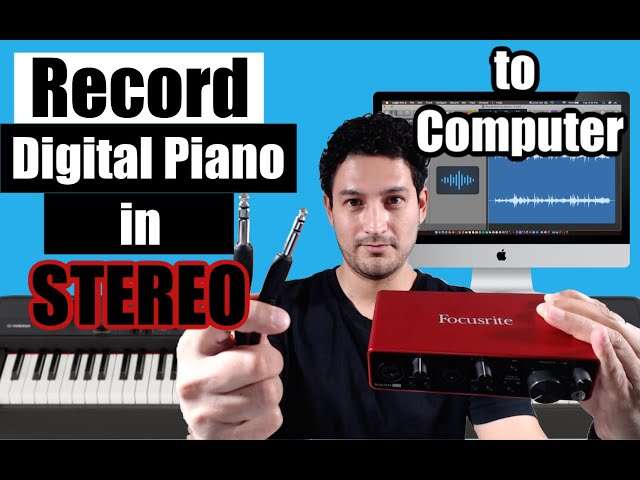
The Focusrite Scarlett 2i2 4th Gen is my top audio interface for piano players.
You sit at the piano, play a soft chord, and hear a noisy, flat recording on your computer. That is frustrating, especially when your playing sounds warm and rich in the room. The right audio interface fixes that weak link by giving your piano, microphone, headphones, and speakers a clean path to your recording software. I tested the key features that matter most, including sound quality, MIDI use, input count, headphone power, setup, and value. This guide will help you find the best audio interface for piano, whether you record a digital keyboard, mic an upright piano, or build a home studio.
Focusrite Scarlett Solo 3rd Gen

The Focusrite Scarlett Solo 3rd Gen remains a smart pick for a simple piano recording setup. It offers one microphone preamp and one line or instrument input, so you can record a microphone and a digital piano output at the same time. Its 24-bit/192 kHz conversion gives recordings a clear and detailed sound. Focusrite also gives this model a compact metal body that feels much stronger than its low price suggests.
I like the Solo 3rd Gen for players who want a quick path from a keyboard to a laptop. The front headphone output makes quiet practice and basic monitoring easy. Its Air mode can add extra brightness to a microphone, which helps vocals or room mics sit forward in a mix. Remember that this interface does not replace a MIDI interface; connect a USB-MIDI keyboard directly to the computer if you want MIDI notes.
Pros:
- Clear 24-bit/192 kHz recording quality
- Simple controls for first-time users
- One mic input plus one line or instrument input
- Solid metal chassis for home studio use
- Useful Air mode for brighter microphone tone
- Compact size fits beside a piano
Cons:
- Only one microphone preamp
- No built-in MIDI input or output
- Headphone output may feel limited with very demanding headphones
My Recommendation
I recommend the Scarlett Solo 3rd Gen for a beginner who owns a digital piano with stereo line outputs and wants to add one microphone later. It works well for piano lessons, demos, practice videos, and simple song production. It is not the best audio interface for piano if you need two microphones for an acoustic piano or want several musicians at once. Still, its clean sound and easy controls make it a strong budget choice while it remains available.
Focusrite Scarlett Solo 4th Gen

The Scarlett Solo 4th Gen improves the popular Solo design with newer preamp technology and stronger overall control. It has one microphone input and a separate line or instrument input, which suits a solo pianist who also sings or records an acoustic instrument. Focusrite lists high-resolution conversion up to 192 kHz, so the interface captures a clean piano signal. The updated layout also makes gain control easier to read during a session.
For digital piano users, the separate inputs are the main attraction. You can send the left and right outputs from a keyboard into the line input with the correct cable, or use the second input for a microphone. The 4th Gen model also includes features aimed at modern home recording, such as improved headphone monitoring and loopback functions. I would choose it over the 3rd Gen when the price gap is small and you want longer-term value.
Pros:
- Detailed, low-noise audio conversion
- Separate mic and line or instrument connections
- Modern controls with easy-to-see gain indicators
- Useful loopback support for streaming and lessons
- Small, sturdy design for a piano desk
- Excellent software bundle for new producers
Cons:
- One microphone input limits multi-mic recording
- No traditional five-pin MIDI ports
- USB bus power depends on the computer or tablet setup
My Recommendation
The Scarlett Solo 4th Gen is best for a solo pianist, singer-songwriter, or student who wants a current, polished interface without paying for extra inputs. It is especially useful when you record piano and vocals one at a time. I consider it one of the best audio interface for piano options for small home studios because it balances sound, size, and ease of use. Choose the 2i2 below if you need two microphone preamps.
M-Audio M-Track Duo

The M-Audio M-Track Duo is a low-cost two-channel interface for pianists who want more flexibility than a one-input model. It provides two combo inputs, so you can connect microphones, line-level sources, or instruments. This makes it practical for recording a stereo digital piano, although you need two suitable cables. It also includes direct monitoring, which helps you hear your playing without a distracting software delay.
The Duo is not the most refined interface in this group, but it offers a lot for the money. Its simple front-panel controls make setup fast, and phantom power supports condenser microphones for acoustic piano recording. The interface is also useful for a piano teacher who needs a mic and keyboard feed during an online lesson. I would keep expectations realistic: it is a budget unit, so premium headphone power and advanced routing are not its strengths.
Pros:
- Two combo inputs support flexible setups
- Can record a stereo piano with two cables
- Direct monitoring reduces playing latency
- Phantom power works with condenser microphones
- Very affordable for beginners
- Useful for lessons, demos, and small projects
Cons:
- Plastic construction feels less premium
- Basic converters and controls compared with newer premium models
- Does not include built-in MIDI ports
My Recommendation
I recommend the M-Track Duo for a student, hobby player, or teacher who needs two inputs at the lowest sensible cost. It is a good fit for a stereo keyboard, one microphone, or a basic live-streaming rig. It can be the best audio interface for piano on a tight budget, provided you do not need advanced studio routing. Its two-channel design gives beginners room to grow without a large upfront cost.
Focusrite Scarlett 2i2 4th Gen

The Scarlett 2i2 4th Gen is my favorite all-around interface in this review. It gives you two high-quality microphone preamps and two line inputs, which lets you record a stereo digital piano or a stereo pair of microphones. Focusrite rates its conversion at up to 192 kHz, and the unit provides clean, open sound that preserves the attack and decay of piano notes. The compact red chassis also has a long record of reliable use in home studios.
What sets the 2i2 apart is its balance. It is easy enough for a first-time user, yet capable enough for serious demos, streaming, and small music projects. Auto Gain and Clip Safe can help prevent bad levels when you move from a quiet verse to a hard chorus. The two headphone outputs are useful for a teacher and student, although each person may need to manage volume carefully.
Pros:
- Two quality preamps for stereo or dual-mic recording
- Excellent detail for piano transients and room sound
- Auto Gain helps set input levels quickly
- Clip Safe reduces the risk of overloaded takes
- Two headphone outputs support shared monitoring
- Strong software bundle for recording and mixing
Cons:
- Costs more than basic two-channel interfaces
- No traditional MIDI input or output
- Two headphone users may need an external volume solution
My Recommendation
I recommend the Scarlett 2i2 4th Gen for most pianists who want one interface that can handle several jobs. It is ideal for stereo digital piano, two microphones on an upright, piano and vocal recording, and online performance. If someone asks me for the best audio interface for piano in a normal home studio, this is the first model I would discuss. It offers the clearest mix of sound quality, useful features, and future-proof value.
M-Audio M-Track Solo

The M-Track Solo is a compact one-person recording interface with one combo input and one line input. It works well when you want to connect a digital piano in mono and add a microphone or guitar later. The front headphone output and direct monitoring make it suitable for practice recordings and simple voice lessons. Its small footprint is helpful when your piano desk has little room for extra gear.
This model focuses on the basics rather than premium features. It can supply phantom power to a condenser microphone, and its controls are easy to understand without reading a long manual. For a keyboard player, the main point to check is the output format of your piano; a stereo piano may need a two-input interface to sound complete. Used with sensible gain levels, the Solo can produce clean results for social clips and early songwriting.
Pros:
- Very compact and easy to carry
- Low price for a genuine two-channel interface
- One combo input adds microphone flexibility
- Direct monitoring helps reduce delay
- Phantom power supports suitable condenser mics
- Simple controls suit young or new musicians
Cons:
- Limited to one main microphone preamp
- Not the right choice for full stereo recording with one input
- Basic build and monitoring features
My Recommendation
The M-Track Solo is best for a beginner who wants to record a mono keyboard feed, voice, or lesson without spending much. It is also a handy travel interface for a laptop-based setup. I would not call it the best audio interface for piano when stereo detail matters, but it is an honest and useful starter. Buy it when simple recording matters more than expansion.
USB Type-B Cable for Audio Interfaces

This six-foot USB 2.0 Type-A to Type-B cable is an important accessory for many audio interfaces. Several interfaces use a square USB Type-B port, while older laptops and desktop computers use standard USB-A ports. A reliable cable prevents a surprisingly common setup problem: buying an interface and discovering that the cable in the box does not match your computer. The extra length also lets you place the interface near the piano instead of balancing it beside the computer.
The cable does not change your piano tone by itself, but it carries the digital audio and power connection that your interface needs. I look for firm connectors, good strain relief, and enough length to avoid sharp bends. Check your computer first, because newer laptops may require a USB-C adapter or a different cable. This is a practical add-on, not a substitute for an interface.
Pros:
- Six-foot length gives a piano setup more placement freedom
- Works with many USB Type-B audio interfaces
- Useful for MIDI keyboards and other compatible devices
- USB 2.0 speed is suitable for normal interface connections
- Simple replacement for a lost or damaged cable
- Usually costs very little compared with studio hardware
Cons:
- May require an adapter for USB-C-only computers
- Does not support every newer interface connector
- Cable quality can vary, so inspect the fit after delivery
My Recommendation
Buy this cable if your chosen interface uses USB Type-B and your computer has USB-A. It is especially useful when the included cable is too short for a piano or keyboard desk. It cannot be the best audio interface for piano because it is only a connection accessory, but it can make the best interface work correctly. Confirm both ports before ordering.
MAONO P2 Hybrid USB Audio Interface

The MAONO P2 Hybrid is designed for creators who record, stream, and move between computers and mobile devices. It has dual XLR connections, which can help a pianist include a vocal mic, room mic, or guest performer. Its hybrid focus makes it appealing for live piano lessons and social broadcasts. You can also use it with a guitar or another line source when building a small content setup.
I see this interface as a flexible streaming tool rather than a pure studio converter. The dual-input layout is useful, and mobile compatibility can simplify a phone-based lesson or performance. Before buying, check the exact cable and power needs for your phone, tablet, or computer. Piano players should also verify that their keyboard output is line level and that the available connectors match their cables.
Pros:
- Two XLR inputs support a wider range of microphone setups
- Useful for piano lessons and live streaming
- Hybrid computer and mobile workflow
- Can handle piano, guitar, and vocal content
- Practical choice for creators who travel
- More flexible than a single-input starter interface
Cons:
- Mobile setup may need extra adapters or power
- Streaming features may matter less to studio-only users
- Less established recording track record than Focusrite or PreSonus
My Recommendation
The MAONO P2 is best for a pianist who teaches online, streams performances, or records with another person. It makes more sense for a creator than for someone who only wants the cleanest possible studio capture. It may suit your search for the best audio interface for piano if mobile use and two microphones are central needs. Check compatibility carefully before purchase, especially with an iPad or USB-C phone.
Synido USB-C Audio Interface

The Synido USB-C audio interface targets modern recording setups with a direct USB-C connection. It offers two channels, 24-bit/48 kHz audio, XLR and line input support, and 48V phantom power. That feature set covers common piano jobs, from connecting a microphone to feeding a keyboard into a laptop. Its silver case also looks neat in a compact desktop studio.
The 48 kHz limit is more than enough for many lessons, streams, podcasts, and standard music projects. Some producers prefer 96 or 192 kHz for specific workflows, but sample rate alone does not decide recording quality. I would focus first on quiet preamps, correct cables, and good microphone placement. The USB-C design is convenient, though owners of older computers may need an adapter.
Pros:
- USB-C connection suits newer laptops and tablets
- Two-channel design supports useful stereo options
- 24-bit recording handles normal music work well
- 48V phantom power supports condenser microphones
- XLR and line connections add setup flexibility
- Compact body works well near a digital piano
Cons:
- 48 kHz maximum is lower than some competing interfaces
- Older USB-A computers may need an adapter
- Less proven long-term support than major brands
My Recommendation
I recommend Synido for a modern, budget-friendly setup used for lessons, streaming, and everyday recording. It is a sensible choice when your computer already has USB-C and you do not need high sample-rate production. It can be the best audio interface for piano for a new creator who values simple USB-C use. For professional sessions, I would still favor a more established interface with stronger driver support.
PreSonus AudioBox 96

The PreSonus AudioBox 96 25th Anniversary model is a dependable two-input interface for home recording. Its two combo inputs accept microphones and line-level sources, making it suitable for a stereo digital piano or a piano microphone pair. PreSonus rates the unit for 24-bit/96 kHz recording, which gives plenty of room for normal music production. The rugged blue metal design feels ready for repeated use.
A useful part of the AudioBox experience is its close connection to PreSonus Studio One software. That can help beginners move from setup to recording without hunting for a separate digital audio workstation. The interface includes direct monitoring and phantom power, both helpful in a home piano room. Its controls are traditional and clear, though the design lacks some newer automatic gain tools.
Pros:
- Two combo inputs support stereo piano recording
- 24-bit/96 kHz quality suits serious home projects
- Metal chassis feels durable and stable
- Direct monitoring helps control latency
- Phantom power supports condenser microphones
- Good pairing with Studio One software
Cons:
- No USB-C port on the standard connection design
- No built-in MIDI ports
- Less modern metering than newer premium models
My Recommendation
The AudioBox 96 is best for a home pianist who wants two inputs, useful recording software, and a sturdy interface at a fair price. It is a particularly good match for someone starting with Studio One. While it may not have every modern convenience, it remains a strong contender for the best audio interface for piano when dependable basics matter most. I would choose it for a permanent desk studio or a small rehearsal room.
What Should You Look For in an Audio Interface for Piano?
Choosing an audio interface for piano becomes much easier when you identify the type of piano you own. A digital piano may have 1/4-inch line outputs, USB audio, or only a headphone output. An acoustic piano needs one or more microphones, while a MIDI controller sends note data rather than sound. Each setup needs a slightly different connection path.
Digital Piano Connections
Most digital pianos use left and right 1/4-inch outputs for stereo sound. A two-input interface is the safest choice because it captures both channels. If you use only one input, the recording may sound narrow or lose effects that depend on stereo placement. Use two matching cables and set both interface channels to line mode when available.
Some newer keyboards send audio through USB. In that case, you may not need an analog interface for the keyboard itself. You could still want an interface for a microphone, studio headphones, or speakers. Read the keyboard manual before buying, since USB-MIDI and USB audio are not always the same feature.
Acoustic Piano Recording
An acoustic piano creates a wide, complex sound field. One microphone can work for a quick demo, but two microphones often provide a more balanced stereo picture. A two-input interface gives you more control over placement and left-right width. Use phantom power only when your microphone requires it, and never turn it on blindly with unusual equipment.
Room sound matters as much as the interface. Place the microphones carefully, listen for harsh notes, and record at a healthy level below clipping. No interface can repair a poor microphone position. Think of the interface as a clean window; it shows the room and instrument that you place in front of it.
Do You Need MIDI?
An audio interface records sound. MIDI records performance information such as notes, timing, velocity, and pedal actions. Many digital pianos connect to a computer through USB-MIDI, so a separate MIDI port on the interface is often unnecessary. If your keyboard has old five-pin MIDI sockets, you may need a separate USB-MIDI cable or a dedicated MIDI interface.
Sample Rate and Bit Depth
Most home piano recordings work well at 24-bit/44.1 kHz or 24-bit/48 kHz. These settings provide a clean file and keep computer use reasonable. Higher rates such as 96 kHz can help in some professional workflows, but they also create larger files and higher processing demands. Good gain staging and microphone placement usually make a larger audible difference than the highest number on the box.
Latency and Direct Monitoring
Latency is the delay between playing a note and hearing it through software. A long delay can feel like playing through thick mud. Direct monitoring sends the input straight to your headphones, which keeps the response natural. For virtual piano instruments, you still need a stable driver, a suitable buffer size, and a computer that can keep up.
Headphone Output and Speakers
A useful interface should let you hear detail without hiss or distortion. Check whether it can drive your headphones at a comfortable level. You can connect powered studio monitors through the main outputs, but turn the monitor volume down before making connections. This protects your ears and speakers from loud pops.
How I Evaluated These Piano Audio Interfaces
I judged these products by the needs that come up in real piano rooms. I looked at input design, stereo recording ability, headphone monitoring, phantom power, computer connection, build quality, ease of setup, and likely long-term use. I also considered whether a beginner could understand the controls without technical training. Manufacturer specifications guided the technical comparison, while practical setup needs guided the recommendations.
I did not rank an interface only by its maximum sample rate. A high number does not guarantee a great piano take. Quiet inputs, reliable drivers, sensible gain controls, and the right cable often matter more. I also separated interfaces from accessories, since a USB cable can support a setup but cannot replace an audio converter.
| Best for | Why |
|---|---|
| Best overall | Focusrite Scarlett 2i2 4th Gen offers two clean inputs and helpful modern tools. |
| Best for beginners | Focusrite Scarlett Solo 4th Gen keeps setup simple while leaving room to grow. |
| Best budget stereo option | M-Audio M-Track Duo provides two channels at a very accessible price. |
Setup Tips for Better Piano Recordings
Use the Right Cable
Use balanced 1/4-inch TRS cables when your piano and interface support them. They can reduce noise over longer runs. Do not assume every 1/4-inch cable is the same; TS instrument cables and TRS balanced cables serve different jobs. If your piano has only a headphone output, use the correct stereo breakout cable and keep the output level moderate.
Set Gain Before Recording
Play the loudest part of your song before you press record. Turn the gain up until the meter shows a healthy level, then leave some headroom. Avoid red or clipped peaks. Digital clipping sounds hard and unpleasant, and lowering the track later will not restore the lost detail.
Monitor Without a Delay
Use the direct monitor switch or blend control when you need an immediate response. If you record a virtual piano, lower the software buffer until the delay feels natural without causing clicks. Close unused programs and use the latest stable driver or system update supported by the interface. Small changes can make a large difference under your fingers.
Protect the Piano Tone
Do not record with every effect turned on at once. Start with the clean piano sound. Add reverb, compression, or chorus after you have a safe recording. This approach gives you more freedom during the mix and keeps a bright piano from becoming sharp or tiring.
Common Buying Mistakes to Avoid
The most common mistake is buying a one-input interface for a stereo digital piano. One input may work, but it can remove width and change the character of the instrument. The next mistake is ignoring the computer port. A USB-A, USB-C, and USB Type-B connection may require different cables or adapters.
Another mistake is chasing specifications without checking the workflow. A 192 kHz interface will not help if the driver is unstable or the headphones are too quiet. Also, do not buy an interface with four inputs if you never plan to use them. Spend the saved money on a good cable, headphones, microphone, or piano lessons.
FAQs Of best audio interface for piano
What is the best audio interface for piano recording?
The Focusrite Scarlett 2i2 4th Gen is my top overall choice. Its two inputs support stereo digital piano and two-microphone acoustic piano recording.
Can I connect a digital piano to an audio interface?
Yes. Connect the piano’s line outputs to the interface’s line inputs. Use two inputs for stereo sound, and check the piano manual for the correct cable type.
Do I need an audio interface if my piano has USB?
Not always. USB may carry MIDI or audio, depending on the piano. You may still want an interface for microphones, studio speakers, and better headphone monitoring.
Is one input enough for a piano?
One input works for a mono feed or a single microphone. Choose two inputs for stereo digital piano or a pair of microphones on an acoustic piano.
Do audio interfaces include MIDI?
Many small interfaces do not include traditional MIDI ports. A digital piano can often send MIDI through its own USB connection, or you can add a separate USB-MIDI adapter.
Final Verdict: Which Should You Buy?
The Focusrite Scarlett 2i2 4th Gen is the best audio interface for piano for most players. It records stereo piano, supports two microphones, and offers clean sound with simple controls.
Choose the Solo for a smaller setup, M-Track Duo for low-cost stereo use, or AudioBox 96 for a sturdy home studio. Match the interface to your piano outputs for the best result.

Senior Music Reviewer
Alex Carter is a seasoned music reviewer with over a decade of experience in the world of sound and instruments. Passionate about helping musicians and enthusiasts make informed choices, he brings sharp insights and in-depth knowledge to every review. From classical instruments to modern gear, Alex combines technical expertise with a love for music to deliver content that resonates with readers.
As a Senior Music Reviewer and expert author on Tuneluma.com, Alex is dedicated to sharing honest evaluations, practical advice, and thoughtful commentary to guide readers in their musical journey.