Best Pads For Finger Drumming: Top Picks For Every Beat
The best pads for finger drumming combine responsive triggers, clear layouts, low noise, and easy control.
You sit down to make a beat, but your laptop keys feel stiff and a desk surface gives no real feedback. A good finger drum pad fixes that gap. It gives your hands clear targets, quick response, and a more natural way to build rhythm. I compared portable electronic pads, MIDI controllers, practice pads, and useful learning tools in this guide. Some choices make drum sounds on their own, while others control music software. That difference matters when you want to pick the best pads for finger drumming for your space, skill level, and budget.
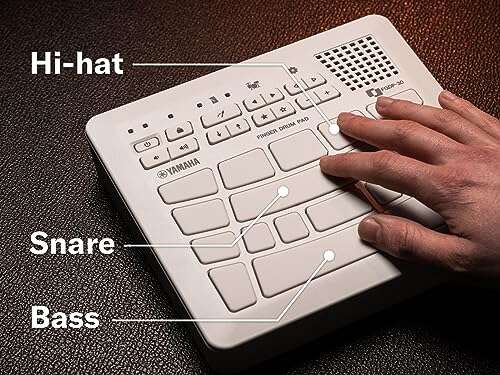
Yamaha FGDP-30 Finger Drum Pad

The Yamaha FGDP-30 is a compact electronic finger drum pad made for players who want built-in sounds without a full drum kit. Its small layout fits on a desk, table, or lap. That makes it useful for quick practice, travel, and late-night beat work. The pad design also keeps the focus on finger control rather than stick technique.
I see this model as a strong choice for beginners who want a simple path into finger drumming. It can also suit experienced producers who need a small sound source beside a computer. The USB connection adds a useful link to a modern music setup. While its compact size limits the number of physical controls, it keeps the unit easy to carry and quick to learn.
Pros:
- Compact body fits small desks and travel bags
- Built-in sounds allow practice without extra gear
- USB connection supports computer-based music work
- Simple layout feels less intimidating for new players
- Useful for quiet beat sketches and rhythm drills
Cons:
- Smaller layout may feel tight for large hands
- Built-in controls offer less depth than a larger controller
- Players who need many pads may outgrow it
My Recommendation
I recommend the FGDP-30 for new finger drummers, mobile beat makers, and anyone who wants a focused pad with its own sounds. It is one of the best pads for finger drumming when space, ease of use, and portability matter most. It does not try to replace a large studio controller. Instead, it works like a small sketchbook for rhythm, ready whenever an idea arrives.
| Best for | Why |
|---|---|
| Beginners | Simple size and built-in sounds shorten the learning curve. |
| Small workspaces | The compact shape leaves room for a laptop and other gear. |
| Portable practice | It is easy to move from a desk to another room or location. |
Finger Drum Genesis Practice Guide

The Finger Drum Genesis is not a hardware pad. It is a learning resource for people who want to build real finger drumming skill. Its focus includes beats, rudiments, music chops, and practice material. That makes it a useful partner for a MIDI pad or electronic drum pad.
Many new players buy a controller and then repeat the same simple beat for weeks. A guided book can give those sessions a clear path. I like this option for players who need drills and ideas instead of more buttons. It will not create sound on its own, so you still need a pad, app, or computer for hands-on practice.
Pros:
- Supports structured practice instead of random tapping
- Covers core rhythm skills and finger control
- Useful with many brands of MIDI pad controllers
- Can help players move beyond basic four-beat loops
- Works without batteries, cables, or software updates
Cons:
- It is a book, not an electronic drum pad
- Sound and pad feedback require separate equipment
- Some readers may prefer video-based lessons
My Recommendation
I recommend Finger Drum Genesis for self-taught players who need a plan. It is not one of the best pads for finger drumming by itself, but it can make any pad more useful. New drummers can use it to build timing, while experienced players can use the drills to refresh weak areas. Its value comes from turning practice into a habit rather than a short burst of tapping.
| Best for | Why |
|---|---|
| Self-taught players | The book gives practice ideas without requiring a live teacher. |
| Skill building | Rudiments and beat work help improve control and timing. |
| Pad owners | It adds lessons to hardware that may otherwise sit unused. |
12-Inch Double-Sided Drum Practice Pad

This 12-inch practice pad is built for traditional drum practice with sticks. Its double-sided design gives players two surfaces to explore. The included maple 5A sticks and storage bag make the set more complete than a bare pad. It is a practical tool for rudiments, warmups, and quiet hand work.
Finger drummers may use this pad in a different way. It does not send MIDI notes or trigger samples, but it can build wrist strength, timing, and basic rhythm control. The larger surface also gives beginners room to develop steady strokes. I would treat it as a training pad that supports electronic finger work, not as a direct replacement for the best pads for finger drumming.
Pros:
- 12-inch surface gives comfortable practice space
- Double-sided design offers more than one response
- Includes two pairs of maple 5A drumsticks
- Storage bag makes transport and storage easier
- Useful for quiet rudiment and timing practice
Cons:
- Does not create sound or send MIDI data
- Designed for sticks rather than direct finger triggering
- The larger size takes more desk or bag space
My Recommendation
This set is best for a drummer who wants to develop basic hand control before moving to electronic finger pads. It can also suit parents, students, and apartment players who need a quieter alternative to an acoustic kit. If your main goal is beat production, choose an electronic pad first. If your goal is clean strokes and steady rhythm, this affordable kit offers strong practical value.
| Best for | Why |
|---|---|
| Drum fundamentals | The two surfaces support rudiments and controlled strokes. |
| Quiet practice | The pad reduces the sound of normal drum exercises. |
| New drummers | Sticks and a storage bag come in the same package. |
Silicone Fingertip Protectors for String Players
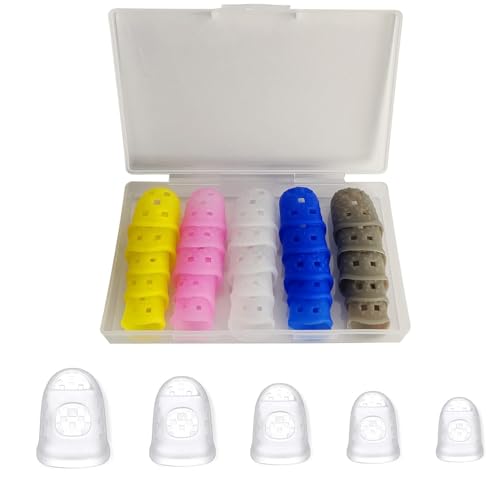
These silicone fingertip protectors are made for guitar, ukulele, banjo, and other string instruments. They are not drum pads, but they may help people who use their fingers for long practice sessions. The flexible covers are designed to add a layer between the fingertips and the strings. A storage case also helps keep the small pieces together.
For finger drumming, comfort can matter when you practice for long periods. Still, a cover can change touch, grip, and accuracy on a sensitive pad. I would use these only when sore fingers are the main problem, and I would first check that they do not block natural contact. They are a support item, not a core part of the best pads for finger drumming.
Pros:
- Can protect sore fingertips during extended practice
- Flexible silicone design allows finger movement
- Non-slip texture may improve grip for some users
- Multiple pieces support different finger sizes
- Reusable design creates less waste than disposable covers
Cons:
- Not made for electronic drum pads
- May reduce natural pad feel and touch accuracy
- Fit can vary from one finger to another
My Recommendation
I recommend these covers only as an optional comfort tool. They may help a player return to practice after mild fingertip soreness, but they cannot improve pad response or MIDI control. Most users should learn with bare fingers and focus on relaxed technique. Consider them if comfort stops you from practicing, and remove them if they make your taps feel slow or uneven.
| Best for | Why |
|---|---|
| Finger comfort | The silicone layer may reduce direct contact with sore skin. |
| String players | The product is designed mainly for guitar and similar instruments. |
| Long sessions | Reusable covers offer an extra option for extended practice. |
Akai Professional MPC Sample Portable Sampler

The Akai Professional MPC family has a long history in beat making and sample-based production. This portable sampler is aimed at users who want to tap, trigger, arrange, and shape sounds in a compact setup. It is more than a basic pad because it connects finger performance with sampling and beat creation. That wider role makes it appealing to producers who want one central music tool.
An MPC-style workflow rewards hands-on players. You can build a beat from short sounds, test patterns, and refine the groove without relying only on a computer keyboard. The learning curve may be higher than it is on a simple drum pad, especially for someone new to sampling. For serious beat makers, though, it can be among the best pads for finger drumming because it supports both performance and production.
Pros:
- Strong fit for sample-based beat production
- Portable design supports work away from a full studio
- Hands-on workflow encourages fast creative choices
- Useful for triggering drums, samples, and patterns
- Can grow with a producer’s skills and projects
Cons:
- May take time to learn compared with a basic pad
- Advanced features can feel excessive for simple practice
- Users should confirm the exact model and included features
My Recommendation
I recommend this Akai option for producers who want finger drumming tied to sampling and beat arrangement. It is a better fit for a creator who plans to make full tracks than for someone who only wants short rhythm drills. Take time to learn the workflow, because the extra features reward patience. If creative control matters more than the lowest price, this is a serious candidate among the best pads for finger drumming.
| Best for | Why |
|---|---|
| Beat producers | The sampler approach connects pad work with full beat creation. |
| Sample work | It gives hands-on control over sampled sounds and patterns. |
| Mobile studios | The portable format supports music work outside a fixed setup. |
Yamaha FGDP-50 Portable Finger Drum Pad

The Yamaha FGDP-50 is a portable electronic finger drum pad with built-in sounds, a speaker, USB MIDI, and battery power. Those features make it a flexible option for practice, performance, and quick music sketches. Unlike a controller that needs a computer, this type of pad can work as a self-contained beat tool. The built-in speaker also helps when you want to play without headphones or extra monitors.
I would place the FGDP-50 near the top for players who value freedom from cables and desks. Its battery-powered design suits travel, outdoor sessions, and casual practice in different rooms. USB MIDI adds a bridge to music software when you need deeper production tools. It costs more than a basic practice pad, but the extra freedom can justify that cost for active musicians.
Pros:
- Built-in speaker supports immediate sound without extra gear
- Battery power improves portability and setup speed
- USB MIDI connects the pad to modern music software
- Built-in sounds make it useful away from a computer
- Good balance of practice, performance, and production use
Cons:
- More expensive than a simple practice pad or basic controller
- Battery use adds another item to manage
- Portable speakers may not suit detailed studio monitoring
My Recommendation
The FGDP-50 is my strongest all-around pick for the best pads for finger drumming. I recommend it to beginners who want room to grow, performers who need a portable tool, and producers who want both built-in sound and USB MIDI. It feels like a small rhythm station rather than a single-purpose trigger surface. If you can afford the step up from the FGDP-30, its speaker and battery design add real daily value.
| Best for | Why |
|---|---|
| On-the-go players | Battery power and a speaker reduce the need for extra equipment. |
| Flexible setups | Built-in sounds and USB MIDI cover standalone and software use. |
| Growing musicians | It supports simple practice now and deeper production later. |
Umelody JP-1 Wireless MIDI Pad Controller

The Umelody JP-1 is a 16-pad MIDI controller with RGB beat pads and wireless connection support. Its layout gives finger drummers more physical targets than a tiny two- or four-pad device. Colored lights can help users see pad groups, samples, and performance zones. The controller is aimed at music production, sampling, looping, and beat making with a laptop, tablet, or phone.
This is a good choice for someone who wants a visual and modern controller at a potentially lower cost than a major production workstation. Wireless use can make a setup feel clean, but compatibility depends on the host device, app, and connection method. I always suggest checking software support before buying any wireless MIDI gear. When the connection fits your system, the JP-1 can be one of the best pads for finger drumming beginners.
Pros:
- Sixteen pads provide room for drums and samples
- RGB lighting makes pad zones easier to see
- Wireless connection can reduce cable clutter
- Works toward laptop, tablet, and phone-based setups
- Useful for looping, sampling, and live beat control
Cons:
- Wireless features may depend on device and app support
- It needs a host device for sounds and instruments
- Beginners may need time to map the pads
My Recommendation
I recommend the JP-1 for new producers who want sixteen pads, color feedback, and a flexible connection style. It is especially useful for people making beats on a tablet, phone, or laptop. Choose it over a self-contained Yamaha if you already plan to use music software. For the best pads for finger drumming on a software budget, this controller deserves close attention, but check compatibility first.
| Best for | Why |
|---|---|
| Software producers | MIDI control lets the host app supply instruments and sounds. |
| Visual learners | RGB pads make active zones easy to spot. |
| Clean desks | Wireless use may reduce the number of cables in a setup. |
GrowDaily 12-Inch Drum Practice Pad

The GrowDaily practice pad set uses a 12-inch surface and includes maple 5A sticks plus a storage bag. It is built for silent or reduced-volume drum practice, not electronic triggering. The blue finish gives it a clear, casual look for a home practice area. A complete bundle can be helpful for a student who does not own sticks yet.
Although it is not a MIDI pad, this set can support the physical skills behind finger drumming. Good timing starts with relaxed hands, even strokes, and control at slow speeds. I like a traditional pad as a low-tech way to warm up before using an electronic controller. It also offers a simple solution for players who want to practice rhythm without disturbing the whole home.
Pros:
- Large 12-inch surface feels familiar to drum students
- Includes four maple 5A sticks
- Storage bag helps keep the kit ready to move
- Supports quiet practice in a home setting
- Useful for warmups, rudiments, and timing drills
Cons:
- Cannot trigger software drums or samples
- Stick practice does not copy finger-pad response
- Its size may be less convenient for travel
My Recommendation
This GrowDaily set suits traditional drummers, students, and parents who want a complete practice bundle. It is not the right choice if you need MIDI, built-in sounds, or finger-sensitive electronic control. Still, it can build the steady pulse that every finger drummer needs. Buy it as a companion practice tool, not as your main pick among the best pads for finger drumming.
| Best for | Why |
|---|---|
| Home practice | The pad offers a quieter way to work on basic drum skills. |
| Students | Sticks and a bag make the starter set more complete. |
| Warmups | A simple surface makes it easy to repeat short daily drills. |
8-Piece Double-Sided Drum Pad Set

This eight-piece set is aimed at realistic drum practice and includes 12-inch and 8-inch double-sided pads. It also includes two pairs of 5A sticks. The different pad sizes can create a more varied practice layout than one single surface. That makes the kit useful for people who want to rehearse movement between drum positions.
For finger drumming, the set has a limited but interesting role. You can use the smaller pad to imitate a compact trigger zone and the larger pad for broader hand work. However, the surfaces do not offer electronic sounds, velocity data, or software control. I would choose this set for physical rhythm training and choose a MIDI controller for production tasks.
Pros:
- Includes both 12-inch and 8-inch practice surfaces
- Double-sided pads offer varied practice responses
- Two pairs of 5A sticks support shared practice
- Multiple pieces allow a basic multi-pad layout
- Useful for realistic movement and drum coordination
Cons:
- It does not produce electronic drum sounds
- The full set needs more storage space
- It is not a direct MIDI finger drum controller
My Recommendation
I recommend this set for families, beginners, and stick drummers who want several surfaces at a low entry cost. It may help a finger drummer build coordination before buying electronic gear. Do not expect it to replace the best pads for finger drumming in a recording setup. Its strongest value is simple, quiet, hands-on practice with more layout options than a single pad.
| Best for | Why |
|---|---|
| Coordination drills | Different pad sizes encourage movement and hand control. |
| Shared practice | Extra sticks allow two people to practice together. |
| Starter kits | Several pieces create a basic practice setup at once. |
Finger Drumming Routine Planner

The Finger Drumming Routine Planner is a paper tool for organizing practice. It includes blank tablature grids, pad layout areas, and space for notes. That format can help you record where each sound sits on a controller. It can also help you track speed, patterns, weak fingers, and session goals.
A planner may seem basic beside a bright electronic controller, but it solves a real problem. Without a record, practice can become a loop of the same comfortable beat. Writing down a routine makes progress easier to see and keeps each session focused. I would pair it with any of the best pads for finger drumming, especially when you are learning custom layouts or building a live set.
Pros:
- Helps organize short and repeatable practice sessions
- Blank grids support custom pad layouts
- Space for notes makes progress easier to track
- Useful for planning beats and live performance maps
- Works with controllers from many brands
Cons:
- It does not include lessons, sounds, or a physical pad
- Paper planning may not suit every digital workflow
- Players must create their own routine and goals
My Recommendation
I recommend this planner for disciplined learners, teachers, and producers who want better practice habits. It is a low-cost add-on that can make expensive hardware more productive. Use it to map pads, write sticking ideas, and note tempos from one session to the next. It is not a replacement for hardware, but it can help you get more value from the best pads for finger drumming.
| Best for | Why |
|---|---|
| Practice planning | Blank pages make daily goals clear and easy to repeat. |
| Custom layouts | Grids help you record where sounds sit on each pad. |
| Teachers | Written plans can make lessons and homework easier to follow. |
How to Choose the Best Pads for Finger Drumming
Choosing the best pads for finger drumming starts with one question: do you need sound inside the pad, or do you want to control software? A self-contained electronic pad can play built-in sounds with little setup. A MIDI controller usually needs a phone, tablet, or computer, but it may offer more sounds and deeper control. Neither choice wins for every player.
I also look at the pad layout. A small controller feels fast and simple, while a 16-pad layout gives more room for drum kits, samples, and loops. New players often benefit from fewer controls because they can focus on timing. Experienced producers may prefer more pads because they can assign kick, snare, hats, samples, and effects at once.
Pad Feel and Finger Response
Pad feel changes how easy it is to play softly, loudly, and quickly. A good surface should register light taps without forcing you to hit hard. It should also give enough space for clean rolls and alternating fingers. If the pads feel too close, your fingers may collide as your patterns become faster.
Do not confuse a silent drum practice pad with an electronic finger pad. A practice pad helps with hand motion and rhythm, but it cannot send a note to music software. That makes it useful for fundamentals but unsuitable for direct beat production. The best pads for finger drumming need electronic sensors when you want sounds, samples, or MIDI data.
Built-In Sounds Versus MIDI Control
Built-in sounds are valuable when you want instant play. You can sit down, turn on the unit, and start working. This is ideal for a beginner, a traveler, or a player who does not want to open a music app for every idea.
MIDI control gives you more choice. The controller can play drum instruments, samplers, synths, and effects inside compatible software. The tradeoff is extra setup, and wireless models may need careful device checks. Before buying, confirm that the pad works with your operating system and preferred app.
Portability and Power
Portability is more than a small case. A portable pad should be easy to connect, comfortable to hold, and quick to use. Battery power and a built-in speaker can make a major difference when you practice away from your main desk. If you always play in a studio, those features may matter less than pad count and software control.
I would also check how you plan to monitor sound. A built-in speaker works well for quick ideas, but headphones or studio monitors give more detail. Keep volume low when practicing for long periods. Your ears and fingers both need a break.
Noise and Home Practice
Finger drumming is often quieter than acoustic drumming, but every tap still creates some sound. Hard hits can travel through a desk or table. A thin mat under the controller can reduce movement and some vibration. You should also keep your posture relaxed so you do not turn a light practice session into a loud one.
Traditional practice pads reduce the sound of sticks, but they do not remove it. They are useful for rudiments in an apartment, dorm, or shared home. Electronic pads with headphones provide a different type of quiet. Think about the noise that bothers your household: airborne tapping, desk vibration, or speaker sound.
Finger Technique That Helps
Start with your hands close to the pad. Do not lift each finger high after every hit. Small movements are faster, quieter, and less tiring. Practice a simple kick and snare pattern first, then add hi-hat taps when the pulse feels steady.
Use a metronome at a slow speed. Play clean notes before you chase speed. I like to record short takes because a groove can feel steady while still rushing or dragging. A daily ten-minute routine often builds more skill than one long session every few weeks.
Durability and Setup Quality
A pad controller should sit still while you play. Check for a stable base, useful weight, and controls that do not move when you tap near them. If the device slides, your hands must chase it, and your timing suffers. A small non-slip mat can solve part of that problem.
For portable gear, protect the knobs, cables, and pad surface in a case or padded bag. Keep drinks away from electronics. Store practice books and planners beside the gear so the next session starts quickly. Simple habits protect your investment and make practice more likely.
Common Mistakes New Finger Drummers Make
The first mistake is buying by pad count alone. More pads can look exciting, but they do not fix weak timing. A smaller unit with clear response may teach you more during the first month. Choose the layout that matches the music you want to play.
The second mistake is ignoring the host device. A MIDI controller may need software, a cable, a compatible phone, or a computer. Read the connection details before you buy. This small check can prevent the frustration of opening a box and finding that your preferred app does not recognize the controller.
The third mistake is playing too hard. Finger drumming does not require force when the sensors respond well. Hard taps can tire your hands and make fast patterns less clean. Relax your wrists, keep your fingers low, and let the pad do its job.
The fourth mistake is skipping rest. Repeated tapping can stress fingers and wrists, even when the pad is quiet. Stop if you feel sharp pain, numbness, or lasting discomfort. Short breaks help your body and often improve your timing when you return.
What I Would Buy for Different Players
For the easiest standalone setup, I would choose the Yamaha FGDP-50. Its built-in sounds, speaker, battery power, and USB MIDI cover many daily needs. It gives a beginner an immediate result while leaving room for software work later.
For a smaller budget and a more focused setup, the Yamaha FGDP-30 makes sense. It keeps the idea simple and portable. It is a good fit for someone who wants to learn the feel of finger drumming without buying a large production system.
For computer-based music, I would look closely at the Umelody JP-1. Sixteen RGB pads can offer a clear layout for drums and samples. Just confirm wireless and app support before ordering.
For a full sample workflow, the Akai portable sampler is the most production-minded choice in this group. It may take longer to learn, but it can grow with a serious beat maker. The Finger Drum Genesis and Routine Planner also make strong companions because skill and consistency matter as much as hardware.
The traditional practice pads serve a different need. They are best for stick work, timing, and quiet drills. They can support finger drumming, but they are not electronic controllers. Knowing that difference will help you spend money on the right tool rather than the most impressive-looking one.
FAQs Of best pads for finger drumming
What are the best pads for finger drumming beginners?
The Yamaha FGDP-30 is a strong beginner choice because it is compact and includes built-in sounds. The Umelody JP-1 is better if you plan to use a laptop, tablet, or phone. Pick the Yamaha for simple standalone play and the Umelody for software control.
Can I use a regular drum practice pad for finger drumming?
You can use one for timing, hand control, and rhythm drills. However, a regular practice pad does not trigger samples or send MIDI notes. Choose an electronic pad when you want to make beats inside music software.
Are built-in sounds important in a finger drum pad?
Built-in sounds help when you want to practice without a computer or phone. They make setup fast and work well for travel. MIDI control may be more important if you already produce music in an app or digital audio workstation.
How many pads do I need for finger drumming?
Four to eight pads can work for basic beats and learning. Sixteen pads offer more room for drum kits, samples, loops, and effects. More pads help only when the layout remains clear and your device responds well.