How Do You Tune A Guitar With A Tuner: Easy Guide
Use a chromatic tuner to match each guitar string to its correct note, then adjust the tuning peg slowly.
Learning how do you tune a guitar with a tuner is one of the first skills every guitarist should master. A properly tuned guitar makes chords sound clean, helps you play along with songs, and builds a reliable musical ear. Whether you use a clip-on tuner, a pedal tuner, or a phone app, the basic process is simple once you know what to watch and hear.
Why guitar tuning matters
Guitar strings must vibrate at the correct pitch to produce the notes used in standard tuning. The six open strings are usually tuned to E, A, D, G, B, and E, from the thickest string to the thinnest.
Even a small tuning error can make a chord sound harsh. This becomes more noticeable when you play with another guitarist, a piano, or a recorded song. A tuner removes much of the guesswork by showing whether each string is sharp, flat, or in tune.
A guitar may go out of tune for several reasons:
• New strings stretch as they settle.
• Temperature and humidity can change string tension.
• Frequent bending can pull strings out of tune.
• Loose tuning pegs may allow the pitch to drift.
• Poor string installation can cause slipping at the bridge or nut.
I have seen beginners blame their fingers when the real problem was an out-of-tune guitar. Tuning first often makes practice feel much easier and more rewarding.
What you need before tuning
You only need a guitar and a reliable guitar tuner. Most beginners find a clip-on chromatic tuner easiest because it detects the vibration of the guitar directly.
Common tuner types include:
Clip-on tuner
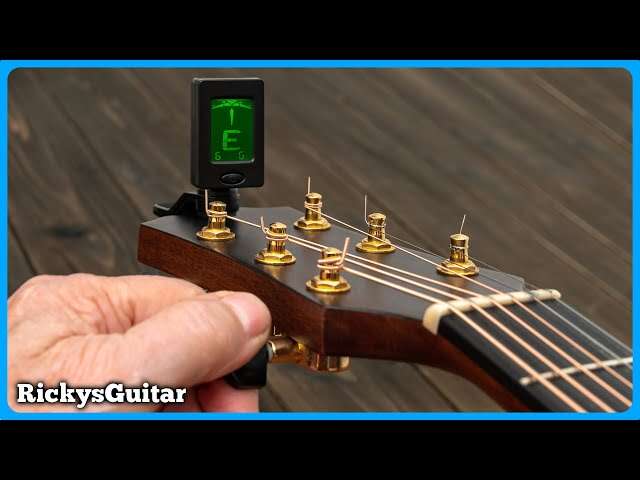
A clip-on tuner attaches to the headstock. It senses vibrations through the guitar wood, so it works well in noisy rooms. This is often the best choice for beginners and acoustic guitar players.
Pedal tuner
A pedal tuner connects between an electric guitar and an amplifier. It mutes the signal while you tune, which is useful during rehearsals and live shows.
Phone tuner app
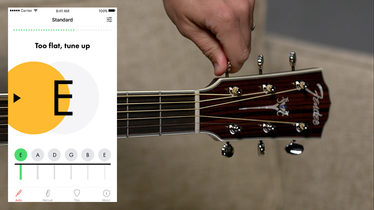
A smartphone app uses the phone’s microphone to hear the note. It can work well in a quiet room, but background noise may confuse it. Place the phone close to the guitar and avoid tuning beside a speaker or fan.
Built-in tuner
Many acoustic-electric guitars and digital amps include a built-in tuner. These are convenient, but always check that the tuner is set to chromatic mode or guitar mode.
Before you begin, set the tuner to standard pitch if it offers a reference setting. Most tuners use A4 = 440 Hz, which is the common reference for modern music. Also, turn down your amplifier if you use an electric guitar.

How do you tune a guitar with a tuner step by step
The following method works for most six-string guitars in standard tuning.
1. Turn on the tuner
Place the clip-on tuner on the guitar headstock, or open your tuner app. Make sure the display is easy to see.
If the tuner has a mode setting, choose chromatic mode. A chromatic tuner can recognize every note, not only the six standard guitar notes.
2. Start with the low E string
The thickest string is the low E string. Play it with a pick or your finger, using a gentle stroke.
The tuner should display a note near E. If it shows D, F, or another note, turn the tuning peg slowly until the display moves toward E. Do not turn the peg quickly or force it.
3. Read the tuner display
Most tuners use a needle, colored light, or arrows.
• The note is flat when the display is below the target pitch.
• The note is sharp when the display is above the target pitch.
• The string is in tune when the indicator reaches the center or shows a green light.
Flat means the string pitch is too low. Sharp means the pitch is too high. Turn the tuning peg in small movements and check the string after each movement.
4. Tune the remaining strings
Tune the strings in this order:
-
Low E, the sixth string
-
A, the fifth string
-
D, the fourth string
-
G, the third string
-
B, the second string
-
High E, the first string
The target notes are E A D G B E. The two E strings have the same letter name, but the high E is one octave above the low E.
5. Pluck one string at a time
Let each note ring clearly. Do not strum all six strings while tuning one string because the tuner may detect the wrong note.
If the display jumps around, mute the other strings with your picking hand. A clean, single note gives the tuner the best signal.
6. Tune slightly below the note, then raise it
When possible, tune up to the target pitch rather than tuning down to it. If you go too sharp, loosen the string below the target and then raise it again.
This can help the tuning peg hold tension more reliably. It also reduces the chance of a string slipping flat soon after you tune.
7. Check all six strings again
Tuning one string can slightly change the neck tension. This effect is more common with new strings or guitars with light string gauges.
After the first pass, repeat the process. Most guitars need two or three passes before all six strings stay centered.
This step-by-step answer explains how do you tune a guitar with a tuner without relying on guesswork. The tuner gives you the pitch target, while your hands make small and controlled adjustments.
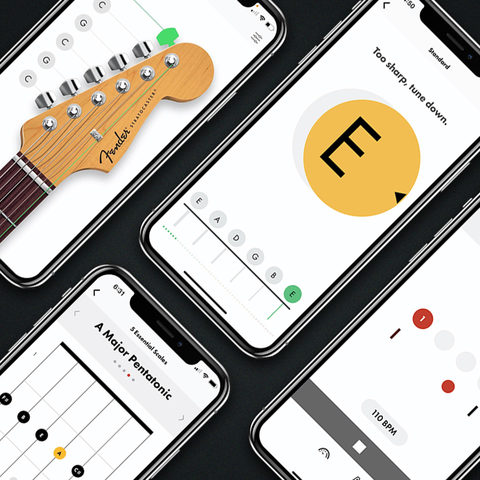
How to turn the tuning pegs correctly
Tuning pegs change pitch by increasing or reducing string tension. Tightening the string raises the pitch. Loosening the string lowers it.
The exact direction depends on the guitar’s headstock design. Rather than memorizing clockwise or counterclockwise rules, watch the tuner while you turn the peg a small amount.
Use these habits:
• Turn the peg slowly.
• Use movements of about one-eighth to one-quarter of a turn.
• Pluck the string again after each adjustment.
• Keep your eyes on both the note name and the pitch indicator.
• Stop if the string feels unusually tight.
A common beginner mistake is turning the peg while the string is not ringing. The tuner cannot show a useful reading without a clear vibration.
Another mistake is tuning to the wrong octave. For example, the thickest string should be low E, not the higher E found on the first string. If the tuner shows the correct letter but the pitch sounds unusually high or low, check the octave indicator if your tuner has one.

How do you tune a guitar with a tuner when the note is wrong
Sometimes the tuner displays a note that is far from the target. This usually means the string is very out of tune, or the tuner has detected a different octave.
For example, when tuning the A string, the tuner may show G or G-sharp. Slowly tighten the string until the display moves to A. If it shows B, the string is too high, so loosen it carefully.
If the tuner shows the wrong note while the string sounds close, try these fixes: