What Device Do I Get To Plug Guitar Into Computer: Best Gear
You need a USB audio interface to plug an electric guitar into your computer safely and clearly.
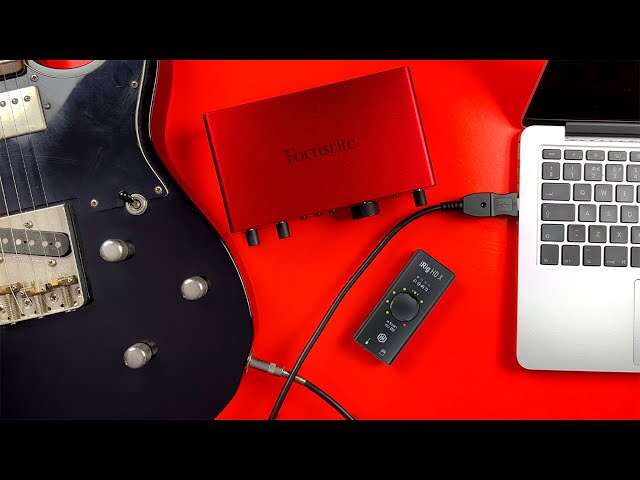
If you are asking, “what device do I get to plug guitar into computer,” the best answer for most players is a USB audio interface with a Hi-Z instrument input. It converts your guitar’s analog signal into digital audio, sends it to recording software, and lets you use amp simulation, effects, and headphones. This guide explains which device to buy, how to connect it, and which common mistakes to avoid.
The best device for plugging guitar into a computer
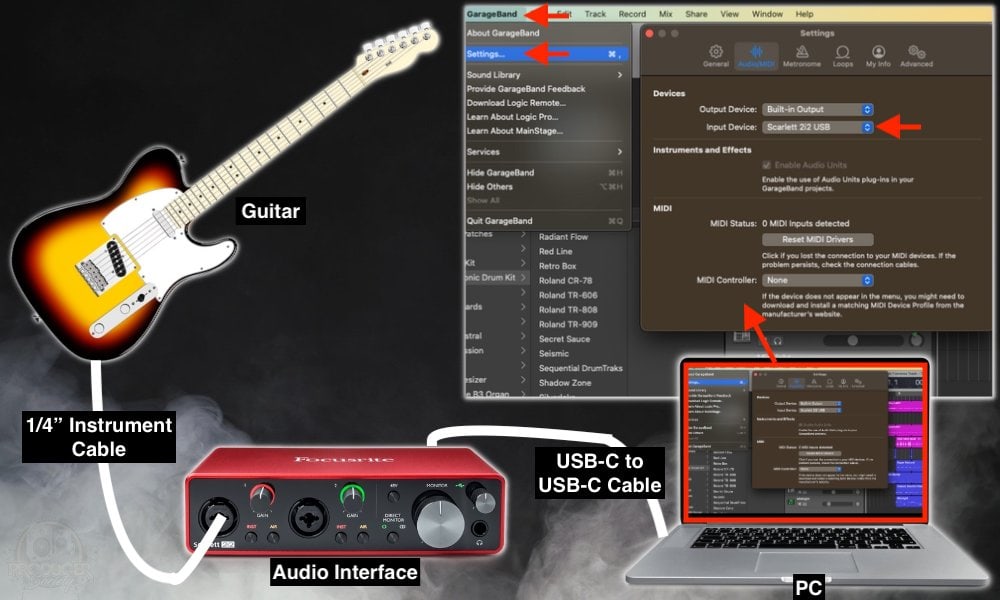
A USB audio interface is the standard device for connecting an electric guitar to a computer. It sits between your guitar and your recording software, such as GarageBand, Logic Pro, Ableton Live, FL Studio, or Reaper.
An audio interface usually includes:
• A ¼-inch instrument input for your guitar cable
• A Hi-Z input designed for passive guitar pickups
• A USB connection to your computer
• Headphone and speaker outputs
• A gain control for setting the input level
• A direct monitoring feature for low-latency playing
The term “Hi-Z” means high impedance. Guitar pickups need this type of input to keep their natural tone and brightness. A regular microphone input can make a guitar sound weak, dull, or noisy.
For most home players, a two-input interface is more than enough. You can plug in one guitar and still have another input for a microphone, bass, keyboard, or second guitar.

Why you should not plug a guitar directly into a computer
Most computers do not have the correct input for an electric guitar. A laptop headphone jack is made for headphones, while a microphone jack is designed for a much weaker microphone signal.
An electric guitar creates an instrument-level signal. A computer expects a different type of signal. The audio interface solves this mismatch by providing the right input circuit, gain, conversion, and monitoring tools.
Plugging a guitar into the wrong port can cause several problems:
• Very low volume
• Thin or harsh tone
• Electrical noise
• Clipping and distortion
• Delay between playing and hearing the sound
• Possible stress on the computer’s audio input
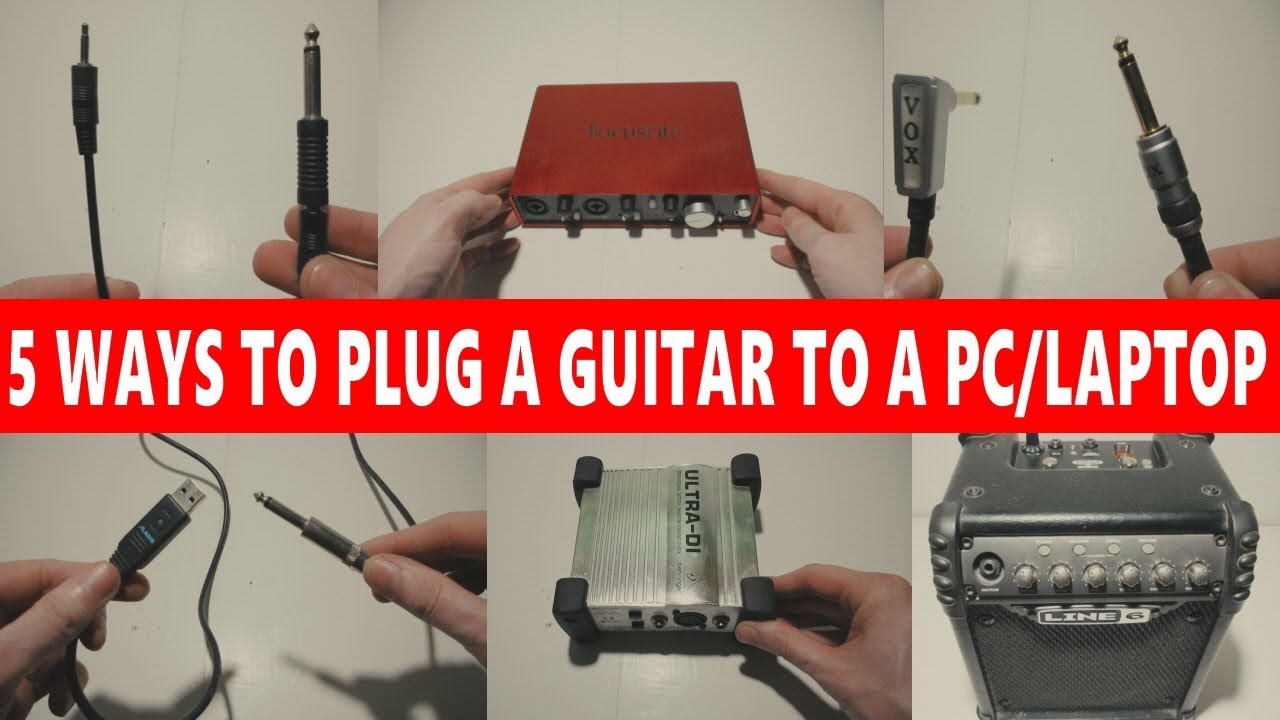
A common mistake is using a simple ¼-inch-to-3.5 mm adapter. That adapter only changes the plug size. It does not provide the proper preamp or instrument input.
If someone asks me what device do I get to plug guitar into computer, I always tell them not to begin with a passive adapter. A proper interface is safer, sounds better, and gives you room to grow.
What to look for in a USB audio interface
Choosing an interface does not need to be difficult. Focus on the features that affect guitar tone, recording quality, and ease of use.
Hi-Z or instrument input
Look for a front-panel input labeled “Instrument,” “Guitar,” or “Hi-Z.” Some interfaces switch between line and instrument mode with a button. Turn on instrument mode when connecting a passive electric guitar.
This input preserves the interaction between your guitar pickups and the amplifier software. Without it, amp modeling may sound flat or lifeless.
Low-latency monitoring
Latency is the short delay between playing a note and hearing it through your computer. A good interface uses efficient drivers and a direct monitoring circuit to reduce this delay.
Direct monitoring lets you hear the guitar signal before it travels through the recording software. This is useful when practicing or recording clean guitar. However, you may not hear software effects through direct monitoring unless the interface supports suitable routing.
USB connection
Most modern interfaces use USB-C or USB-A. USB-C describes the connector shape, but it does not always mean the interface is faster or better. Check whether the package includes the correct cable for your computer.
Some interfaces are bus-powered. This means they draw power from the USB port. Others use an external power supply, which can be useful with tablets or devices that provide limited power.
Headphone output
A headphone output is important for quiet practice. It also helps you hear amp simulations without microphone feedback or speaker noise.
Check the headphone volume control. Some small interfaces have enough power for common studio headphones, while high-impedance headphones may require more output power.
Input level control and meters
A gain knob controls how strongly the guitar signal enters the computer. A signal meter helps you set a healthy level without clipping.
When you play your loudest part, leave some headroom. Digital clipping sounds harsh and cannot be fully repaired later.

Which type of device should you buy?
The right choice depends on your guitar, budget, and goals. Here are the main options.
Best overall: a USB audio interface
A compact USB audio interface is the best choice for recording, practice, video calls, and music production. It offers better sound and more control than a basic guitar cable.
Choose this option if you want to:
• Record guitar tracks
• Use amp simulators and effects
• Play along with backing tracks
• Connect studio monitors
• Add a microphone later
• Learn home recording
A reliable entry-level interface can serve you for years. You do not need an expensive model to get a clean guitar recording.
Simple option: a USB guitar cable
A USB guitar cable has a ¼-inch plug on one end and a USB plug on the other. It contains a small audio converter inside the cable.
This can work for casual practice and basic recording. It is simple, but it usually offers fewer controls, lower flexibility, and less reliable monitoring than a full interface.
A USB guitar cable may be suitable if you only need one guitar input and want the lowest-cost setup. Still, a compact interface is often the better long-term purchase.
Portable option: a guitar effects processor
Many modern multi-effects pedals and amp modelers connect to a computer by USB. They can act as an audio interface while also providing built-in amp sounds, effects, and foot control.
This is useful for guitarists who want a complete playing rig. It may cost more than a basic interface, but it can replace several separate devices.
For recording an amplifier: an audio interface and microphone
If you love the sound of a real guitar amplifier, place a microphone in front of its speaker and connect the microphone to an audio interface.
This method can sound excellent, but it requires more setup. You need a microphone, a mic cable, a suitable room, and a way to control volume. Never connect a speaker output from an amplifier directly to a standard interface input.
For acoustic guitar
An acoustic guitar with a pickup can connect through an audio interface in the same way as an electric guitar. An acoustic guitar without a pickup needs a microphone.
Some acoustic guitars use an active pickup with a battery. These may work well through a line or instrument input, depending on the manufacturer’s instructions. Start with low gain and raise it slowly.

How to connect your guitar to a computer
Once you have the right device, the setup is straightforward.
- Plug a standard ¼-inch guitar cable into your guitar.
- Connect the other end to the interface’s instrument or Hi-Z input.
- Connect the interface to your computer with the correct USB cable.
- Install the manufacturer’s driver if your operating system requires one.
- Open your recording or amp simulation software.
- Select the interface as the input and output device.
- Create a guitar or audio track.
- Choose the correct input number.
- Play your guitar and raise the gain until the signal is strong but not clipping.
- Put on headphones and test the sound.
On Windows, an interface may use an ASIO driver for lower latency. On macOS, many interfaces work through the system audio settings without a separate driver. Always check the current support information for your specific model.
The answer to what device do I get to plug guitar into computer also depends on your software. Some applications need you to select the interface manually. If the guitar produces no sound, check both the operating system settings and the track input.

Setting the correct guitar gain
Gain is one of the most important controls in your setup. It changes the strength of the signal before it reaches the computer.
Start with the gain knob turned down. Play your loudest chord or strum, then slowly increase the gain. Stop when the meter reaches a healthy level without turning red or showing an overload warning.
Avoid confusing input gain with volume. Gain controls the recording level. Headphone volume controls how loud the sound is for you. Increasing headphone volume will not fix a weak recording signal.
A clean signal gives you more options later. You can add distortion, compression, delay, and reverb in software. A clipped recording, however, is permanently damaged.
In real home setups, the most common early mistake is setting the gain too high because the guitar sounds exciting through headphones. Leave a little space below the maximum level, especially if you use hard strumming or active pickups.

Guitar software you can use after connecting
The interface only gets the guitar into the computer. You still need software to record, shape, or monitor the sound.
Digital audio workstations
A digital audio workstation, or DAW, lets you record and edit guitar. Popular choices include:
• GarageBand for simple recording on Apple devices
• Reaper for flexible recording on Windows and macOS
• Logic Pro for advanced Apple-based production
• Ableton Live for recording and loop-based music
• FL Studio for production and beat-focused work
Amp simulation software
Amp simulation software copies the sound of guitar amplifiers, cabinets, microphones, and effects. Some DAWs include basic amp models. Other programs specialize in realistic amp and pedal sounds.
Select your interface as the audio input. Then place an amp simulator plug-in on the guitar track. Use headphones or studio monitors to hear the processed tone.
Do not use a guitar amp simulator while also monitoring a dry signal unless you intend to hear both. A dry signal mixed with a delayed processed signal can create an echo or hollow tone.
Free and low-cost choices
You can begin with free amp software, built-in DAW effects, or a trial version. This lets you learn recording basics before spending more money.
The best device for plugging guitar into a computer will not automatically create a great tone. Pickup height, strings, playing technique, gain settings, room noise, and software choices all matter.
Common problems and easy fixes
No guitar sound
Check that the cable is fully inserted at both ends. Confirm that the track is armed, the correct input is selected, and the interface is chosen as the computer’s audio device.
Some interfaces have a direct monitoring switch. Turn it on to test whether the guitar reaches the interface. If direct monitoring works but the DAW does not, the problem is likely an input or software setting.
Loud hum or buzzing
Guitar hum can come from single-coil pickups, poor cables, nearby power supplies, or computer equipment. Move the guitar away from monitors, chargers, and fluorescent lights.
Try a different cable and power outlet. Do not remove the ground pin from a power cable. If the noise is severe, a qualified technician should inspect the setup.
Noticeable delay
Reduce the audio buffer size in your DAW. A smaller buffer lowers latency but uses more computer power. If your computer begins to crackle, raise the buffer slightly.
Direct monitoring can help when you need to hear the guitar with almost no delay. It may not include software effects, so use it according to your monitoring needs.
Distorted sound when the guitar is clean
Lower the interface gain first. Then check whether the amp simulation has its own input control set too high.
Also check the guitar’s volume knob and active pickup battery. A weak battery can produce strange or distorted sounds in some active systems.
The computer does not recognize the interface
Try another USB port and cable. Restart the computer with the interface connected, then check the audio settings.
Some USB hubs do not provide stable power. Connect the interface directly to the computer when possible.

What device do I get to plug guitar into computer for different budgets?
You can build a useful guitar recording setup at several price levels.
Basic setup
A basic setup includes:
• A compact USB audio interface
• A guitar cable
• Headphones
• Free recording software
• Free or built-in amp simulation
This is enough for practice, demos, online lessons, and learning home recording.
Mid-range setup
A mid-range setup may add:
• An interface with better headphone output
• Studio monitor speakers
• A dynamic microphone
• A second input
• Better amp and cabinet software
• A small desktop stand or acoustic treatment
This setup is ideal for regular recording and songwriting.
Advanced setup
An advanced setup may include:
• A multi-effects processor or modeling unit
• Several microphones
• A larger interface
• Hardware pedals
• Reamping tools
• Studio monitors and room treatment
Spend money where it improves your actual workflow. A costly interface will not correct poor gain settings or a noisy room.
Mistakes to avoid when buying a guitar interface
Many new players focus only on brand names. Features and compatibility matter more.
Avoid these mistakes:
• Buying an interface without a Hi-Z instrument input
• Assuming a plug adapter is an audio interface
• Choosing a device without checking computer compatibility
• Ignoring headphone monitoring
• Buying too few inputs for your planned setup
• Forgetting that some interfaces need special cables
• Setting the gain so high that the signal clips
• Using a speaker output from an amplifier as an interface input
• Purchasing expensive gear before learning basic recording skills
If you are still unsure what device do I get to plug guitar into computer, choose a well-supported USB interface with one or two instrument inputs. It is the safest and most useful starting point for most guitarists.
Frequently Asked Questions
What device do I get to plug guitar into computer?
Get a USB audio interface with a Hi-Z or instrument input. Connect your guitar with a standard ¼-inch cable, then connect the interface to your computer by USB.
Can I plug my guitar directly into a laptop?
Usually, no. A laptop does not normally have the correct high-impedance instrument input, so you should use a USB audio interface or a purpose-built USB guitar cable.
Do I need an amplifier to record guitar on a computer?
No. You can use amp simulation software through an audio interface. If you want the sound of a real amplifier, you can place a microphone in front of it and connect that microphone to the interface.
Is a USB guitar cable better than an audio interface?
A USB guitar cable is simple and can work for basic practice. An audio interface usually provides better control, stronger monitoring, more reliable sound, and extra inputs for future recording.
Can I use a guitar effects pedal with a computer?
Yes. You can place pedals before the audio interface input. Some modern effects processors also connect directly to a computer and function as USB audio interfaces.
Why does my guitar sound delayed on my computer?
The delay comes from audio latency. Lower the buffer size, use the correct driver, close unnecessary programs, or turn on direct monitoring if your interface provides it.
Do I need special software after buying an interface?
You need recording or amp simulation software to hear and shape the guitar through the computer. Many interfaces include basic software, and free DAWs or amp tools are also available.
Conclusion
The simplest answer to what device do I get to plug guitar into computer is a USB audio interface with a Hi-Z instrument input. It gives your guitar the correct connection, clean conversion, low-latency monitoring, and access to recording software and amp simulations.
A USB guitar cable can work for a very basic setup, while a modeling processor or microphone setup may suit more advanced players. Start with a reliable interface, set the gain carefully, choose the right software input, and keep your first setup simple.
Plug in your guitar, record a short riff, and learn from the result. Then explore amp tones, effects, and recording techniques as your skills grow.

Senior Music Reviewer
Alex Carter is a seasoned music reviewer with over a decade of experience in the world of sound and instruments. Passionate about helping musicians and enthusiasts make informed choices, he brings sharp insights and in-depth knowledge to every review. From classical instruments to modern gear, Alex combines technical expertise with a love for music to deliver content that resonates with readers.
As a Senior Music Reviewer and expert author on Tuneluma.com, Alex is dedicated to sharing honest evaluations, practical advice, and thoughtful commentary to guide readers in their musical journey.