
How To Distort Drums For Trap In FL Studio: Quick Guide
Use saturation, waveshaping, bitcrushing, and parallel processing to make trap drums hard-hitting.
I’ve spent years making beats in FL Studio for artists and my own projects. In this guide I’ll show you how to distort drums for trap in FL studio step by step. You’ll get clear methods, plugin choices, routing tips, and real-world tricks I use in sessions to take kicks, snares, and hi-hats from clean to aggressive without wrecking the mix. Read on to learn workflow, settings, and mistakes to avoid so your drums hit in any system.
Why distortion matters for trap drums
Trap relies on power, texture, and presence. Distortion adds harmonics and perceived loudness. When you learn how to distort drums for trap in fl studio, you control color and aggression, not just volume.
Distortion can bring a sample forward in the mix. It can make a kick punchier or a snare sharper. Used well, it adds character while keeping dynamics.

Types of distortion and when to use them in FL Studio
Distortion is not one thing. Each type shapes drums differently. Knowing which to use is crucial for how to distort drums for trap in fl studio.
- Saturation: Adds warm harmonics. Good for kicks and low mids.
- Soft clipping: Smoothens peaks and raises perceived level. Use on buss or master.
- Hard clipping: Adds edge and grit. Use lightly on snares and leads.
- Bitcrushing/sample rate reduction: Adds digital grit and texture for hats and fills.
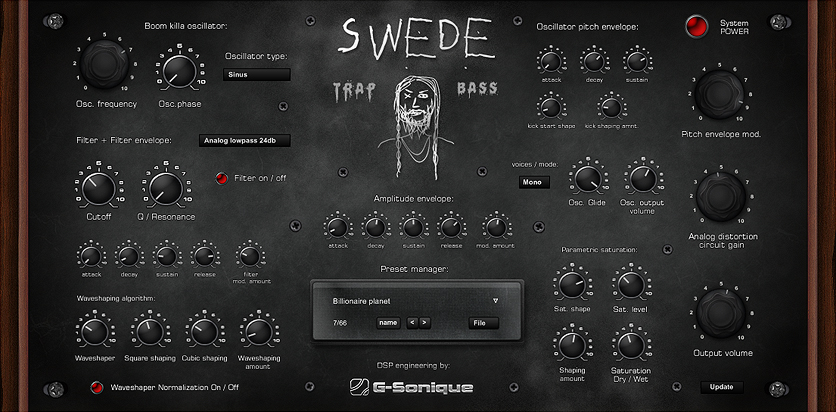
- Waveshaping: Precise harmonic control. Great for designing custom kick distortion.
- Overdrive/Tube emulation: Adds warmth and body. Use on 808s and snares.
When to use each:
- Kick and 808: saturation, soft clipping, waveshaping.
- Snare and clap: hard clipping, overdrive, transient shaping then distortion.
- Hats and percussion: bitcrush and light saturation for grit.

Step-by-step: How to distort drums for trap in FL Studio
Follow a clear chain. I’ll use stock and common third-party plugins. Keep sessions simple and organized.
- Prepare and tune
- Clean up low-end with a high-pass on non-bass drums.
- Tune your 808s and kicks to the key.
- Trim unwanted tails and normalize levels.
- Parallel processing setup
- Send your drum channel to an FX bus. Label it “Drum Distort Bus.”
- Duplicate the bus for different flavors (Tape, Bitcrush, Hard Clip).
- Blend wet/dry to taste.
- Use saturation first
- Add a saturation plugin on the bus. Drive slowly.
- Listen for added low-mid warmth. Back off if muddy.
- Use low-pass on the saturation bus if it brings harsh highs.
- Add dynamics control
- Use a transient shaper pre-distortion for snap or body.
- Compress lightly before heavy distortion to keep control.
- Waveshape or clip for punch
- Add waveshaper or hard clipper on a duplicate bus.
- Push until harmonic content is clear, then reduce the wet level.
- Automate amount to keep dynamics musical.
- Bitcrush for texture
- Use on hi-hats or fills. Keep bit depth high enough to avoid aliasing nightmares.
- Try short automation bursts for interest in transitions.
- EQ and clean-up
- High-pass any distorted bus below 30–40 Hz unless you want sub distortion.
- Cut nasty resonances that distortion can amplify. Use narrow Q.
- Add a gentle low-shelf boost if you lose weight.
- Final glue and limiting
* Use a glue compressor on the drum buss for cohesion.
- Limit only if you need extra perceived volume. Watch for pumping.
Repeat these steps and trust your ears. When you practice how to distort drums for trap in fl studio, you’ll develop presets and chains that work for your sounds.

Plugin choices and routing in FL Studio
You don’t need expensive tools. FL Studio has powerful stock options. Here’s a practical setup to use right now.
-
Stock FL tools
-
Fruity WaveShaper: precise waveshaping.
-
Fruity Blood Overdrive: warm drive.
-
Fruity Fast Dist: clean clipping and distortion.
-
Fruity Squeeze / Fruity Love Philter: for creative texture.
-
Edison: resample and audition effects.
-
Third-party picks (optional)
-
Saturator-type plugins for analog warmth.
-
Bitcrushers for hats.
-
Multiband distortion for targeted color.
Routing tips:
- Use sends for parallel distortion. That keeps dry audio intact.
- Group kicks and 808s, then route to a low-end bus before the main drum bus.
- Sidechain the distortion bus lightly to the 808 if it clashes.

Sound design tips and workflow for consistent results
A workflow keeps sound consistent. These tips speed up mixing and improve results.
- Start subtle. Small drive changes cause big differences.
- Compare bypass often. A/B testing prevents overdoing it.
- Save distortion chains as presets. Reuse and tweak.
- Reference on multiple systems. Distortion can sound different on headphones vs. speakers.
- Use automation for build-ups and breakdowns. Distort more during drops, less in verses.
Real-world note: I often run two parallel distortion buses—one warm tape-style and one harsh digital bus. Blending these gives the depth of analog and the punch of digital.

Common mistakes and how to avoid them
Distortion can ruin clarity if misused. These are frequent traps and how to fix them.
-
Over-distorting the low end
-
Problem: Muddy subs and lost 808 tone.
-
Fix: High-pass distortion buses below 30–40 Hz and apply distortion mainly to mids.
-
Not using parallel processing
-
Problem: You lose transients and dynamics.
-
Fix: Send to a distortion bus and blend wet/dry.
-
Ignoring phase and polarity
-
Problem: Distortion can alter phase and cancel low frequencies.
-
Fix: Check mono compatibility and invert phase if needed.
-
Applying blanket distortion on master
-
Problem: Mix becomes harsh and fatiguing.
-
Fix: Distort on buses or channels, not the master, except subtle glue.
Practicing these prevents common issues when learning how to distort drums for trap in fl studio.

Personal experience: what worked and what failed
I once distorted a whole drum loop with heavy clipping and lost the 808’s punch. I learned to use parallel clipping instead. Another time, bitcrushing a hat track in a build made the drop feel unique. Lessons I learned:
- Always save a clean version before heavy processing.
- Use small gains and automate increases for excitement.
- Trust A/B testing with a reference track.
These habits cut hours off my workflow and kept mixes tight.
Quick PAA-style questions
What is the best distortion for 808s in FL Studio?
- Soft saturation and waveshaping work best. They add harmonics without destroying low-end.
How much distortion should I add to a snare?
- Start very light. Increase until the snare cuts through, then back off slightly.
Will bitcrushing damage my mix?
- Only if overused. Use on high-frequency elements and in short automated bursts.
Are parallel buses necessary?
- They are highly recommended. Parallel buses keep the original transient and dynamics intact while adding grit.
Should I limit after distortion?
- Limit only for perceived loudness. Use glue compression first to keep dynamics natural.

Frequently Asked Questions of how to distort drums for trap in fl studio
How do I start distorting drums in FL Studio?
Start by setting up a parallel send for your drums. Add a saturation or waveshaper on the send and blend slowly while listening for tonal changes.
Which FL Studio plugin is best for clean clipping?
Fruity Fast Dist and Fruity WaveShaper are great stock options. Use them gently and control the output level.
How do I keep my 808 clean after distortion?
High-pass the distortion bus under 30–40 Hz and apply distortion mainly to mids. Use a parallel chain to retain the clean low end.
How do I avoid harshness when distorting hats?
Use bitcrush sparingly and add a low-pass filter to remove stray high-frequency aliasing. Automate the effect for brief moments.
Can distortion fix weak drum samples?
Yes, it can add presence and harmonics. But combine distortion with transient shaping and tuning for best results.
Conclusion
Distortion is a key tool for modern trap drum sound. Use saturation, waveshaping, clipping, and bitcrushing with parallel routing to add punch and texture without ruining the low end. Practice the step-by-step chain here and build presets for fast sessions. Try small changes, compare often, and automate for musical motion. Now pick a drum loop, apply these techniques, and share what you create—or subscribe and comment to keep learning.

Senior Music Reviewer
Alex Carter is a seasoned music reviewer with over a decade of experience in the world of sound and instruments. Passionate about helping musicians and enthusiasts make informed choices, he brings sharp insights and in-depth knowledge to every review. From classical instruments to modern gear, Alex combines technical expertise with a love for music to deliver content that resonates with readers.
As a Senior Music Reviewer and expert author on Tuneluma.com, Alex is dedicated to sharing honest evaluations, practical advice, and thoughtful commentary to guide readers in their musical journey.