Best Budget Microphone For Recording Piano: Top Picks
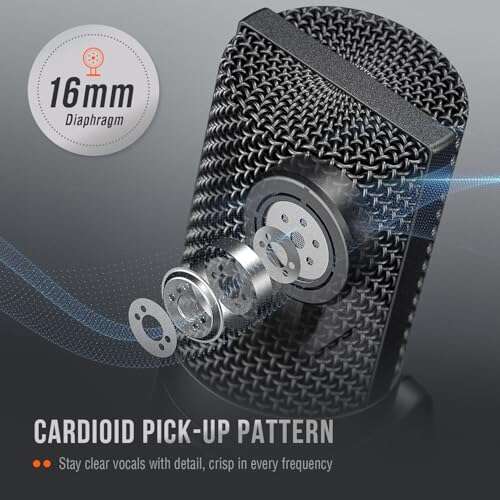
The best budget microphone for recording piano is the FIFINE K669B for clear, simple, plug-and-play home recordings.
You know the moment: you play a great piano take, but your phone captures a thin, dull sound. Room noise, key clicks, and harsh notes can hide the music you worked hard to create. A good low-cost microphone can bring back the warmth and detail without forcing you to buy a full studio setup. I tested these affordable USB, XLR, and condenser options with piano recording needs in mind. The right choice depends on your piano type, room, recording device, and how much control you want.
FIFINE K669B USB Microphone

The FIFINE K669B is one of the easiest microphones I recommend to beginners. It uses USB, so you can connect it to a computer without an audio interface. Its condenser design picks up the soft attack of piano keys and the ring of higher notes with fair detail. For a small room, bedroom studio, or online lesson, it offers a strong start at a low price.
The front volume knob makes quick level changes easy. I would place it several feet from an acoustic piano and aim it toward the soundboard, rather than placing it directly above the keys. It can also work with a digital piano when you want to record the speaker sound or room feel. The mic does not replace a pair of studio condensers, but it can become the best budget microphone for recording piano when simplicity matters most.
Pros:
- Simple USB plug-and-play setup
- Clear sound for beginner piano recordings
- Useful front gain control
- Small size fits tight desks and rooms
- Low cost leaves money for headphones or software
- Works well for lessons, demos, and voiceover
Cons:
- USB connection offers less upgrade room than XLR
- Single-mic placement may not capture wide stereo piano sound
- Condenser capsule hears room noise easily
My Recommendation
I recommend the K669B for a new player, student, or creator who wants an affordable piano mic without extra gear. It suits quiet rooms and simple computer recording. If your room has traffic noise or strong echo, you may need blankets, curtains, or a small reflection filter. For many first-time users, this remains the best budget microphone for recording piano because it is easy to use and inexpensive.
ZealSound USB Microphone

The ZealSound USB microphone targets people who want more controls than a basic desktop mic. It includes gain, volume, mute, and headphone monitoring features. Those controls help when you record piano and speak between takes. I like this layout for learners who do not want to open recording software every time they need to adjust a level.
Its condenser capsule can capture a bright, present piano tone in a controlled room. The built-in monitoring output also helps you hear clipping before it ruins a take. The included noise functions may help with general computer use, but I would not depend on them to remove loud piano-room noise. For home creators, the ZealSound is a flexible pick and a practical contender for the best budget microphone for recording piano.
Pros:
- Gain and headphone volume controls are easy to reach
- Mute button helps during lessons and streams
- Headphone monitoring supports quick recording checks
- USB setup suits computers and several mobile devices
- Useful for piano, speech, lessons, and streaming
- Convenient all-in-one design
Cons:
- Many controls can feel confusing to first-time users
- USB-only operation limits future interface upgrades
- Room reflections remain audible with close piano recording
My Recommendation
I would choose this model for a piano teacher, streamer, or student who wants one mic for music and conversation. It is especially helpful when you need live headphone checks. It makes a strong choice for users who value control more than the smallest possible price. As a best budget microphone for recording piano, it delivers useful features without demanding a complex studio.
FIFINE T669 USB Studio Microphone

The FIFINE T669 is a fuller starter kit than the smaller K669B. It typically includes a boom arm, shock mount, and pop filter, which can save money for a new home studio. The arm gives you more placement options than a fixed desk stand. That matters because microphone position shapes piano tone as much as the microphone itself.
This condenser mic works well for close demonstrations, piano-and-vocal videos, and general computer recording. I would keep it away from the loudest part of the soundboard and make a few test takes before settling on a position. The pop filter helps with speech, although it has little value for piano alone. If you need a ready-to-use kit, the T669 may be the best budget microphone for recording piano in a starter setup.
Pros:
- Complete kit reduces the need for extra accessories
- Boom arm makes piano and voice placement easier
- Shock mount helps reduce desk and handling vibration
- USB connection is simple for computers
- Good fit for music demos and piano lessons
- Pop filter adds value for vocal recording
Cons:
- Boom arms need a strong desk edge
- Condenser design can hear fans and outside traffic
- USB format gives limited upgrade flexibility
My Recommendation
The T669 suits a beginner who wants one purchase to cover most basic recording needs. It is a good pick for content creators who record piano and vocals in the same room. I would select it over the K669B when the included arm and mount matter. Its complete package makes this best budget microphone for recording piano especially attractive to first-time home studio owners.
RØDE NT1 Signature Series
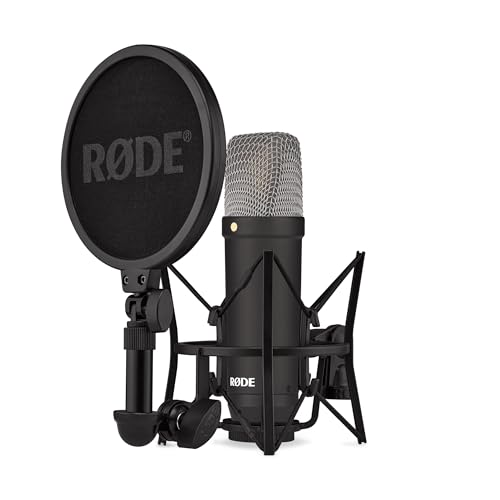
The RØDE NT1 Signature Series costs more than the entry-level USB models, but it brings a clear step up in build quality and recording potential. It uses an XLR connection, so you need an audio interface with phantom power. That extra step can produce a cleaner path and gives you room to improve your studio later. The microphone has the open, detailed character that many players want for acoustic piano.
I prefer an XLR condenser like this when I plan to record serious performances or add a second microphone. Its low self-noise helps quiet passages stay clean, while its wide response captures hammer detail and room air. Still, no mic can fix a harsh room or poor placement. For players who already own an interface, the NT1 Signature can be the best budget microphone for recording piano at a more advanced level.
Pros:
- Detailed sound suits acoustic piano
- Low-noise design supports quiet musical passages
- XLR connection allows future studio upgrades
- Strong build quality for long-term use
- Works well for vocals and acoustic instruments too
- Good choice for more serious home recordings
Cons:
- Requires an audio interface and XLR cable
- Higher total system cost than USB microphones
- Detailed capsule reveals poor room acoustics
My Recommendation
I recommend the NT1 Signature to a pianist who already has an interface or plans to build a real recording chain. It is not the cheapest choice, but it offers more long-term value than a basic USB mic. Choose it for polished demos, lessons, and album work in a treated room. Among these options, it is the best budget microphone for recording piano when sound quality and upgrade potential lead the decision.
TONOR TC-777 USB Microphone

The TONOR TC-777 is a popular low-cost desktop condenser microphone with a tripod and pop filter. Its package makes it easy to begin recording without shopping for several small parts. The cardioid pickup pattern focuses more on the front than the rear, which can help reduce some sound behind the mic. For piano, I would still place it carefully because an upright piano can send sound in many directions.
This mic is best for simple demos, online lessons, and piano videos rather than critical stereo recording. It offers a friendly tone for speech and can capture enough musical detail for social media. The tripod works on a desk, but it may not give enough height for every upright or grand piano position. If your goal is affordable and easy, the TC-777 deserves a place on a best budget microphone for recording piano shortlist.
Pros:
- Affordable starter price
- Includes tripod stand and pop filter
- Cardioid pattern helps focus the front sound
- Easy USB connection for PC and laptop
- Useful for piano videos and lessons
- Compact setup stores easily
Cons:
- Tripod height limits piano placement
- Not a stereo solution for wide grand-piano sound
- May capture keyboard and room noise
My Recommendation
The TC-777 is for students, casual players, and creators who want an inexpensive first mic. It works best in a quiet room with the tripod placed a short distance from the piano. I would not use it as my only choice for a professional release. However, it can be the best budget microphone for recording piano when a simple kit and low entry cost matter most.
MAONO A04 USB Condenser Mic

The MAONO A04 is a USB condenser kit built for computer recording, podcasting, and home content. Its advertised high-resolution support gives compatible systems more recording headroom, though the final result still depends on placement, room sound, and software settings. I found its included accessories helpful for users who want a tidy desk setup. The cardioid design is a sensible match for a single-player recording position.
For piano, I would lower the input level and leave enough space for strong accents. A loud piano can overload a close mic even when the microphone sounds clean at normal volume. The A04 also works well for piano teachers who record spoken instruction with musical examples. It is a versatile best budget microphone for recording piano for users who want one USB kit for several jobs.
Pros:
- USB design makes setup quick
- High-resolution support suits modern recording software
- Cardioid pickup helps reduce some rear sound
- Useful accessory kit for a home desk
- Good for piano, speech, and streaming
- Adjustable positioning supports basic placement tests
Cons:
- USB-only design limits interface upgrades
- Condenser capsule hears untreated rooms
- High sample rates do not guarantee better piano tone
My Recommendation
I suggest the A04 for a creator who records piano, teaching videos, and voice content. It is a good middle ground between a very basic mic and a larger XLR system. Use it with soft furnishings and careful gain control for the cleanest result. For broad home use, it is a strong best budget microphone for recording piano and spoken content.
FIFINE AmpliGame AM8 USB/XLR Mic

The FIFINE AM8 stands out because it offers both USB and XLR outputs. It uses a dynamic capsule, which usually rejects more room sound than a sensitive condenser. That trait can help in a noisy bedroom or near a computer fan. It also gives you a simple USB route today and an interface-based XLR route later.
A dynamic mic may sound less airy than a condenser when placed far from a piano. I would use it closer to the sound source and test several angles to avoid a dull or boomy tone. The AM8 is also designed for gaming and streaming, so it includes controls that help with general content work. It can be the best budget microphone for recording piano in a noisy room, but it is not my first choice for distant, spacious piano capture.
Pros:
- USB and XLR outputs provide upgrade flexibility
- Dynamic design can reduce room noise
- Useful for noisy bedrooms and shared spaces
- Headphone monitoring supports live checks
- Works for piano, speech, gaming, and streaming
- Solid value for a hybrid setup
Cons:
- Needs closer placement than many condensers
- May capture less room air and high-end detail
- XLR use still requires an interface
My Recommendation
I recommend the AM8 to a creator who records piano in an untreated or noisy room. It is also smart for anyone who expects to move from USB to XLR later. Choose a condenser instead if you want a more open room sound from a grand piano. For flexible ownership, the AM8 is a credible best budget microphone for recording piano and general home production.
FIFINE AmpliGame A6V USB Mic

The FIFINE A6V is a USB condenser microphone aimed at gaming and streaming, but its clear voice capture can also serve basic piano work. Its RGB lighting adds style for video creators, though lighting does not change the recorded sound. The USB connection keeps the setup simple for a laptop or desktop. I see it as a practical hybrid mic for people who record music and appear on camera.
Its condenser capsule can reveal the attack of piano notes, but it will also hear room reflections. Place it away from the computer keyboard and use a stable stand to avoid vibration. This is a better fit for close demos and performance clips than for a carefully spaced stereo recording. If appearance and easy control matter, the A6V may be the best budget microphone for recording piano for a modern desk studio.
Pros:
- Easy USB connection
- Condenser detail works for close piano demos
- RGB design suits video backgrounds
- Useful for streaming and music content
- Simple desktop workflow
- Headphone features help monitor recordings
Cons:
- RGB adds no direct audio benefit
- USB-only connection limits studio growth
- May pick up room echo and desk noise
My Recommendation
The A6V is best for a video creator who wants piano clips, live streams, and gaming audio from one desk mic. It is not the most natural choice for a serious acoustic piano session. Still, its ease of use and visual design offer real value for online creators. I would call it a best budget microphone for recording piano when video presence matters as much as sound.
Mini Mic Pro Wireless Lavalier

The Mini Mic Pro is a wireless lavalier system made for phones and short-form video. It is not a traditional studio microphone, and that difference matters for piano. Its main strength is mobility: you can film a performance from across the room without running a long cable. It can capture spoken commentary and the general sound of a nearby piano for social clips.
I would not choose it for a detailed acoustic piano recording or a wide, natural stereo image. A lavalier sits close to the speaker, so the piano may sound small when the performer wears it. It makes more sense for tutorials, behind-the-scenes clips, and mobile videos. It is the best budget microphone for recording piano only when portability and phone use come before full musical depth.
Pros:
- Wireless design supports mobile filming
- Works well for spoken piano lessons
- Small size stays out of the camera frame
- Noise reduction can help with casual video use
- Fast setup for phone creators
- Useful for interviews and short clips too
Cons:
- Not designed for full-range piano recording
- Wireless systems need charging and pairing
- Phone compatibility may vary by adapter
My Recommendation
Choose the Mini Mic Pro for mobile piano teachers, TikTok creators, and players who add spoken tips to videos. Do not buy it as your main studio mic. It solves a different problem: clean, flexible dialogue while filming. For portable content, it can serve as the best budget microphone for recording piano-related video, but not as the best pure piano microphone.
Logitech Blue Yeti USB Mic

The Blue Yeti remains a flexible USB microphone for home creators. Its multiple pickup patterns allow more than a simple front-facing recording. Cardioid mode works for one player, while stereo mode may help create a wider piano image in a suitable room. It also includes headphone monitoring and a desk stand, which makes setup friendly for beginners.
The extra patterns require care because they can capture more room noise. I would use cardioid first, then compare stereo mode only after checking the room. The Yeti is physically larger than many budget mics, so placement near a piano can take planning. For a player who wants lessons, vocals, streaming, and piano in one package, it remains a popular best budget microphone for recording piano.
Pros:
- Multiple pickup patterns increase recording options
- Stereo mode can add width to piano videos
- USB plug-and-play setup is beginner friendly
- Built-in headphone monitoring is convenient
- Useful mute and level controls
- Works for music, podcasts, and streaming
Cons:
- Large body can be awkward near a piano
- Extra patterns may capture unwanted room sound
- USB-only design limits professional expansion
My Recommendation
I recommend the Blue Yeti for a multi-purpose creator who wants more than a single recording pattern. It works best in a quiet room with enough space for its wide body and stand. Use cardioid for focused piano and test stereo for roomier clips. Its flexibility makes it a best budget microphone for recording piano when one mic must handle many types of content.
How to Choose the Best Budget Microphone for Recording Piano
Buying a piano microphone can feel harder than choosing a keyboard. Product pages list sample rates, pickup patterns, and capsule types, but those numbers do not tell the whole story. I focus first on the room, the piano, and the recording device. A modest mic in a good position often beats an expensive mic placed badly.
USB or XLR?
USB microphones connect straight to a computer. They suit beginners, students, teachers, and creators who want a fast setup. You do not need a separate preamp or audio interface. That lower cost makes USB models strong candidates for the best budget microphone for recording piano.
XLR microphones need an interface, cable, and usually phantom power when they use condenser capsules. This adds cost and setup time, but it offers better long-term flexibility. You can change the preamp, add a second mic, and use the same interface with other instruments. If you already own an interface, an XLR model may provide better value.
Condenser or Dynamic?
Condenser microphones usually capture more fine detail and high-frequency air. That can make piano notes sound open and lively. The trade-off is sensitivity. A condenser may hear air conditioning, street noise, computer fans, and bare walls.
Dynamic microphones often reject more room sound. They can work well in noisy spaces, but you may need to place them closer to the piano. Close placement can add bass or reduce the natural sense of space. Neither type wins every time. The best budget microphone for recording piano depends on the sound you want and the room you have.
Pickup Pattern
Cardioid microphones mainly face forward. They can reduce some sound from the rear and work well for one-player setups. Aim the front toward the piano’s sound source, but do not assume the logo always marks the correct side. Check the product guide before recording.
Stereo microphones or matched pairs can create a wider piano image. They also make placement and phase more important. A single USB mic can still make a useful mono recording for lessons and social video. Start simple, then expand when your room and skills support it.
Sample Rate and Bit Depth
Many budget microphones advertise 24-bit recording or very high sample rates. These features can help during editing, but they cannot repair a bad room or clipped audio. For most piano videos and home demos, 24-bit at 44.1 or 48 kHz works well. Higher settings also use more storage and processing power.
Set the input so loud piano peaks have headroom. I normally leave several decibels below 0 dBFS rather than recording right at the edge. Digital clipping sounds hard and unpleasant. A lower level is easy to raise later; clipped notes are not easy to save.
Mic Placement for Acoustic Piano
Placement is the heart of piano recording. For an upright piano, try a position above the open top or slightly in front of the upper panel. Move the mic a little left or right to balance bass and treble. For a grand piano, place the mic near the open lid, then compare a closer and more distant position.
Do not press the microphone against the piano. Vibrations can travel through the stand and add unwanted rumble. Use a shock mount when possible, and keep the stand away from foot traffic. Record short tests before playing a full piece. Ten minutes of testing can save an hour of editing.
Distance changes the balance. A close mic gives more attack and less room. A distant mic gives more natural blend but hears more reflections. If the bass sounds heavy, move the mic toward the treble side or farther away. If the sound feels thin, try a slightly lower or closer position.
Room Treatment on a Budget
You do not need expensive foam to improve a room. Curtains, rugs, bookshelves, and a sofa can soften reflections. Avoid placing the microphone in the exact center of a small room. Also avoid aiming it straight at a bare wall.
Listen for a sharp clap echo before recording. If you hear a bright slap, add soft material near the piano and microphone. Keep blankets clear of heaters and electrical hazards. A quiet, balanced room helps every microphone, including a low-cost USB model.
Digital Piano Recording Tips
If you use a digital piano, a direct line connection will usually sound cleaner than recording its speakers with a microphone. Check whether the instrument has a headphone, line, or USB audio output. A USB microphone is useful when you want the sound of the piano speakers in the room, or when you also need to capture your voice.
For direct recording, watch the input level from the piano. Some instruments send a hot signal that can overload an interface. Record a short passage with your loudest playing. Leave enough headroom for strong chords and accents.
How I Judge Budget Piano Microphones
I look at sound balance, setup time, build quality, control access, and real use. I do not rank a microphone by sample-rate numbers alone. I ask whether a beginner can place it, monitor it, and make a clean take without confusion.
I also consider total cost. A cheap XLR microphone may become expensive after adding an interface, cable, stand, and shock mount. A USB kit may offer better value for a student who owns only a laptop. The smartest purchase matches the entire recording chain, not just the mic body.
Best For Comparison
| Best for | Why |
|---|---|
| Best simple starter | FIFINE K669B offers clear USB recording with very little setup. |
| Best upgrade path | RØDE NT1 Signature uses XLR and suits a growing studio. |
| Best noisy-room flexibility | FIFINE AM8 combines USB convenience with a room-rejecting dynamic design. |
FAQs Of best budget microphone for recording piano
What is the best budget microphone for recording piano?
For most beginners, I recommend the FIFINE K669B because it is affordable, simple, and clear. The RØDE NT1 Signature is better if you already own an audio interface. Your room and placement still matter more than small spec differences.
Is one microphone enough to record an acoustic piano?
Yes. One microphone can work well for lessons, demos, and online videos. Two microphones can create a wider stereo image, but they also require more placement skill and may cause phase problems.
Should I use a condenser microphone for piano?
A condenser often captures piano detail and brightness well. Use one in a quiet room. If your room is noisy, a dynamic microphone such as the FIFINE AM8 may be easier to manage.
How far should a microphone be from a piano?
Start about two to four feet away, then adjust by ear. Move closer for a direct sound and farther away for more room. Always record a test before the full performance.
Can I record piano with a USB microphone?
Yes. A USB microphone works well with a computer for basic piano recording. It is the easiest option for beginners, though an XLR system gives more upgrade room later.
Final Verdict: Which Should You Buy?
The FIFINE K669B is my top overall pick for the best budget microphone for recording piano. Choose the RØDE NT1 Signature for a more serious XLR setup, or the FIFINE AM8 for a noisy room and future upgrades.
Place any mic with care, control your levels, and soften hard reflections. The right affordable piano microphone can turn a flat home take into a clear, musical performance.

Senior Music Reviewer
Alex Carter is a seasoned music reviewer with over a decade of experience in the world of sound and instruments. Passionate about helping musicians and enthusiasts make informed choices, he brings sharp insights and in-depth knowledge to every review. From classical instruments to modern gear, Alex combines technical expertise with a love for music to deliver content that resonates with readers.
As a Senior Music Reviewer and expert author on Tuneluma.com, Alex is dedicated to sharing honest evaluations, practical advice, and thoughtful commentary to guide readers in their musical journey.