How To Fix Guitar Jack Socket Loose Connection Issue: Fix
Tighten the nut, clean or re-solder the connection, or swap in a new jack to restore contact.
I’ve fixed dozens of guitars and taught repair classes. This guide shows clear, practical steps on how to fix guitar jack socket loose connection issue. You’ll get causes, simple tools, step-by-step repairs, testing tips, and when to call a pro. Read on to save time, protect your sound, and keep your guitar playing reliably.

Why guitar jacks become loose and fail
Loose jack sockets cause crackling, cutting out, or no sound at all. Knowing why helps you fix the problem fast. Common causes are mechanical wear, stripped threads, broken solder joints, dirty contacts, and cheap or damaged parts. Movement from plugging and unplugging, heavy cables, and stage knocks speed up the damage. Older instruments often have worn nuts or plastic that no longer holds the socket snug.
Experience note: I once played a gig where the jack cut out every few bars. A loose nut was the culprit. Tightening it and reflowing the solder fixed it on the spot. These are usually quick fixes if you have the right tools.

Tools and parts you’ll need
Having the right tools makes this safe and fast. You do not need a full workshop.
- Basic screwdriver set for knobs or pickguards
- Small adjustable wrench or 7/16" wrench for the jack nut
- Soldering iron (25–40W) and rosin-core solder
- Desoldering braid or pump
- Replacement jack (mono 1/4" or Switchcraft-style) if needed
- Multimeter to check continuity
- Contact cleaner and lint-free cloth
- Small pliers and wire cutters
- Heat shrink or electrical tape
Tip: Keep a spare quality jack in your gig bag. A Switchcraft or other gold-standard make lasts longer and performs reliably.

Step-by-step fixes for how to fix guitar jack socket loose connection issue
Below are ordered fixes from easiest to more involved. Try them in order.
1) Tighten the jack nut
- Remove any plate or pickguard screws as needed.
- Hold the jack from inside with pliers to prevent twisting the wiring.
- Use a wrench to tighten the nut gently. Do not over-tighten and crack the body.
- Reassemble and test the jack with a cable.
This often solves play-cutout caused by a loose outer sleeve making poor contact.
2) Clean the contacts
- Spray a little contact cleaner into the jack while moving a plug in and out.
- Plug and unplug the cable several times to dislodge grime.
- Wipe the plug and jack area with a cloth. Test the tone and noise.
Dirt and oxidation cause scratchy sounds. Cleaning can restore good contact.
3) Re-solder a loose wire
- Remove strings or access the jack cavity.
- Cut power (guitar unplugged). Note wire positions or take a photo.
- Use desolder braid to remove old solder from terminals.
- Reheat and apply fresh solder to secure wires to the jack lugs.
- Inspect joints; they should look shiny and smooth. Test with a multimeter.
Cold or cracked solder joints are a top cause of intermittent signal. Re-soldering is reliable and cheap.
4) Replace the jack socket
- Buy a compatible replacement jack. Note whether the original is a stereo or mono and whether it’s a switched jack.
- Unsolder and remove the old jack. Fit the new one into the cavity.
- Solder wires to the correct lugs. Reinstall the nut and washer snugly.
- Test the guitar plugged into an amp before reassembly.
When the lug tabs are bent, corroded, or threads are stripped, replacement is best.
5) Quick stage or gig fix
- Plug in a short, high-quality patch cable to reduce strain.
- Use a small wedge or gaff tape to secure the cable and avoid movement.
- If the jack body is spinning, hold the jack in place while an assistant tightens the nut or strap.
I’ve used a folded business card under the cable jack as a temporary stabilizer. It’s not pretty, but it gets you through the set.

Troubleshooting checklist and quick tests
Use these tests to pinpoint the root cause before you start work.
- Wiggle the cable while playing. If it crackles or cuts, the fault is mechanical or soldered.
- Test continuity with a multimeter between the tip sleeve and output jack lugs.
- Try a different cable and amp to rule out cable or amp issues.
- Inspect the jack for visible damage, bent lugs, or loose nut.
- Listen for static only when touching certain areas; this suggests a grounding or body contact problem.
PAA-style common questions:
- Why does my guitar cut out only when I move the cable? Usually a loose solder joint or worn contact inside the jack.
- Can a dirty jack cause no sound? Yes. Heavy oxidation or grime can block electrical contact and silence the signal.
- How long will a replacement jack last? With quality parts and care, a good jack can last many years even under heavy use.

Preventive maintenance and tips I learned on the road
Small habits extend jack life and keep your tone steady.
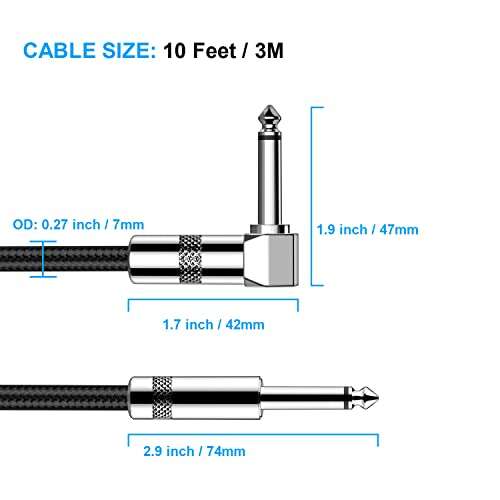
- Use right-angle plugs or strain-relief cables when possible to reduce leverage on the jack.
- Tighten the nut during regular setups. Check it every few months.
- Avoid yanking the cable. Pull the plug, not the cable.
- Swap cheap jacks for reliable brands before heavy use.
- Keep a repair kit and spare jack in your case for quick fixes.
Personal tip: After touring, I began replacing cheap factory jacks before shows. It cut down mid-set failures to zero. Prevention is cheaper than fixing on stage.

When to seek professional repair or replacement
Know when to stop DIY and call a tech.
- The jack threads or body are cracked and won’t secure the nut.
- Multiple electronics issues appear together, like pots and switches acting up.
- You lack soldering skills or safe workspace.
- The guitar is vintage and you want original parts preserved.
A luthier or tech can replace a jack cleanly and ensure wiring and shielding stay intact. For vintage gear, professional care protects value.

Frequently Asked Questions of how to fix guitar jack socket loose connection issue
What tool is best to tighten a loose jack nut?
Use a small adjustable wrench or a 7/16" wrench. Hold the jack inside to avoid twisting the wiring and tighten gently.
How do I know if the solder joint is bad?
Look for dull, cracked, or flaky solder. If the connection fails when you wiggle the wire, re-soldering usually fixes it.
Can I use any replacement jack for my guitar?
No. Match mono vs. stereo, switched vs. unswitched, and the physical fit. Choose quality brands for durability.
Will cleaning the jack always fix crackling?
Cleaning often helps but not always. If the jack is worn or the solder is bad, cleaning alone won’t solve the issue.
Is it dangerous to solder in a guitar?
It’s safe if you unplug the guitar and work in a ventilated area. Avoid excessive heat on pickups or finish and use appropriate soldering skills.
Conclusion
Fixing a loose guitar jack is usually straightforward. Tightening the nut, cleaning contacts, re-soldering joints, or swapping a worn jack will restore reliable sound. Start with simple checks and move to replacement only when needed. Take time to prevent future issues by using quality parts and gentle cable handling. Try the steps here, keep a spare jack in your case, and share your results or questions below.

Senior Music Reviewer
Alex Carter is a seasoned music reviewer with over a decade of experience in the world of sound and instruments. Passionate about helping musicians and enthusiasts make informed choices, he brings sharp insights and in-depth knowledge to every review. From classical instruments to modern gear, Alex combines technical expertise with a love for music to deliver content that resonates with readers.
As a Senior Music Reviewer and expert author on Tuneluma.com, Alex is dedicated to sharing honest evaluations, practical advice, and thoughtful commentary to guide readers in their musical journey.