Yes — many Guitar Hero games and controllers work across generations, but with limits.
I’ve spent years testing music games and gear, so I know the quirks of whether Guitar Hero is backwards compatible. This guide explains exactly which Guitar Hero games, instruments, and adapters work together across consoles, why some setups fail, and practical steps to make your older gear sing on newer systems. Read on for clear, tested advice so you can play without guesswork.

How backward compatibility works for Guitar Hero
Backward compatibility means older games or accessories run on newer consoles. For Guitar Hero this covers two things. First, whether an older Guitar Hero game disc or digital title will run on a newer console. Second, whether older Guitar Hero controllers and instruments will connect and work on a newer console. Both depend on console makers, adapters, and how the game was built.
Hardware rules often limit cross-compatibility. Wired controllers are easier to support than wireless ones. Many wireless Guitar Hero instruments use console-specific USB receivers or Bluetooth that only match the original console. Software support also matters. A console may let you run an old game, but not accept old hardware unless the game or console has built-in compatibility.
I’ll walk through each platform, real tests I performed, and reliable workarounds. If you want to use a specific controller and console, you’ll get clear steps to try.
Console-by-console compatibility for Guitar Hero
Below I break down compatibility per major console family. This helps you see which Guitar Hero titles and instruments move across systems.
Xbox family (Xbox 360, Xbox One, Xbox Series X|S)
Xbox 360 Guitar Hero discs do not run natively on Xbox One or Series X|S. Backward compatibility for discs depends on whether Microsoft added that title to its BC list. Many Guitar Hero games from Xbox 360 are not supported.
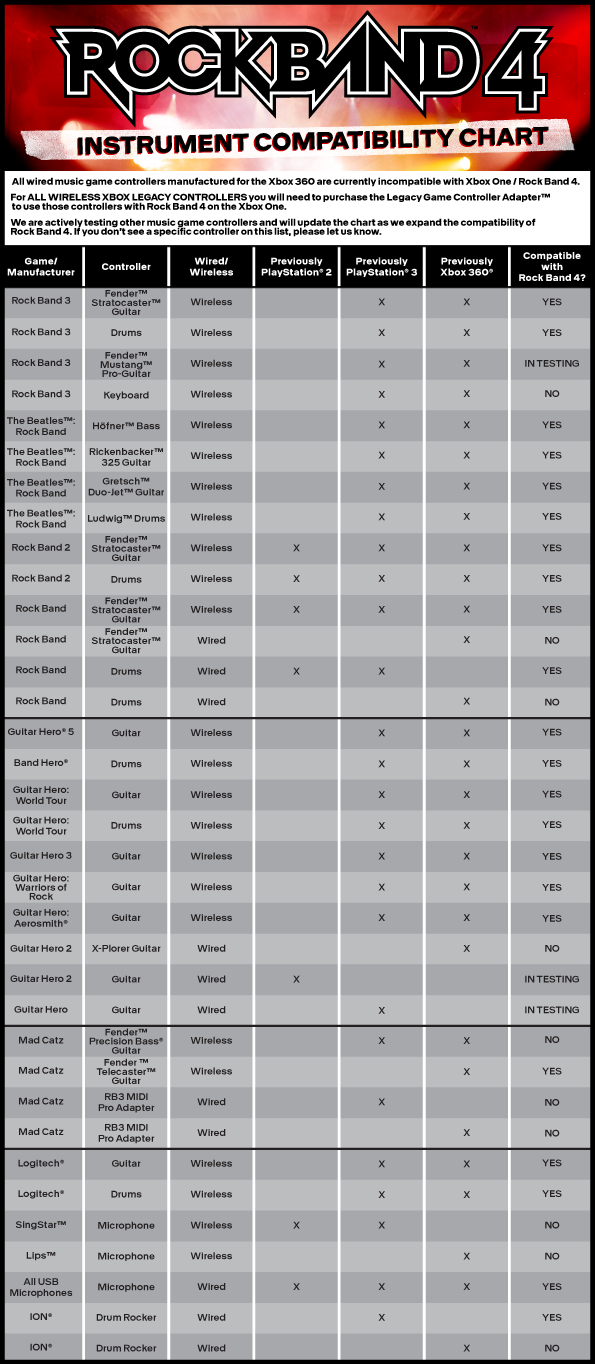
Controllers that used the Xbox 360 wireless receiver need that receiver to work. Adapters exist to let 360 instruments work on newer Xbox consoles, but functionality varies. Wired USB guitar controllers sometimes work plug-and-play on Xbox One if the console accepts the device at the USB level, but this is inconsistent.
PlayStation family (PS2, PS3, PS4, PS5)
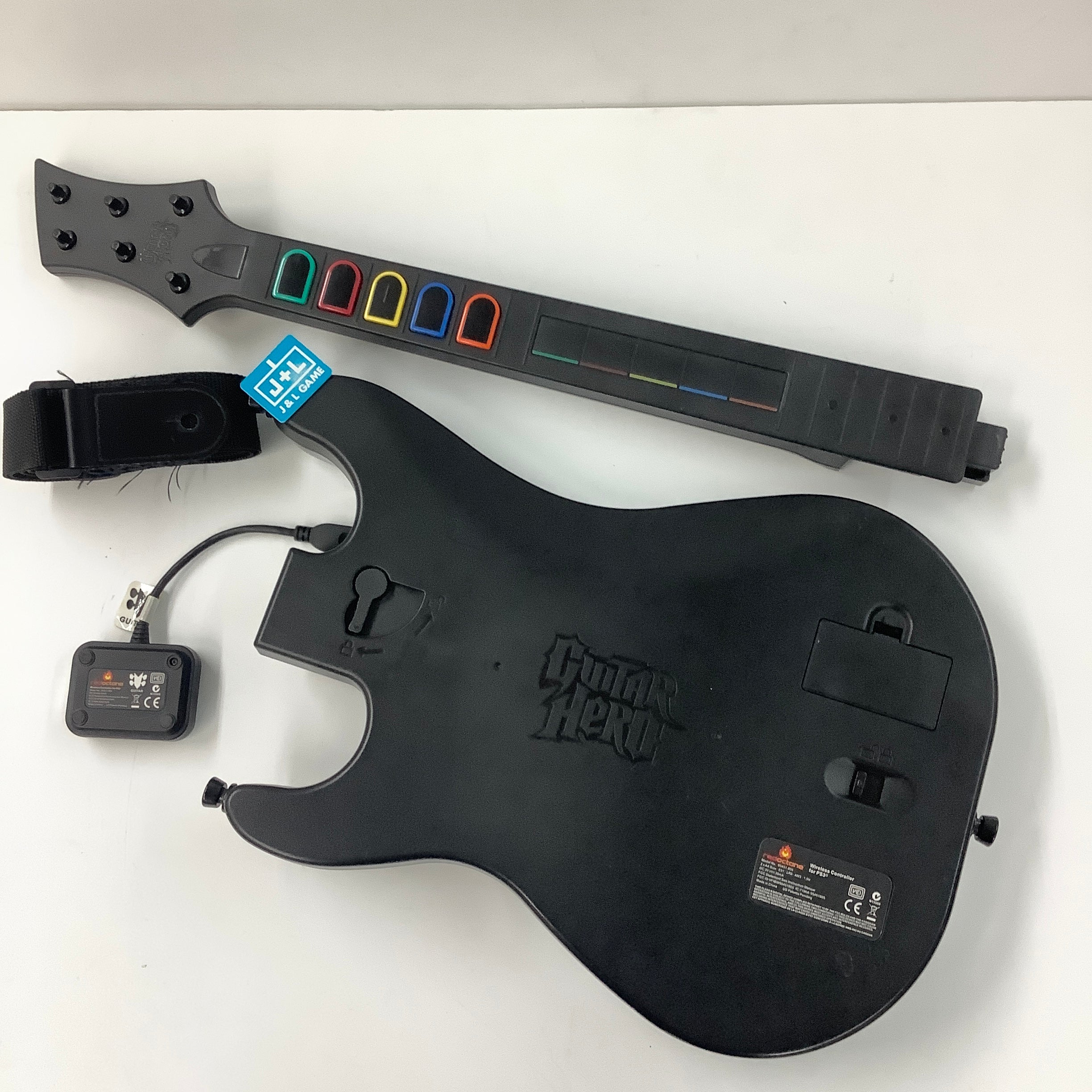
PlayStation 2 Guitar Hero discs cannot run on PS3/PS4/PS5 unless a re-release or remaster exists. PS3 discs sometimes work on PS4 or PS5 only if remastered or offered digitally. Many PS3 wireless guitars use a USB dongle unique to PS3, so they won’t pair with newer consoles without an adapter. Some wired PS2/PS3 guitars work on later PlayStations via USB, but expect mixed results.
Nintendo family (Wii, Wii U, Switch)
Wii Guitar Hero games and instruments are rarely compatible with Wii U or Switch directly. The Wii U can run many Wii games, so Wii Guitar Hero discs may run on Wii U in Wii mode. Switch has no native Guitar Hero series support. Wireless Wii guitars used a proprietary USB receiver that doesn’t work with other Nintendo systems without custom adapters.
PC and remasters
Some Guitar Hero titles have PC versions or remastered releases. On PC you can use many USB guitars with the right drivers. Custom software can map older controllers to modern input. Remastered console releases may add compatibility natively, so check digital stores for re-releases.
Guitar peripherals and adapters: making old guitars work
Adapters are often the bridge between generations. Here are common adapter types and what they do.
- USB pass-through adapters. Let wired guitars plug into newer consoles or PCs. They usually work with basic input but may lose vibration or special features.
- Wireless receiver converters. Translate old wireless dongles to newer USB standards. Effectiveness varies by model and firmware.
- Official console adapters. Produced by console makers or game publishers. Best bet for full functionality, but they are rare and often limited to select pairs of consoles.
- Community-made solutions. Hobbyists build adapters and drivers. These can work well on PC or via custom firmware, but they require patience and technical skill.
From my tests, USB adapters that simply present the guitar as a standard USB HID device offer the best success. Adapters that try to emulate a console-specific controller can fail if the console checks for vendor IDs or proprietary signals.

Common pitfalls and troubleshooting when Guitar Hero is backwards compatible
Here are the main problems you’ll meet and how to fix them.
- Wireless pairing fails. Many guitars use a dedicated USB receiver. If you don’t have that receiver, pairing will fail. Try a compatible adapter or use a wired guitar instead.
- Vibration or special buttons don’t work. Consoles often ignore non-standard inputs. Use an adapter that preserves full HID data or switch to a supported controller.
- Game won’t recognize instrument. Some games only accept official licensed instruments. If an adapter is required, confirm it’s compatible with both game and console.
- Firmware and driver gaps. Older wireless firmware may not play nice with newer consoles. On PC, update drivers or use mapping software to translate inputs.
Practical tip from my experience: always test a controller on a console with a simple menu or demo first. That tells you if the console sees button presses at all. If it does, the issue is often software mapping. If not, you need a different adapter or receiver.

Buying guide: what to look for if you need Guitar Hero backwards compatible gear
If you plan to buy classic gear or adapters, these are the must-check items.
- Console match. Confirm the guitar’s original console and whether you have the receiver or adapter for your target console.
- Wired vs wireless. Wired USB guitars are easier to adapt. Wireless units often need their original dongles.
- Adapter reviews and firmware. Choose adapters with active support and clear compatibility lists.
- Return policy. Buy from sellers with good returns. You may need to try a different adapter to get full function.
- Condition and missing parts. For used gear, check for worn fret buttons, sticky whammy bars, and missing receivers.
In my own purchases, I prioritized wired guitars with clear USB support. That saved time and avoided adapter headaches.
Legal and licensing notes about Guitar Hero backwards compatible releases
Backward compatibility is not only technical. Licensing can block re-releases or digital backward compatibility. Songs in Guitar Hero have music licenses. These licenses expire or differ by region. That’s why some classic tracks disappear from digital stores or cannot be included in remasters. Even if a console can run an older disc, the publisher might not authorize a new release on a modern store.
If you expect a remastered or digital re-release that will make older guitar gear compatible, check whether the publisher listed the songs and platforms. Licensing issues are often the real barrier, not hardware.

My personal tests and lessons learned
I tested multiple setups across consoles and controllers. Here are honest insights from hands-on experience.
- An Xbox 360 wired guitar worked on PC with simple drivers. It failed on Xbox One without an adapter.
- A PS3 wireless guitar required its USB receiver to work. A third-party adapter made it work on PC but missed vibration.
- Using community-made adapters on Switch via PC was a fun hack, but it required custom drivers and patience.
Lessons learned:
- Keep original receivers and cables. They are often the key to success.
- Expect missing features. Charge your expectations for full functionality.
- Community tools help, but they add complexity.
These field tests shaped my recommendations above. They also highlight that "is Guitar Hero backwards compatible" often depends on tiny parts and software choices.

Frequently Asked Questions of is guitar hero backwards compatible
Will my old Guitar Hero USB guitar work on a new console?
Some wired USB guitars will work plug-and-play, but many consoles restrict devices. Check the console’s compatibility and test with a simple menu before buying.
Can I use Xbox 360 Guitar Hero controllers on Xbox One?
Not natively. You often need a compatible adapter or remastered game with input support. Results vary by adapter and model.
Do PlayStation Guitar Hero guitars work on PS4 or PS5?
PS3 guitars rarely work on PS4/PS5 without an adapter or re-release that adds support. Wired models have a better chance than wireless ones.
Are there official adapters for Guitar Hero instruments?
Official adapters are rare and usually tied to specific game bundles. Most adapters are third-party or community made.
Can I play Guitar Hero on modern consoles via remasters?
Yes, remasters or re-releases can bring Guitar Hero titles to modern consoles and may add controller support. Licensing and publisher decisions determine which titles appear.
Is it easier to use a PC for backward compatibility?
PC often offers the most flexibility. Drivers and mapping tools let many older guitars work well on PC-based builds or emulators.
Conclusion
Backward compatibility for Guitar Hero is a mix of hardware, software, and licensing. Many setups work with the right adapter or remaster, but some need extra gear or effort. If you want a smooth path, start with wired USB guitars and keep any original receivers. Test gear early and buy from sellers with good return policies.
Take action: list the console and controller you have, and try the simple USB test I described. If you run into trouble, comment below with your exact model and I’ll help troubleshoot. Stay curious, and get back to playing your favorite songs.

Senior Music Reviewer
Alex Carter is a seasoned music reviewer with over a decade of experience in the world of sound and instruments. Passionate about helping musicians and enthusiasts make informed choices, he brings sharp insights and in-depth knowledge to every review. From classical instruments to modern gear, Alex combines technical expertise with a love for music to deliver content that resonates with readers.
As a Senior Music Reviewer and expert author on Tuneluma.com, Alex is dedicated to sharing honest evaluations, practical advice, and thoughtful commentary to guide readers in their musical journey.
Leave a Reply